


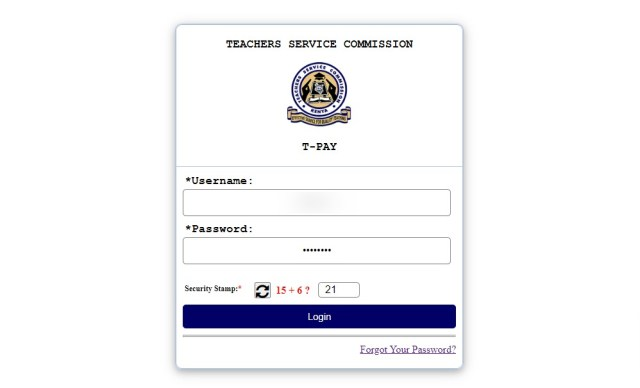
How to Send TSC Payslips to Banks, Saccos, Hire Purchase, etc. The Teachers Service Commission (TSC) has a TPAY portal that allows teachers to manage their payslips, P9 forms, and other deductions. Through this portal, teachers can also directly send their latest payslips to various institutions such as banks, Saccos, hire purchase companies, insurance firms, microfinance institutions, and more. This guide will walk you through the process.
Requirements
- TPAY Portal Access: You need your TSC number and TPAY password.
- Registered Phone Number: Ensure the phone number registered on TPAY is active for receiving OTP (One-Time Password).
- Internet Access: Use a phone or PC browser.
Step-by-Step Procedure to Send TSC Payslips
- Open Your Browser
- Use your phone or PC to open your preferred browser.
- Access the TPAY Portal
- Go to the TPAY portal by entering the URL: https://tpay.tsc.go.ke.
- Log In to Your TPAY Account
- Enter your TSC number.
- Enter your TPAY password.
- Complete the security stamp summation and click on “Login”.
- Navigate to the Send Payslips Section
- Once logged in, click on the menu on the left side of the dashboard to reveal hidden menu items.
- Locate and click on the “Send Payslips” link.
- Select the Organization Type
- Choose the type of organization you wish to send your payslip to. This could be a bank, Sacco, hire purchase firm, insurance company, etc.
- Select the Specific Institution
- After selecting the organization type, choose the specific institution from the list provided (e.g., name of the bank or Sacco).
- Authorize and Send Payslips
- You will be prompted to send the payslips. Click on “Send” to receive an OTP on your registered phone number.
- Enter the OTP in the provided field to authorize the action.
- Click on “Send Payslips” to confirm.
Additional Tips
- Ensure Accuracy: Double-check the institution type and specific institution name to avoid sending payslips to the wrong recipient.
- Maintain Security: Keep your TPAY login credentials secure and do not share your OTP with anyone.
- Monitor Confirmation: After sending the payslip, confirm with the institution to ensure they received it.
By following these steps, you can efficiently send your TSC payslips to banks, Saccos, hire purchase firms, and other institutions, facilitating processes such as loan applications and other financial transactions.




