
Nyongesa Sande
No Result
View All Result
  • News
    • World
    • Africa
  • Politics
  • Business
  • Tech
  • AI
  • Telecom
  • Sports
  • Opinion
  • Lifestyle
  • Live
  • World Cup 2026
    • World Cup 2026 Standings
    • World Cup 2026
Nyongesa Sande
  • About Us
    • Nyosake Designers
      • Nyosake Webmasters
      • Nyosake Investment
  • Contact Us
    • Newsroom Contact
  • Ownership Disclosure
  • Advertise
No Result
View All Result
Nyongesa Sande
No Result
View All Result
  • News
  • Politics
  • Business
  • Tech
  • AI
  • Telecom
  • Sports
  • Opinion
  • Lifestyle
  • Live
  • World Cup 2026
ADVERTISEMENT

Home » How to Login to the KPSEA Portal

How to Login to the KPSEA Portal

NyongesaSande News Desk by NyongesaSande News Desk
2 years ago
in How To
Reading Time: 3 mins read
A A
How to Login to the KPSEA Portal

How to Login to the KPSEA Portal. The Kenya Primary School Education Assessment (KPSEA) portal is essential for managing learning assessments under the Competency Based Assessment (CBA) framework. School managers use this portal to register learners, manage student data, and download nominal rolls and result slips for Grade 6. Here’s a step-by-step guide on how to login to the KPSEA Portal.

  • Services Available on the KPSEA Portal
  • Requirements
  • Step-by-Step Procedure to Login to the KPSEA Portal
  • Tips for Using the KPSEA Portal

Services Available on the KPSEA Portal

  • Check the list of KPSEA learners
  • Download the KPSEA nominal roll
  • Download KPSEA result slips for Grade 6
  • Register new learners in the school
  • Capture learners’ assessments

Requirements

  • School Examination Center Code: Used as the username.
  • Password: Set by the head of the institution.

Step-by-Step Procedure to Login to the KPSEA Portal

  1. Open Your Browser
    • Use a PC or phone to open your preferred browser.
  2. Access the KNEC Portal Website
    • In the URL bar, type https://knec-portal.ac.ke and press Enter.
  3. Navigate to the CBA Portal
    • On the KNEC Portal homepage, click on the “CBA Portal” link.
    • Alternatively, directly access the CBA Portal by visiting https://cba.knec.ac.ke.
  4. Login to the KPSEA Portal
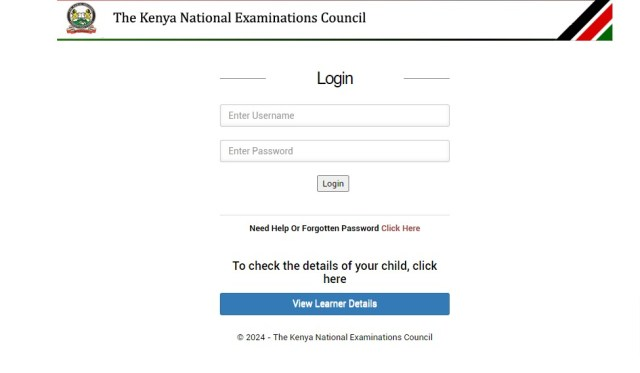
    • Once the CBA Portal page loads, enter the school code (provided by KNEC) and the password.
    • Click on “Login” to access the KPSEA Portal.
  5. Access the Services
    • After logging in, you will see a dashboard similar to the image below.
    • Select the grade you wish to access or click on the relevant links for specific services like checking the list of learners, downloading the nominal roll, or accessing result slips.

Tips for Using the KPSEA Portal

  • Use a PC: For better visibility and ease of access, using a PC is recommended over a phone.
  • Keep Credentials Secure: Ensure that the school code and password are kept secure to prevent unauthorized access.
  • Stable Internet Connection: Make sure you have a stable internet connection to avoid interruptions during login and data management.

By following these steps, school managers can effectively utilize the KPSEA Portal to manage learner information and assessments under the CBA framework.

Tags: How ToLogin to the KPSEA Portal
Share1Tweet1SendShareScanSharePinShareShare
Google Add as a Preferred Source on Google
Previous Post

How to Apply for a Job Using the Public Service Jobs Portal

Next Post

How to Apply for the NTSA Smart Driving License on eCitizen

NyongesaSande News Desk

NyongesaSande News Desk

Nyongesa Sande offers diverse content across news, technology, entertainment, and more, aiming to provide readers with a wide range of informative and engaging articles. NYONGESA SANDE's dedicated team provides our audience not only with the highly relevant news but also with outstanding interactive experience.

Related Posts

How to Weld a 2-Block Rectangular Hollow Block Mold: Measurements, Materials and Step-by-Step Guide
How To

How to Weld a 2-Block Rectangular Hollow Block Mold: Measurements, Materials and Step-by-Step Guide

1 month ago
How to Create a Facebook Account on iPhone App
How To

How to Fix Facebook Confirmation Email Not Received

1 month ago
How to Create a Facebook Account on iPhone App
How To

How to Fix Facebook Confirmation Code Not Received

1 month ago
How to Create a Facebook Account on iPhone App
How To

How to Confirm Your Facebook Email or Phone Number

1 month ago
How to Create a Facebook Account on iPhone App
How To

How to Understand Your Facebook Account and Profiles

1 month ago
How to Create a Facebook Account on iPhone App
How To

How to Fix Facebook Name Not Accepted

1 month ago
Load More
Next Post
How To Renew Your Driving License in Kenya Online

How to Apply for the NTSA Smart Driving License on eCitizen

Work Instructions on NHIF Payment Via Mpesa Paybill Number 222222.

How to Generate NHIF E-slip Using NHIF Byproduct Portal

Trending

  • FIFA 2026 World Cup Stadiums: Everything to Know

    FIFA 2026 World Cup Stadiums: Everything to Know

    3 shares
    Share 1 Tweet 1
  • List of Elected MCAs in Nakuru County for the 2017 General Elections

    23 shares
    Share 9 Tweet 6
  • World Cup 2026 Venues, Tickets and Fan Festivals

    2 shares
    Share 1 Tweet 1
  • World Cup 2026 Tickets and Hospitality

    1 shares
    Share 0 Tweet 0
  • List of 2022 – 2027 mps contacts in Kenya

    586 shares
    Share 234 Tweet 147
  • List of Elected MCAs in Meru County for the 2017 General Elections

    11 shares
    Share 4 Tweet 3
  • Levi’s Stadium World Cup 2026 Guide: Capacity, Location, Matches and Round of 32 Venue

    1 shares
    Share 0 Tweet 0
  • Germany vs Curaçao: 2026 World Cup Match Preview

    1 shares
    Share 0 Tweet 0
  • MTN Router Login

    14 shares
    Share 6 Tweet 4
  • QVSELP Scam Warning: Why Kenyans Should Be Careful

    2 shares
    Share 1 Tweet 1
ADVERTISEMENT
ADVERTISEMENT

Who We Are

Nyongesa Sande

NyongesaSande.com is a digital news and media platform covering breaking news, business, technology, AI, politics, sports, world affairs and African innovation.

News Sections

  • News
    • World
    • Africa
  • Politics
  • Business
  • Tech
  • AI
  • Telecom
  • Sports
  • Opinion
  • Lifestyle
  • Live
  • World Cup 2026
    • World Cup 2026 Standings
    • World Cup 2026

Editorial Standards

  • Editorial Policy
  • Fact Checking Policy
  • Corrections Policy
  • Ethics Policy
  • AI Usage Policy
  • News Tips
  • Submit Press Release

Legal

  • Privacy Policy
  • Terms of Use
  • Cookie Policy
  • Risk Disclaimer
  • Disclaimer
  • DMCA
  • Ad Choices

Our Company

  • About Us
    • Nyosake Designers
      • Nyosake Webmasters
      • Nyosake Investment
  • Contact Us
    • Newsroom Contact
  • Ownership Disclosure
  • Advertise
  • Privacy Policy
  • Terms of Use
  • Cookie Policy
  • Risk Disclaimer
  • Disclaimer
  • DMCA
  • Ad Choices

NyongesaSande.com is an independent digital news and media platform covering Africa, business, technology, AI, politics and global developments.

© 2026 NyongesaSande.com. All rights reserved.

No Result
View All Result
  • News
    • World
    • Africa
  • Politics
  • Business
  • Tech
  • AI
  • Telecom
  • Sports
  • Opinion
  • Lifestyle
  • Live
  • World Cup 2026
    • World Cup 2026 Standings
    • World Cup 2026

NyongesaSande.com is an independent digital news and media platform covering Africa, business, technology, AI, politics and global developments.

© 2026 NyongesaSande.com. All rights reserved.
