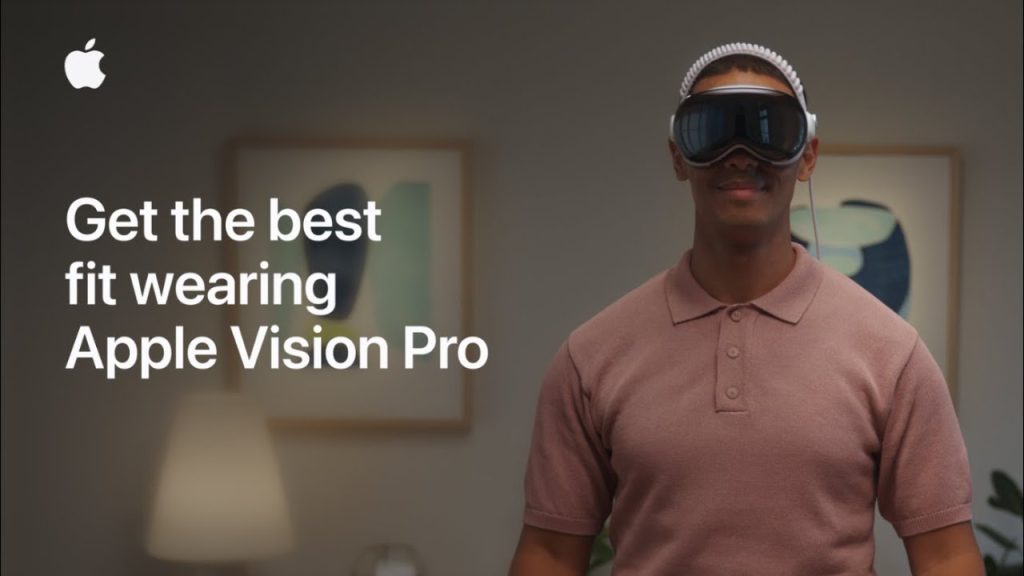
The Apple Vision Pro is a revolutionary mixed-reality headset that combines advanced technology with cutting-edge design to offer an immersive experience like no other. However, to fully enjoy everything it has to offer, it’s essential to get the right fit. A proper fit ensures that you not only achieve the best visual experience but also remain comfortable during extended wear. Whether you’re using your Apple Vision Pro for work, entertainment, or gaming, a snug and comfortable fit is key to preventing discomfort and ensuring optimal performance.
Getting the best fit for your Apple Vision Pro is more than just adjusting the headband. It involves fine-tuning the position of the lenses, adjusting the straps, and ensuring the device sits comfortably on your face. While Apple has designed the Vision Pro to be adjustable, everyone’s head shape and size are different, so it may take a little time and patience to get it just right. In this guide, we’ll walk you through all the steps you need to take to achieve the perfect fit and get the most out of your Apple Vision Pro.
Steps to Get the Best Fit with Apple Vision Pro
1. Adjust the Headband for Proper Alignment
The first step in achieving the best fit with the Apple Vision Pro is adjusting the headband. Apple’s headband design is built to provide comfort and stability, but finding the right length is crucial for a secure fit.
- Place the Headset on Your Head
Put the headset on and adjust the headband so it sits comfortably across the top of your head. The headband should not be too tight, but it should also not slip off easily. - Adjust for Height
The Vision Pro comes with an adjustable headband that allows you to change its height. You can raise or lower the headband to ensure that the headset aligns well with your eyes, providing the best viewing angle. - Tighten the Strap for a Secure Fit
Once the headband is in place, adjust the side straps to ensure the headset is secure. The straps should be snug enough to hold the headset in place but not so tight that they cause discomfort.
2. Adjust the Lenses for Optimal Clarity
Achieving the best fit isn’t just about the physical headband adjustment; it’s also about getting the lenses positioned correctly. Apple Vision Pro offers lens adjustments to help users find the best clarity and focus.
- Position the Lenses for Eye Comfort
Once the headset is secure, you’ll want to make sure the lenses are positioned correctly over your eyes. The Vision Pro uses a feature called “eye-tracking,” which adjusts the lens position automatically based on your eye alignment, but you can still manually fine-tune the lens for the best clarity. Adjust the lenses to make sure the image is sharp and free of distortion. - Use the Diopter Adjustments
Some users may need additional adjustments to the lenses for vision correction. The Vision Pro comes with diopter adjustments to fine-tune the clarity of the image based on your prescription needs. This can be particularly helpful if you wear glasses, as the device is designed to accommodate various vision profiles.
3. Ensure Proper Fit Around the Face
The fit around your face is just as important as the headband adjustments. Proper alignment around your face will help ensure the best visual experience, as well as comfort.
- Adjust the Lower Straps for Stability
The Apple Vision Pro features straps around the bottom of the device that help secure the headset in place. Adjust these straps so that the headset sits comfortably on your face. It should create a seal without putting too much pressure on your forehead or nose. - Check for Light Leakage
The goal is to eliminate any light leakage that might interfere with your experience. Check the perimeter of the headset for any gaps, and adjust the straps and positioning of the device to ensure it fits snugly around your face. A good seal will enhance immersion and ensure that no external light disrupts your view. - Consider the Nose Bridge Fit
The nose bridge area should not pinch or cause discomfort. Adjust the fit so that the device rests gently on your nose. If needed, Apple provides removable nose pads that can be customized for better comfort.
4. Test Comfort for Extended Use
Once the initial adjustments are made, it’s time to test the fit for comfort. The Apple Vision Pro is designed for long-term use, so comfort is paramount. Wear the headset for a few minutes, and assess how it feels on your head and face.
- Check for Pressure Points
Pay attention to any areas where the headset may cause pressure, such as your temples, forehead, or the bridge of your nose. If you feel any discomfort, adjust the straps or the headband for better balance. - Take Regular Breaks
Even with the best fit, it’s essential to take breaks during extended sessions. Your face and head may need a rest after prolonged use, so set reminders to take breaks and reduce the strain on your head and eyes. - Fine-Tune Over Time
As you continue to use the Vision Pro, you may find small adjustments that improve your comfort further. Don’t hesitate to fine-tune the fit over time based on your experience.
Tips for a Better Fit with Apple Vision Pro
- Use Memory Foam Padding
If you experience any discomfort on the sides of your face, consider using additional memory foam padding around the straps. This will help cushion pressure points and make the device more comfortable for long periods. - Wear Glasses or Contact Lenses
If you wear glasses, it’s important to ensure that the lenses on the Vision Pro are adjusted correctly to work with your prescription. If you prefer, you can also use contact lenses to avoid any potential interference with the fit of the headset. - Store the Headset Properly
When not in use, store the Apple Vision Pro in a safe place to prevent it from being damaged. Use the protective case provided by Apple to keep the device in top condition for your next use.
Final Thoughts on Getting the Best Fit with Apple Vision Pro
Achieving the best fit with the Apple Vision Pro is essential for comfort, clarity, and an immersive experience. By adjusting the headband, lenses, and face fit, you can ensure that the headset is perfectly aligned with your needs. Whether you’re using it for entertainment, work, or gaming, a well-fitted Apple Vision Pro will help you maximize your experience. Keep experimenting with different settings and remember to take regular breaks to maintain comfort during long sessions.