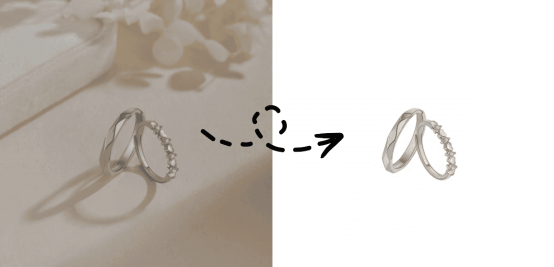
Whether it’s product main images on e-commerce platforms, creative posters on social media, or professional icons in corporate presentations, transparent backgrounds grant design work unparalleled flexibility and a professional edge.
Traditionally, removing image backgrounds required designers to perform tedious pen tool tracing or complex masking operations in professional software like Photoshop—a time-consuming process demanding specialized skills.
Transparent background maker – UltraPic has revolutionized this landscape, making high-quality transparent background creation simple, fast, and accessible to everyone.
Read Also: Top iMovie Alternatives for Mac, iPhone, & Windows: Powerful Video Editors
UltraPic: One-Click Intelligent Background Remover
Among numerous background removal tools, UltraPic stands out with its exceptional intelligent performance. This software is more than just a background removal tool—it offers a complete visual content optimization solution designed to meet the needs of today’s creators, marketers, and e-commerce operators.
You can easily place objects with their backgrounds removed into any new scene to preview the effect; or upload an entire product image folder at once—by the time you’ve brewed a cup of coffee, all images will be processed.
Core Advantages of UltraPic
Powered by advanced AI algorithms, UltraPic intelligently identifies even the most intricate image boundaries. Whether it’s flowing hair, semi-transparent wedding gowns, or delicate branches in complex backgrounds, UltraPic precisely separates subjects from backgrounds while maintaining natural, smooth edges—eliminating the halo effects or jagged edges common in traditional tools.
3 Simple Steps to Make a Clean Transparent Background
UltraPic as an efficient photo background remover simplifies complex background removal into 3 intuitive steps, enabling even users without design experience to achieve professional results in minutes.
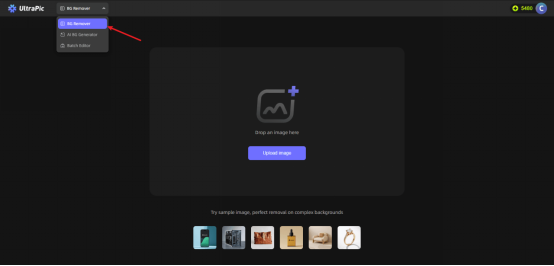
Step 1: Effortless Upload
Upload your image via drag-and-drop or file browser. UltraPic supports nearly all common formats, including JPEG, PNG, BMP, and WebP.
Step 2: AI Smart Analysis
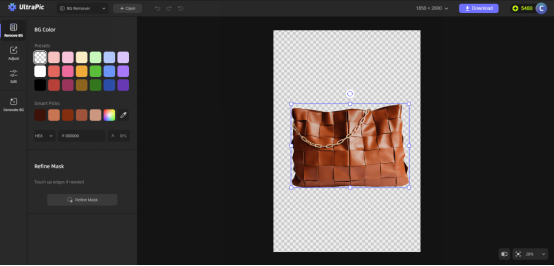
After upload, UltraPic’s intelligent algorithms automatically identify the subject and background within seconds. For complex images, users can fine-tune selections with auxiliary tools to ensure precision.
Step 3: Fine-Tuning
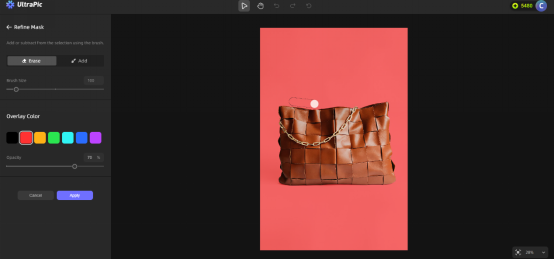
In the live preview window, users instantly see the background transparency effect and can make precise adjustments using edge refinement tools, feathering controls, and transparency settings. Throughout this process, the original image remains protected, and all edits are non-destructive.
Step 4: High-Quality Export
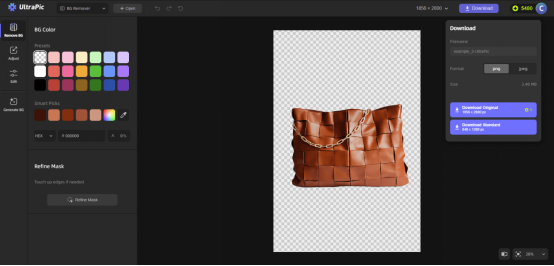
After editing, click Download and save as PNG format, and then export the image.
Comprehensive Features: Beyond Background Removal
Beyond exceptional background transparency, UltraPic offers a suite of enhancement tools:
Smart Background Replacement: Instantly place background-removed images into new scenes with one click
Batch Processing: Handle hundreds of images simultaneously for dramatically improved workflow efficiency
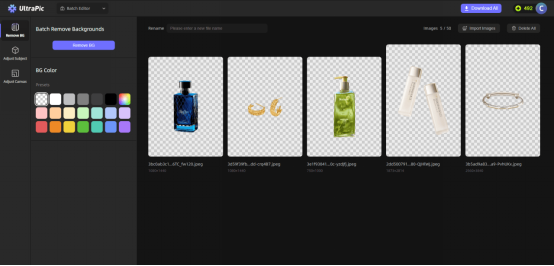
Multiple Output Formats: Supports PNG, JPG, WebP, and more to meet diverse platform requirements
Resize & Optimize: Adjust dimensions while preserving image quality for any application scenario
Read Also: How to Use AI to Edit YouTube Videos Automatically
Multi-scenario Applications: Empowering Creative Expression Across Industries
E-commerce and Product Photography
E-commerce sellers can use UltraPic to create transparent backgrounds for product images, ensuring professional and consistent product displays on websites without background color interference, boosting conversion rates by up to 40%.
Social Media and Content Creation
Content creators can effortlessly produce creative collages, infographics, and marketing materials featuring transparent elements, maintaining visual consistency across social media platforms with varying background colors.
Corporate Branding and Professional Design
Marketing teams can rapidly produce brand materials for diverse media—from presentations to print—ensuring logos and graphics maintain a professional appearance against any background.
Personal Projects and Everyday Use
Even individual users can leverage UltraPic to add creative effects to family photos or create professional visual assets for school projects, breaking down barriers to professional-grade results.
Read Also:Best Free Tools for Online Store Owners to Grow Fast
Summary
In an era where digital content grows at an astonishing pace, tools that balance efficiency and quality are no longer luxuries but necessities.
As the leader in transparent background creation, UltraPic not only solves the technical challenges of traditional background removal but also puts professional-grade image processing capabilities into the hands of every user through intelligent, user-friendly design.
Whether you’re a busy e-commerce operator, an efficiency-driven designer, or an everyday user occasionally needing to edit images, UltraPic saves you precious time and unleashes your creative potential. Creating transparent backgrounds is no longer a time-consuming, labor-intensive professional skill—it’s a routine task completed with a single click.
Experience UltraPic now and join thousands of creatives who’ve transformed their workflow. Discover how transparent background maker unlocks new possibilities for your visual content—clear, professional, and limitless.