


How to Pay NHIF Contributions via M-PESA for Companies. The National Health Insurance Fund (NHIF) provides medical insurance coverage for Kenyans through monthly contributions. Companies and small businesses can easily submit NHIF contributions for their employees using the M-PESA payment platform. Here is a step-by-step guide on how to make these payments using the government paybill number 222222 via the eCitizen Payment Platform.
Requirements:
- Registered NHIF Employer Code
- NHIF Byproduct Portal access for generating an e-slip
- List of employees with their ID numbers and contribution amounts in the correct format
Steps to Pay NHIF Contributions via M-PESA for Companies:
- Generate NHIF E-slip:
- Log in to the NHIF Byproduct Portal using your Employer Code and Password.
- Generate an NHIF E-slip for the total contribution amount, including all employees.
- Prepare Employee List:
- Ensure you have an Excel list of employees with their ID numbers and the contribution amount.
- Format the list according to NHIF guidelines.
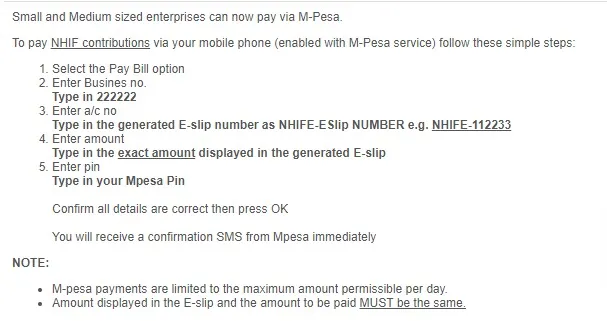
- Access M-PESA Menu:
- Open the Safaricom SIM Toolkit on your mobile phone.
- Select the M-PESA option.
- Select Lipa na M-PESA:
- Choose the “Lipa na M-PESA” option.
- Choose Paybill:
- Select the “Paybill” option.
- Enter Paybill Number:
- Enter the Government Paybill Number for eCitizen: 222222.
- Enter Account Number:
- Input the account number as NHIFE-0123456, where 0123456 is the e-slip number generated from the NHIF portal.
- Enter Payment Amount:
- Key in the total amount as indicated on the NHIF E-slip.
- Enter M-PESA PIN:
- Input your M-PESA PIN to authorize the transaction.
- Confirm Details:
- Review the details (Paybill Number, Account Number, and Amount) to ensure they are correct.
- Confirm and submit the transaction.
- Receive Confirmation:
- You will receive a confirmation message from M-PESA acknowledging the payment.
- The eCitizen platform will also confirm the payment.
Important Tips:
- Accuracy: Double-check the e-slip number and payment details to avoid errors.
- Records: Keep a copy of the transaction details for reference.
- No Receipt: NHIF does not issue a separate receipt for the payment, so the M-PESA confirmation message serves as proof of payment.
Conclusion
Using M-PESA to pay NHIF contributions for companies is a convenient and efficient method. By following these steps, you can ensure that your employees’ contributions are submitted accurately and timely, helping maintain their health insurance coverage. For any further assistance or issues, you can contact NHIF or visit their website for more information.




