Nyongesa Sande
No Result
View All Result
  • News
    • World
    • Africa
  • Politics
  • Business
  • Tech
  • AI
  • Telecom
  • Sports
  • Opinion
  • Lifestyle
  • Live
  • World Cup 2026
    • World Cup 2026 Standings
    • World Cup 2026
Nyongesa Sande
  • About Us
    • Nyosake Designers
      • Nyosake Webmasters
      • Nyosake Investment
  • Contact Us
    • Newsroom Contact
  • Ownership Disclosure
  • Advertise
No Result
View All Result
Nyongesa Sande
No Result
View All Result
  • News
  • Politics
  • Business
  • Tech
  • AI
  • Telecom
  • Sports
  • Opinion
  • Lifestyle
  • Live
  • World Cup 2026
ADVERTISEMENT

Home » Myfiosgateway.com

Myfiosgateway.com

NyongesaSande News Desk by NyongesaSande News Desk
2 years ago
in Technology
Reading Time: 3 mins read
A A
Verizon Fios Router Login

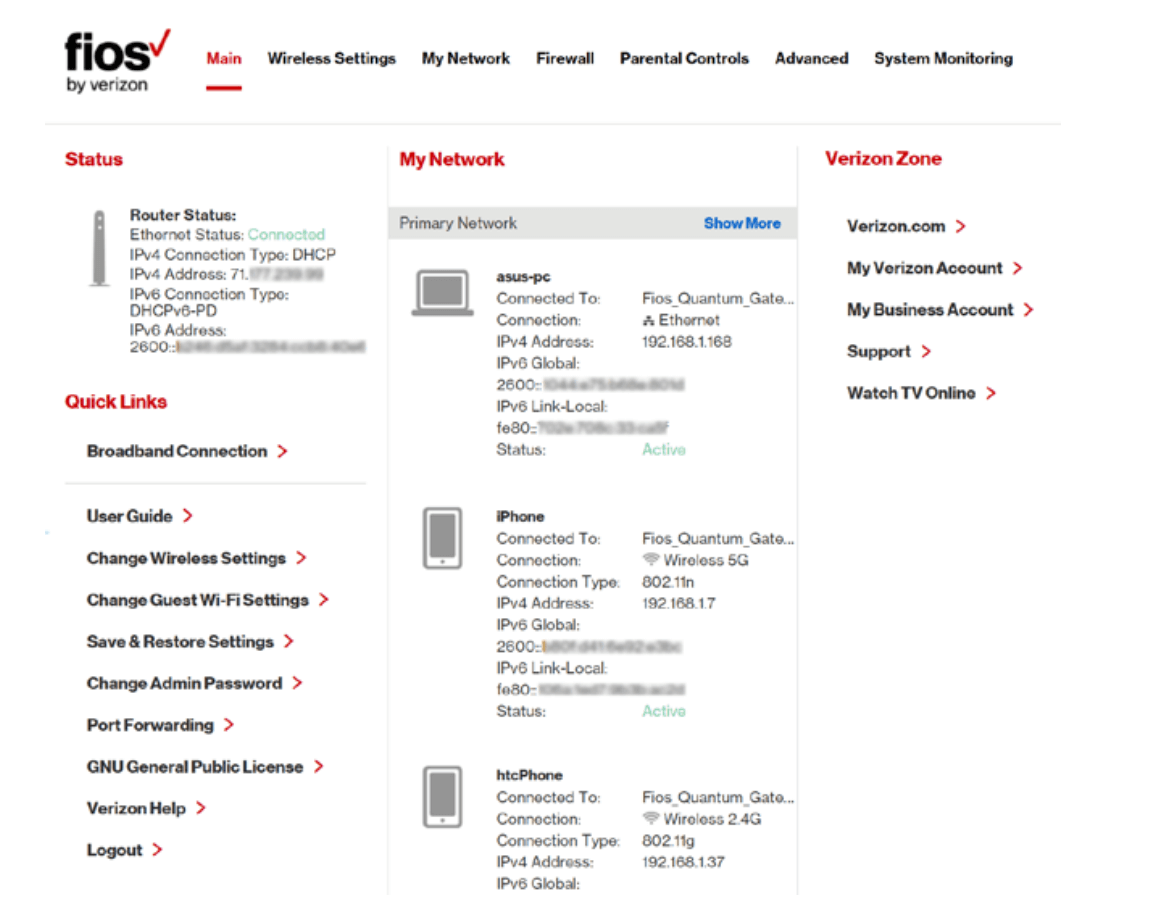
MyFiosGateway is the web address that is used to login the admin interface of the Verizon router and make changes to the settings at http://myfiosgateway.com. For people who own Verizon Routers, they can access the web interface of their gateway router and access all the important router and wireless network settings from there.

Myfiosgateway.com Login

192.168.1.1 Login

ADVERTISEMENT

How to login to MyFiosGateway.com?

Here is how you can login the web interface of the Verizon router through myfiosgateway.com:

  1. The first thing to do is connect your PC to the Verizon Router. This can be done in two ways, either through wired connection by using an Ethernet cable or wirelessly by connecting to the wireless network of the router.
  2. Once your PC is connected to the Verizon Router, open a web browser on your PC.
  3. Open a new blank tab and in the address bar type, http://myfiosgateway.com or 192.168.1.1 and press Enter.
  4. You will be taken to the login screen of the router and will be asked to enter the username and password.
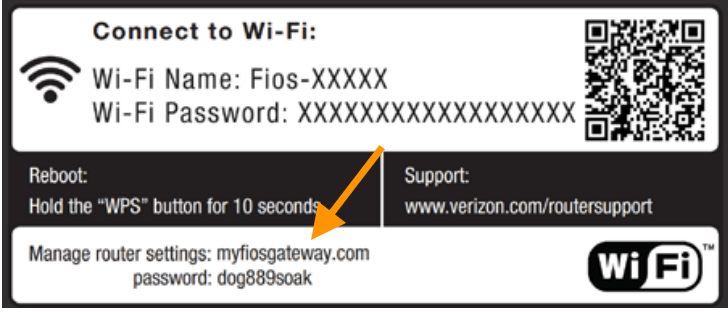
  5. The default username and password for FiOS or Verizon Routers are:
  6. Username: admin
  7. Password: You can find the password printer on a sticker at the side of the router
    (Image may vary depending upon your configurations)
  8. Enter the login username and password and click on Log In.
  9. You will be now logged into the MyFiosgateway admin web interface of your Verizon Router. Now that you have logged in, you can change different settings and configurations of the router.

How to Factory Reset your Verizon Router?

If you forgot the password to access the admin web interface of the router, or the wireless password, or messed up the settings of the router and want to start off fresh then you should consider factory resetting your Verizon router.

ADVERTISEMENT

When you factory reset the router then everything will be wiped out and reverted back to the factory defaults including any customized settings, changed router username and password, and all the other personal WiFi settings.

Here is how you can factory reset your Verizon router and revert al the settings back to factory defaults:

  1. Locate the Reset button on your router. It is usually located at the back of the router.
  2. While your router is powered on, use a pointed object such as a paperclip or a needle, or any similar object to press and hold the Reset button for 10-15 seconds.
  3. After 10-15 seconds, let go of the Reset button.
  4. The LED lights will blink and the router will reboot. Wait for the router to fully reset and turn on.
  5. After it turns on, every customized setting will be reverted back to factory defaults including any changed passwords, usernames, WiFi settings, etc.
Share1Tweet1SendShareScanSharePinShareShare
Google Add as a Preferred Source on Google
Previous Post

MyFritz.net

Next Post

Speedport.ip Login

NyongesaSande News Desk

NyongesaSande News Desk

Nyongesa Sande offers diverse content across news, technology, entertainment, and more, aiming to provide readers with a wide range of informative and engaging articles. NYONGESA SANDE's dedicated team provides our audience not only with the highly relevant news but also with outstanding interactive experience.

Related Posts

IMO vs WhatsApp: Best Messaging App Compared
Technology

IMO vs WhatsApp: Which App Is Best for International Messaging?

7 days ago
Galaxy Z Fold8 Could Be Lighter Than S26 Ultra
Tech News

Galaxy Z Fold8 Could Be Lighter Than S26 Ultra

1 week ago
Nvidia Vera CPU Promises 80% Faster AI Performance
Tech News

Nvidia Vera CPU Promises 80% Faster AI Performance

1 week ago
AMD Unveils 5800X3D, 7700X3D and RX 9070 GRE
Tech News

AMD Unveils 5800X3D, 7700X3D and RX 9070 GRE

1 week ago
Leaked iPhone Fold Photo Reveals New Design
Tech News

Leaked iPhone Fold Photo Reveals New Design

1 week ago
Google Opens First Store Outside the US
Tech News

Google Opens First Store Outside the US

1 week ago
Load More
Next Post
Telkom Router Login

Speedport.ip Login

Inseego MiFi Login

MiWiFi Login – miwifi.com

Trending

  • Top 10 Richest People in Tripura (2026)

    Top 10 Richest People in Tripura (2026)

    169 shares
    Share 68 Tweet 42
  • QVSELP Scam Warning: Why Kenyans Should Be Careful

    4 shares
    Share 2 Tweet 1
  • List of All Phone Numbers for the Kenyan 13th Parliament – Contact your MP today

    156 shares
    Share 62 Tweet 39
  • Product Review: Bose Portable Smart Speaker

    183 shares
    Share 73 Tweet 46
  • ZimLoan: A Quick Guide to Salary Advance Loans in Zimbabwe

    288 shares
    Share 115 Tweet 72
  • Final World Cup 2026: Messi, Ronaldo and Veteran Stars Facing Their Last Dance

    1 shares
    Share 0 Tweet 0
  • 2026 World Cup Absentees: Biggest Stars Missing the Tournament

    1 shares
    Share 0 Tweet 0
  • Top 10 Richest People in Manipur (2026)

    58 shares
    Share 23 Tweet 15
  • Top 10 Richest People in Meru County

    86 shares
    Share 34 Tweet 22
  • How to Access the KMTC Student Portal Online

    7 shares
    Share 3 Tweet 2
ADVERTISEMENT
ADVERTISEMENT

Who We Are

Nyongesa Sande

NyongesaSande.com is a digital news and media platform covering breaking news, business, technology, AI, politics, sports, world affairs and African innovation.

News Sections

  • News
    • World
    • Africa
  • Politics
  • Business
  • Tech
  • AI
  • Telecom
  • Sports
  • Opinion
  • Lifestyle
  • Live
  • World Cup 2026
    • World Cup 2026 Standings
    • World Cup 2026

Editorial Standards

  • Editorial Policy
  • Fact Checking Policy
  • Corrections Policy
  • Ethics Policy
  • AI Usage Policy
  • News Tips
  • Submit Press Release

Legal

  • Privacy Policy
  • Terms of Use
  • Cookie Policy
  • Risk Disclaimer
  • Disclaimer
  • DMCA
  • Ad Choices

Our Company

  • About Us
    • Nyosake Designers
      • Nyosake Webmasters
      • Nyosake Investment
  • Contact Us
    • Newsroom Contact
  • Ownership Disclosure
  • Advertise
  • Privacy Policy
  • Terms of Use
  • Cookie Policy
  • Risk Disclaimer
  • Disclaimer
  • DMCA
  • Ad Choices

NyongesaSande.com is an independent digital news and media platform covering Africa, business, technology, AI, politics and global developments.

© 2026 NyongesaSande.com. All rights reserved.

No Result
View All Result
  • News
    • World
    • Africa
  • Politics
  • Business
  • Tech
  • AI
  • Telecom
  • Sports
  • Opinion
  • Lifestyle
  • Live
  • World Cup 2026
    • World Cup 2026 Standings
    • World Cup 2026

NyongesaSande.com is an independent digital news and media platform covering Africa, business, technology, AI, politics and global developments.

© 2026 NyongesaSande.com. All rights reserved.