Nyongesa Sande
No Result
View All Result
  • News
    • World
    • Africa
  • Politics
  • Business
  • Tech
  • AI
  • Telecom
  • Sports
  • Opinion
  • Lifestyle
  • Live
  • World Cup 2026
    • World Cup 2026 Standings
    • World Cup 2026
Nyongesa Sande
  • About Us
    • Nyosake Designers
      • Nyosake Webmasters
      • Nyosake Investment
  • Contact Us
    • Newsroom Contact
  • Ownership Disclosure
  • Advertise
No Result
View All Result
Nyongesa Sande
No Result
View All Result
  • News
  • Politics
  • Business
  • Tech
  • AI
  • Telecom
  • Sports
  • Opinion
  • Lifestyle
  • Live
  • World Cup 2026
ADVERTISEMENT

Home » Master Your Mail: 15 Essential Keyboard Shortcuts for Mac Users

Master Your Mail: 15 Essential Keyboard Shortcuts for Mac Users

NyongesaSande News Desk by NyongesaSande News Desk
2 years ago
in Mac Specifications
Reading Time: 2 mins read
A A
How to Fix It When a MacBook Pro Keyboard Isn’t Working

Learn how to navigate the Mail app on your Mac like a pro with these 15 handy keyboard shortcuts. From composing new emails to managing your inbox, these shortcuts will help you work faster and more efficiently.

Streamline your email management with these 15 essential keyboard shortcuts for the Mail app on your Mac. Whether you’re composing new messages or organizing your inbox, these shortcuts will save you time and effort.

15 Keyboard Shortcuts for Mail on Mac:

ADVERTISEMENT
  1. Compose New Email – Command + N
  2. Get All New Email – Command + Shift + N
  3. Paste Text as Quotation – Command + Shift + V
  4. Send Mail – Command + Shift + D
  5. Forward Mail – Command + Shift + F
  6. Reply to Selected Email – Command + R
  7. Reply All to Selected Email – Command + Shift + R
  8. Mark Selected Email as Read/Unread – Command + Shift + U
  9. Mark Selected Email as Junk – Command + Shift + J
  10. Format Email as Plain Text/Rich Text – Command + Shift + T
  11. Go to Inbox – Command + 1
  12. Go to Sent – Command + 4
  13. Move to Flagged – Control + 5
  14. Delete Selected Message – Command + Delete
  15. Print Mail – Command + P

These shortcuts are designed to make your email workflow more efficient and productive. Remember to use them in the appropriate context, whether you’re composing a new message or managing your mailbox.

Take advantage of these keyboard shortcuts to streamline your email management and become a Mail app power user on your Mac. Explore more shortcuts by checking out the menu bar items in macOS, and elevate your productivity to new heights.

Tags: 15 Essential Keyboard Shortcuts for Mac
Share1Tweet1SendShareScanSharePinShareShare
Google Add as a Preferred Source on Google
Previous Post

Unlock the Power of GPT-4 & DALL-E 3 for Free on iPhone & iPad with Copilot

Next Post

Mastering Hover Text: Magnify On-Screen Text with Ease on Your Mac

NyongesaSande News Desk

NyongesaSande News Desk

Nyongesa Sande offers diverse content across news, technology, entertainment, and more, aiming to provide readers with a wide range of informative and engaging articles. NYONGESA SANDE's dedicated team provides our audience not only with the highly relevant news but also with outstanding interactive experience.

Related Posts

M4 Mac Mini
Mac Mini

Apple Drops 256GB M4 Mac Mini Model

2 months ago
How to Free Up Storage Space on Mac – Easy Guide to Clear Space
How To

How to Free Up Storage Space on Mac – Easy Guide to Clear Space

5 months ago
How to Back Up Your Mac with Time Machine
How To

How to Back Up Your Mac with Time Machine

5 months ago
How to Use Split View on Mac – Efficient Multitasking Tips
Instructables

How to Use Split View on Mac – Efficient Multitasking Tips

5 months ago
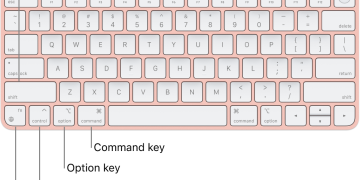
How to Use Mac Keyboard Shortcuts – Boost Productivity with Simple Commands
How To

How to Use Mac Keyboard Shortcuts – Boost Productivity with Simple Commands

5 months ago
How to Update macOS on Your Mac: A Simple Guide
iMac

How to Update macOS on Your Mac: A Simple Guide

5 months ago
Load More
Next Post
Mastering Hover Text: Magnify On-Screen Text with Ease on Your Mac

Mastering Hover Text: Magnify On-Screen Text with Ease on Your Mac

Google I/O 2024: Dates, Rumors, News, and Everything Else To Know

Google I/O 2024: Dates, Rumors, News, and Everything Else To Know

ADVERTISEMENT

Trending

  • Bose Portable Smart Speaker

    Product Review: Bose Portable Smart Speaker

    191 shares
    Share 76 Tweet 48
  • MOPH Launches National Training Program for Quality Improvement and Patient Safety

    4 shares
    Share 2 Tweet 1
  • List of 2022 – 2027 mps contacts in Kenya

    597 shares
    Share 239 Tweet 149
  • How to Check UHR and GHRIS Payslips Online

    136 shares
    Share 54 Tweet 34
  • Borehole Drillers in the Philippines

    6 shares
    Share 2 Tweet 2
  • Karishma Hazarika

    12 shares
    Share 5 Tweet 3
  • Surveyors in the United States

    1 shares
    Share 0 Tweet 0
  • Building Contractors in the United States

    1 shares
    Share 0 Tweet 0
  • South Korea FIFA World Cup 2026 Kits: Home, Away, Release Dates & Prices

    6 shares
    Share 2 Tweet 2
  • Top 10 Richest People in Busia County

    159 shares
    Share 64 Tweet 40
ADVERTISEMENT

Who We Are

Nyongesa Sande

NyongesaSande.com is a digital news and media platform covering breaking news, business, technology, AI, politics, sports, world affairs and African innovation.

News Sections

  • News
    • World
    • Africa
  • Politics
  • Business
  • Tech
  • AI
  • Telecom
  • Sports
  • Opinion
  • Lifestyle
  • Live
  • World Cup 2026
    • World Cup 2026 Standings
    • World Cup 2026

Editorial Standards

  • Editorial Policy
  • Fact Checking Policy
  • Corrections Policy
  • Ethics Policy
  • AI Usage Policy
  • News Tips
  • Submit Press Release

Legal

  • Privacy Policy
  • Terms of Use
  • Cookie Policy
  • Disclaimer
  • Risk Disclaimer
  • DMCA
  • Ad Choices

Our Company

  • About Us
    • Nyosake Designers
      • Nyosake Webmasters
      • Nyosake Investment
  • Contact Us
    • Newsroom Contact
  • Ownership Disclosure
  • Advertise
  • Privacy Policy
  • Terms of Use
  • Cookie Policy
  • Disclaimer
  • Risk Disclaimer
  • DMCA
  • Ad Choices

NyongesaSande.com is an independent digital news and media platform covering Africa, business, technology, AI, politics and global developments.

© 2026 NyongesaSande.com. All rights reserved.

No Result
View All Result
  • News
    • World
    • Africa
  • Politics
  • Business
  • Tech
  • AI
  • Telecom
  • Sports
  • Opinion
  • Lifestyle
  • Live
  • World Cup 2026
    • World Cup 2026 Standings
    • World Cup 2026

NyongesaSande.com is an independent digital news and media platform covering Africa, business, technology, AI, politics and global developments.

© 2026 NyongesaSande.com. All rights reserved.