


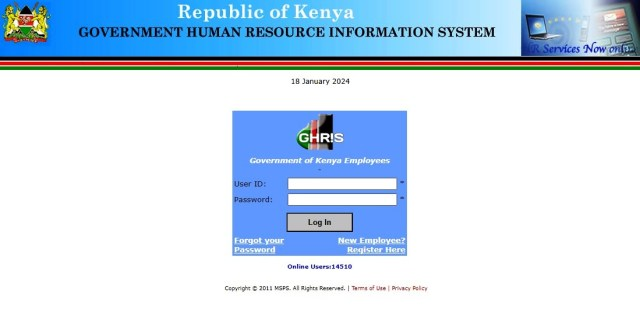
How to Check UHR and GHRIS Payslips Online. The Government Human Resource Information System (GHRIS) and the Unified Payroll Service (UHR) are portals designed for government employees in Kenya to access their payslips and P9 forms. UHR is the new portal by Public Service, while GHRIS serves as the previous portal. This guide outlines the steps to check your payslip using both systems. GHRIS Payslips
For Kenyan public servants, accessing payslips quickly and securely is essential. The Government Human Resource Information System (GHRIS) was developed to simplify human resource management and provide employees with easy access to payroll and employment records online.
The system allows government employees to retrieve monthly payslips, update personal information, monitor leave balances, and access various HR services through a centralized digital platform.
What Is GHRIS Kenya?
Government Human Resource Information System, commonly known as GHRIS, is a web-based Human Resource Information System created by the Government of Kenya to modernize HR operations within public service.
The platform serves ministries, departments, agencies, and county governments by centralizing employee information and streamlining administrative processes.
GHRIS operates as a self-service platform where both HR managers and employees can manage employment records online.
Main Functions of GHRIS
The system supports various HR functions, including:
- Employee registration and records management
- Monthly payslip generation
- Leave application and tracking
- Performance appraisal management
- Payroll access
- Staff verification services
- Pension and employment history management
It also enables authorized third parties such as banks and insurance providers to verify employment details where necessary.
Government employees in Kenya can access their payslips and payroll records through the Government Human Resource Information System (GHRIS) and the newer UHR Kenya Payroll Portal.
Following upgrades completed in December 2024, payroll services previously managed under the IPPD system were migrated to the UHR Kenya Payroll System.
To register for a GHRIS account, you will need the following documents and details.
- National identity card
- Appointment letter
- Mobile phone number
- KRA PIN
- Employment number
You May Also Like: 888starz Kenya Best Online Sports Betting in Kenya
Requirements to Check and Print GHRIS Payslip Online
To use GHRIS, you must be an employee in one of the following departments:
- Ministries and State Departments
- Uniformed Services
- State Corporations and Semi-Autonomous Government Agencies (SAGAs)
- Counties (both Executive and Assembly)
- Constitutional Commissions and Independent Offices
- Third-Party Organizations (e.g., Banks, SACCOs, Micro-Finance Institutions, Insurance Companies, Pension Schemes)
Additionally, you need:
- A User Payroll Number (UPN)
- A password for the GHRIS portal
- Active internet connection
You May Also Like: 888STARZ: Best Online Sports Betting Site in Kenya
How to Log In
Employees should use their existing GHRIS login credentials.
Login Steps
- Visit the UHR portal.
- Enter your User ID (Personal Number).
- Enter your Password.
- Complete the security check by solving the simple math question.
- Navigate to:
- Payslips
- P9 Forms
- Download or print the required document.
How to Check UHR Payslip Online (Procedure)
- Open Your Browser
- Use a PC or phone browser (Chrome is recommended).
- Access the UHR Portal
- For GHRIS: Type https://ghris.go.ke/loginonly.aspx
- For UHR: Type https://uhr.kenya.go.ke/ippd/auth/login.php
- Login to the Portal
- Enter your Payroll Number and payslip password.
- Click “Login” and wait for the portal to load.
- View Your Payslip
- For UHR: You will land directly on the current payslip. To view different payslips, select the month and year, then click “View Payslip”.
- For GHRIS: Hover over “My Records” and click on “My Payslip”. Click on “Current Payslip” to view the latest payslip.
- Access P9 Forms
- Use the menu on the left to select P9 forms for different years.
Detailed Steps for GHRIS Portal
- Visit the GHRIS Portal
- Open your browser and go to https://ghris.go.ke/loginonly.aspx.
- Login
- Enter your Payroll Number and Password.
- Click “Login”.
- Navigate to Payslip
- Hover on “My Records”.
- Click on “My Payslip”.
- Click on “Current Payslip” to view the current month’s payslip.
- For Previous Payslips
- Use the UHR portal (https://uhr.kenya.go.ke/ippd/auth/login.php).
By following these steps, you can efficiently check and print your payslips using the UHR or GHRIS portals, ensuring you have access to essential financial documents for various needs such as securing loans or filing tax returns.
GHRIS Portal (MSPS Online)
GHRIS Kenya Portal remains the government’s primary HR management platform for:
- Employee registration
- Updating personal details
- Performance appraisals
- HR records management
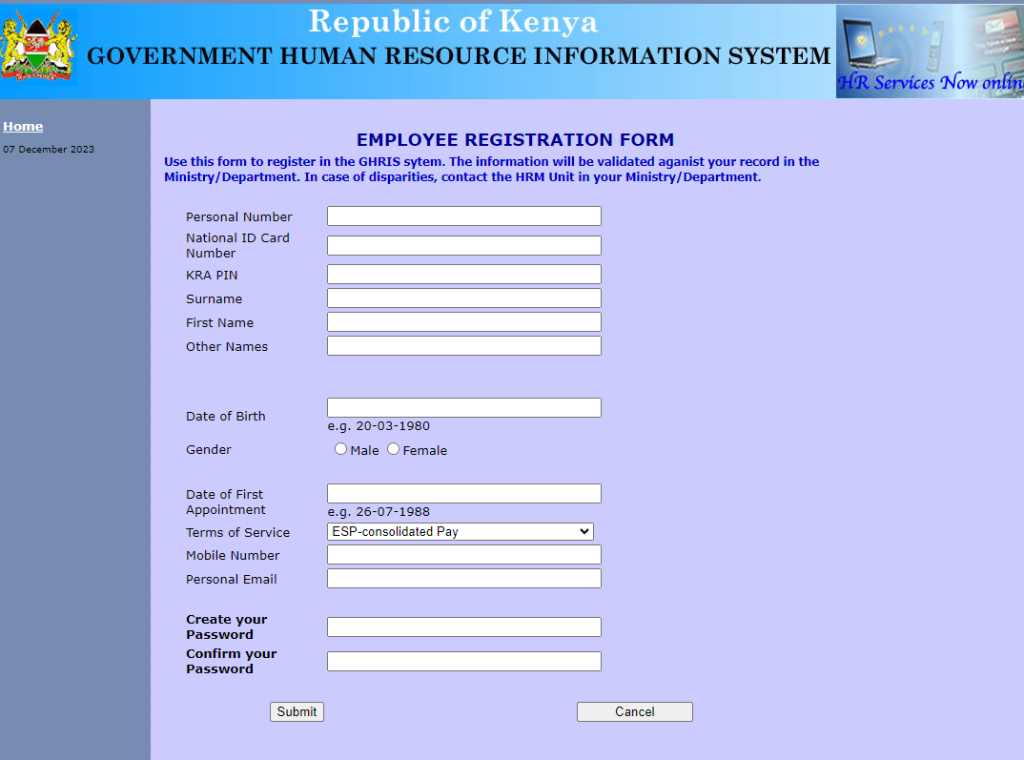
New Employee Registration Steps
- Visit the GHRIS portal.
- Click “New Employee? Register Here.”
- Fill in:
- National ID Number
- KRA PIN
- Personal details
- Submit registration details.
Once registered, the same credentials can be used on the UHR Payroll Portal.
Important Tips for Users
Passwords Are Case Sensitive
Ensure your password is typed exactly as registered. For example:
- Correct:
Password123 - Incorrect:
password123
Forgot Password
Employees experiencing login problems can use the password reset option available on the GHRIS portal.
Technical Support
If you encounter system issues, contact your Ministry or Department HRM Unit.
Support line:
- 020-2227411 Ext-174
Services Available on the Platforms
UHR Payroll Portal
- Payslip downloads
- P9 forms
- Payroll information
GHRIS Portal
- Employee profiles
- Leave management
- Performance appraisals
- HR records updates
Why the Upgrade Matters
The migration from IPPD to the UHR Kenya Payroll System was introduced to:
- Improve payroll efficiency
- Enhance security
- Simplify employee self-service access
- Centralize HR and payroll management across government institutions
Essential requirements for registration
To register on GHRIS, a valid email address is necessary. Employees must input their date of birth and provide their national ID card number. Additionally, the registration form requires a mobile number for verification. Furthermore, creating a new password is essential to completing the registration process.
- Name
- KRA tax PIN
- TSC number
- ID number
- Pay station code
- Date of birth
- Mobile number
- Designation code
- Bank account number
- Personal e-mail address
- Create a new password
- Confirm your new password
To conclude, GHRIS is a crucial platform that has revolutionized the management of human resources in the Kenyan public service. It offers numerous benefits, such as easy access to payslips, efficient service delivery, and improved transparency. By following a simple registration process, employees can gain access to their payslips and conveniently download and print them when needed. In case of any issues, GHRIS provides troubleshooting options and a dedicated customer support team to assist users. The impact of GHRIS extends beyond the public sector, with Chartered Universities in Kenya adopting its practices to enhance their own learning organizations. For any inquiries or assistance, don’t hesitate to reach out to GHRIS customer support. Embrace the convenience and efficiency that GHRIS brings to managing your payslips and contributing to the overall governance and performance of the Kenyan Government.


