
Nyongesa Sande
No Result
View All Result
  • News
    • World
    • Africa
  • Politics
  • Business
  • Tech
  • AI
  • Telecom
  • Sports
  • Opinion
  • Lifestyle
  • Live
  • World Cup 2026
    • World Cup 2026 Standings
    • World Cup 2026
Nyongesa Sande
  • About Us
    • Nyosake Designers
      • Nyosake Webmasters
      • Nyosake Investment
  • Contact Us
    • Newsroom Contact
  • Ownership Disclosure
  • Advertise
No Result
View All Result
Nyongesa Sande
No Result
View All Result
  • News
  • Politics
  • Business
  • Tech
  • AI
  • Telecom
  • Sports
  • Opinion
  • Lifestyle
  • Live
  • World Cup 2026
ADVERTISEMENT

Home » How to Stop Safaricom Promotional Messages and Skiza Tunes via WhatsApp

How to Stop Safaricom Promotional Messages and Skiza Tunes via WhatsApp

NyongesaSande News Desk by NyongesaSande News Desk
2 years ago
in How To
Reading Time: 3 mins read
A A
Zuri

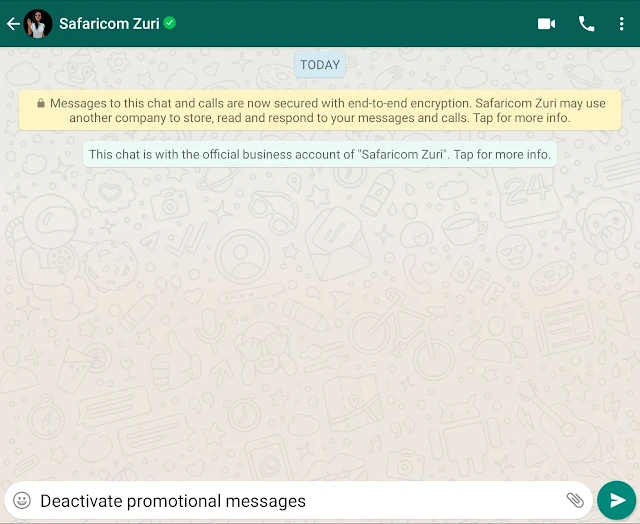
If you’re a Safaricom user in Kenya, you might find yourself occasionally overwhelmed by promotional messages or Skiza tunes that you’ve subscribed to, sometimes even without your explicit consent. Fortunately, Safaricom has introduced a convenient way to manage these subscriptions directly through WhatsApp, leveraging their customer service bot, Zuri. Here’s a step-by-step guide on how to utilize this service to clean up your subscriptions.

Understanding Zuri: Zuri is Safaricom’s automated chatbot designed to assist with a variety of customer service requests. Originally available on Facebook Messenger, Zuri has now expanded to WhatsApp, offering a more accessible platform for users to manage their accounts.

Steps to Stop Safaricom Promotional Messages and Skiza Tunes via WhatsApp:
ADVERTISEMENT
  1. Save the Zuri WhatsApp Number:
    • First, save the official Safaricom Zuri WhatsApp number to your contacts. This number is typically shared by Safaricom on their official channels.
  2. Start a Chat:
    • Open WhatsApp and start a new chat with the Zuri contact.
  3. Initiate the Request:
    • Send a greeting or start the conversation with “Hi” or “Hello”. Zuri will respond with a menu of options.
  4. Navigate to Service Options:
    • Follow the prompts to navigate to the service options. You will likely need to choose options related to ‘Manage My Subscriptions’ or ‘Promotional Messages’.
  5. Select Unsubscribe Options:
    • Select the specific services you wish to unsubscribe from. In this case, choose the options to stop promotional messages or delete all Skiza tunes.
  6. Confirmation:
    • Confirm your choices as directed by Zuri. You may need to confirm your identity or provide further details to process the request.
  7. Completion:
    • Zuri will confirm that the promotional messages have been stopped and any Skiza tunes have been deleted from your account.

Additional Tips:

  • Direct Commands: Sometimes stating your request directly such as “Stop all promotional messages” or “Delete all Skiza tunes” can expedite the process.
  • Customer Support: If Zuri is unable to process your request or if you encounter issues, consider reaching out to Safaricom’s customer support directly via call or other digital platforms for assistance.

Benefits of Using WhatsApp for Service Management:

ADVERTISEMENT
  • Convenience: Manage your subscriptions from anywhere and at any time directly through your smartphone.
  • Speed: Interactions with Zuri are typically faster than waiting in line for a customer service representative.
  • Record Keeping: Keep a record of your interactions with Zuri for future reference in your WhatsApp chat history.

Conclusion: Safaricom’s introduction of Zuri on WhatsApp to manage promotional messages and Skiza tunes is a testament to their commitment to improving customer service. This method provides a straightforward, user-friendly way to manage your communication preferences with Safaricom, ensuring that you only receive content that is relevant to you.

This guide provides Safaricom users with the necessary steps to effectively control the promotional content they receive, enhancing their overall mobile experience.

Tags: How ToStop Safaricom Promotional Messages
ShareTweetSendShareScanSharePinShareShare
Google Add as a Preferred Source on Google
Previous Post

Guide to Top Quick Loans Without Security in Kenya

Next Post

Zuri Cash Loan App: Your Guide to Quick Mobile Loans in Kenya

NyongesaSande News Desk

NyongesaSande News Desk

Nyongesa Sande offers diverse content across news, technology, entertainment, and more, aiming to provide readers with a wide range of informative and engaging articles. NYONGESA SANDE's dedicated team provides our audience not only with the highly relevant news but also with outstanding interactive experience.

Related Posts

How to Weld a 2-Block Rectangular Hollow Block Mold: Measurements, Materials and Step-by-Step Guide
How To

How to Weld a 2-Block Rectangular Hollow Block Mold: Measurements, Materials and Step-by-Step Guide

1 month ago
How to Create a Facebook Account on iPhone App
How To

How to Fix Facebook Confirmation Email Not Received

1 month ago
How to Create a Facebook Account on iPhone App
How To

How to Fix Facebook Confirmation Code Not Received

1 month ago
How to Create a Facebook Account on iPhone App
How To

How to Confirm Your Facebook Email or Phone Number

1 month ago
How to Create a Facebook Account on iPhone App
How To

How to Understand Your Facebook Account and Profiles

1 month ago
How to Create a Facebook Account on iPhone App
How To

How to Fix Facebook Name Not Accepted

1 month ago
Load More
Next Post
Download the Zuri Cash Loan App

Zuri Cash Loan App: Your Guide to Quick Mobile Loans in Kenya

Moniepoint USSD Code: Unlocking Banking Accessibility in Nigeria

Moniepoint USSD Code: Unlocking Banking Accessibility in Nigeria

Trending

  • FIFA 2026 World Cup Stadiums: Everything to Know

    FIFA 2026 World Cup Stadiums: Everything to Know

    3 shares
    Share 1 Tweet 1
  • List of Elected MCAs in Nakuru County for the 2017 General Elections

    23 shares
    Share 9 Tweet 6
  • World Cup 2026 Venues, Tickets and Fan Festivals

    2 shares
    Share 1 Tweet 1
  • World Cup 2026 Tickets and Hospitality

    1 shares
    Share 0 Tweet 0
  • List of 2022 – 2027 mps contacts in Kenya

    586 shares
    Share 234 Tweet 147
  • List of Elected MCAs in Meru County for the 2017 General Elections

    11 shares
    Share 4 Tweet 3
  • Levi’s Stadium World Cup 2026 Guide: Capacity, Location, Matches and Round of 32 Venue

    1 shares
    Share 0 Tweet 0
  • Germany vs Curaçao: 2026 World Cup Match Preview

    1 shares
    Share 0 Tweet 0
  • MTN Router Login

    14 shares
    Share 6 Tweet 4
  • QVSELP Scam Warning: Why Kenyans Should Be Careful

    2 shares
    Share 1 Tweet 1
ADVERTISEMENT
ADVERTISEMENT

Who We Are

Nyongesa Sande

NyongesaSande.com is a digital news and media platform covering breaking news, business, technology, AI, politics, sports, world affairs and African innovation.

News Sections

  • News
    • World
    • Africa
  • Politics
  • Business
  • Tech
  • AI
  • Telecom
  • Sports
  • Opinion
  • Lifestyle
  • Live
  • World Cup 2026
    • World Cup 2026 Standings
    • World Cup 2026

Editorial Standards

  • Editorial Policy
  • Fact Checking Policy
  • Corrections Policy
  • Ethics Policy
  • AI Usage Policy
  • News Tips
  • Submit Press Release

Legal

  • Privacy Policy
  • Terms of Use
  • Cookie Policy
  • Risk Disclaimer
  • Disclaimer
  • DMCA
  • Ad Choices

Our Company

  • About Us
    • Nyosake Designers
      • Nyosake Webmasters
      • Nyosake Investment
  • Contact Us
    • Newsroom Contact
  • Ownership Disclosure
  • Advertise
  • Privacy Policy
  • Terms of Use
  • Cookie Policy
  • Risk Disclaimer
  • Disclaimer
  • DMCA
  • Ad Choices

NyongesaSande.com is an independent digital news and media platform covering Africa, business, technology, AI, politics and global developments.

© 2026 NyongesaSande.com. All rights reserved.

No Result
View All Result
  • News
    • World
    • Africa
  • Politics
  • Business
  • Tech
  • AI
  • Telecom
  • Sports
  • Opinion
  • Lifestyle
  • Live
  • World Cup 2026
    • World Cup 2026 Standings
    • World Cup 2026

NyongesaSande.com is an independent digital news and media platform covering Africa, business, technology, AI, politics and global developments.

© 2026 NyongesaSande.com. All rights reserved.
