Macs age gracefully, but even the most powerful MacBook eventually slows down. Over time, cached data, system junk, leftover app files, duplicate photos, and forgotten downloads quietly pile up. Storage fills faster than expected, apps launch more slowly, and Finder searches feel heavier. That is where Mac cleaner apps become useful — not as miracle speed boosters, but as practical maintenance tools.
The challenge is choosing the right one. Many cleaners promise instant performance gains but rely on aggressive deletions or outdated methods. Others are genuinely useful but designed for advanced users only. This guide focuses only on Mac cleaner apps that are still relevant, safe, and reliable, based on real-world use rather than marketing hype.
Below, you will find a carefully curated selection of Mac cleaner tools that solve different problems: system junk, duplicate files, manual maintenance, and long-term organization. Each app has a clear purpose, strengths, and limitations, so you can choose what fits your workflow instead of installing everything.
Why Mac cleaner apps still matter
macOS is efficient, but it does not automatically remove everything it no longer needs. Cache files from browsers, design apps, video editors, and development tools accumulate quickly. Deleted apps often leave behind support files. Photos and videos duplicate through backups, messaging apps, and cloud sync conflicts.
A good Mac cleaner app helps you:
Free storage space without breaking macOS
Remove hidden junk safely
Find duplicate files and similar photos
Improve system responsiveness
Reduce manual maintenance time
The key is using the right cleaner for the right task, not one app to do everything blindly.
CleanMyMac: the best all-in-one Mac cleaner

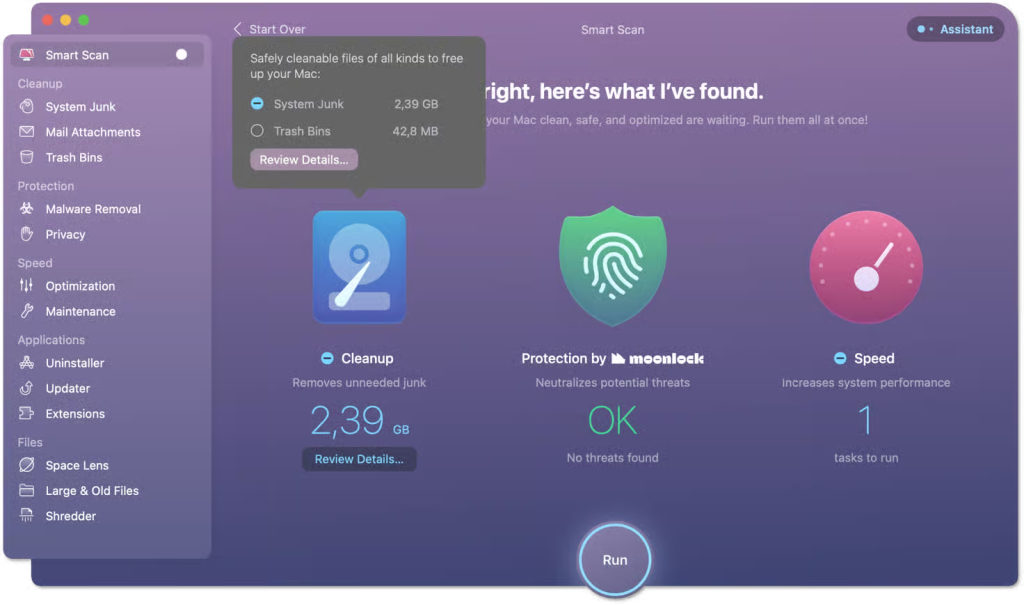

If you want a single, beginner-friendly solution, CleanMyMac remains the most complete Mac cleaner available. It combines system junk cleanup, performance optimization, malware protection, privacy controls, and app uninstallation into one interface.
CleanMyMac works best for users who want maintenance without micromanaging files. Its Smart Scan analyzes junk files, system health, and potential threats in one pass, making it ideal for regular upkeep.
What it cleans well:
System cache and log files
Old Time Machine snapshots
Unused app leftovers
Large forgotten files
Background startup items
Strengths:
Very easy to use
Clear explanations before deletion
Regular macOS compatibility updates
Cloud storage cleanup support
Limitations:
Not designed for deep duplicate photo management
Standalone pricing is higher than basic tools
CleanMyMac is best for people who want their Mac to “just feel clean” without digging through folders manually.
Gemini: the best duplicate file cleaner


Duplicate files are one of the biggest hidden storage killers, especially for photos, videos, and documents. Gemini focuses exclusively on this problem — and does it better than any general cleaner.
Gemini uses smart matching to find exact duplicates and visually similar photos, including burst shots, edited images, and repeated downloads. Over time, it learns which files you usually keep and which you remove.
Best use cases:
Photo libraries bloated by similar images
Downloads folders with repeated files
Music and media collections
Old backups merged multiple times
Strengths:
Very accurate duplicate detection
Safe review process before deletion
Learns your cleanup preferences
Excellent for Photos and media folders
Limitations:
Does not clean system junk or caches
Initial scans can take time on large drives
Gemini pairs perfectly with a system cleaner but is not meant to replace one.
OnyX: the best free Mac cleaner for advanced users


If you want a free Mac cleaner and are comfortable with technical tools, OnyX is unmatched. OnyX provides direct access to macOS maintenance scripts, cache clearing, and system parameters.
OnyX does not guide you through decisions. It assumes you understand what you are changing, which makes it powerful but risky for beginners.
Best for:
Advanced macOS users
Troubleshooting glitches
Manual cache clearing
System maintenance scripts
Strengths:
Completely free
Deep system access
Updated for each macOS version
Limitations:
Steep learning curve
No undo for many actions
Not suitable for casual users
OnyX is best used occasionally, not as a daily cleaner.
CCleaner: customizable but requires caution


CCleaner offers granular control over what gets cleaned. It appeals to users who want to decide exactly which caches, cookies, and files remain.
While effective, CCleaner requires attention. Aggressive settings can remove useful data if you are not careful.
Best for:
Users who want full control
Browser cache management
Mixed Mac and Windows environments
Strengths:
Free tier available
Customizable cleaning rules
Selective cookie preservation
Limitations:
Interface is less Mac-native
Cloud cleaning features are limited
Requires careful configuration
CCleaner is useful if you know what you want to remove and what you want to keep.
Spotless: automatic organization instead of cleanup


Not all clutter comes from junk. Some comes from disorganization. Spotless prevents mess before it starts by automatically sorting files based on rules.
Instead of deleting files, Spotless moves and organizes them as they appear.
Best for:
Downloads folder chaos
Project-based workflows
Designers and content creators
Strengths:
Rule-based automation
Prevents long-term clutter
Highly customizable
Limitations:
Requires setup time
Not a traditional cleaner
Spotless works best alongside a cleaner, not instead of one.
Unclutter: instant access without desktop mess


Unclutter does not clean your Mac, but it reduces clutter by giving temporary files a proper place. Files, notes, and clipboard items stay accessible without covering your desktop.
Best for:
Writers and researchers
People juggling many temporary files
Quick reference workflows
Strengths:
Fast access panel
Clipboard history
Minimal system impact
Limitations:
Not designed for storage cleanup
Clipboard history size is limited
Unclutter helps keep things tidy, not smaller.
Built-in macOS cleaning tools
macOS includes basic cleanup options:
Storage Management recommendations
Manual Finder sorting by file size
Trash cleanup
These tools work, but they require time and attention. For most users, they are best combined with a dedicated Mac cleaner app.
How to choose the right Mac cleaner app
There is no single “best” Mac cleaner for everyone. Choose based on your problem:
General slowdown and junk buildup → CleanMyMac
Duplicate photos and files → Gemini
Free, technical maintenance → OnyX
Selective control → CCleaner
Automatic organization → Spotless
Temporary file access → Unclutter
The most effective setup often combines one system cleaner and one duplicate finder.
Final thoughts on Mac cleaner apps
Mac cleaner apps are not magic, but the right ones save time, prevent storage chaos, and keep macOS responsive. The best results come from using reliable tools with clear purposes rather than aggressive cleaners that promise instant speed boosts.
When chosen carefully, Mac cleaner apps become quiet maintenance partners — not risky shortcuts.