
Nyongesa Sande
No Result
View All Result
  • News
    • World
    • Africa
  • Politics
  • Business
  • Tech
  • AI
  • Telecom
  • Sports
  • Opinion
  • Lifestyle
  • Live
  • World Cup 2026
    • World Cup 2026 Standings
    • World Cup 2026
Nyongesa Sande
  • About Us
    • Nyosake Designers
      • Nyosake Webmasters
      • Nyosake Investment
  • Contact Us
    • Newsroom Contact
  • Ownership Disclosure
  • Advertise
No Result
View All Result
Nyongesa Sande
No Result
View All Result
  • News
  • Politics
  • Business
  • Tech
  • AI
  • Telecom
  • Sports
  • Opinion
  • Lifestyle
  • Live
  • World Cup 2026
ADVERTISEMENT

Home » How to Register for SHIF in Kenya: A 2025 Step-By-Step Guide

How to Register for SHIF in Kenya: A 2025 Step-By-Step Guide

NyongesaSande News Desk by NyongesaSande News Desk
1 year ago
in How To
Reading Time: 7 mins read
A A
How to Register as an Employer on SHA: A Comprehensive 2025 Guide

How to Register as an Employer on SHA: A Comprehensive 2025 Guide

The Social Health Insurance Fund (SHIF) is a revolutionary public health insurance program introduced by the Kenyan government to provide citizens with affordable, quality healthcare services. How to Register for SHIF in Kenya. Officially launched on March 1, 2024, SHIF has replaced the National Hospital Insurance Fund (NHIF) and offers broader, more inclusive healthcare coverage for Kenyans.

  • What is SHIF?
  • Benefits of SHIF Membership
  • Eligibility for SHIF
  • Membership Categories
  • Documents Required for Registration
  • Step-by-Step Registration Process
    • Option 1: USSD Code Registration
    • Option 2: Online Registration
    • Option 3: In-Person Registration
  • Post-Registration: Managing Your SHIF Account
    • 1. Update Personal Information
    • 2. Add or Remove Dependents
    • 3. Monitor Contributions
  • FAQs
  • Next Steps: Enjoy Your SHIF Benefits

If you’re looking to join SHIF, this guide will walk you through the process, whether you prefer online registration, using a USSD code, or visiting an authorized registration center. Let’s dive in!


What is SHIF?

SHIF operates on the principle of pooling member contributions to provide equitable access to healthcare services. The program ensures that all Kenyans can access outpatient, inpatient, maternity, and emergency medical care at accredited health facilities without the financial burden of out-of-pocket payments.

ADVERTISEMENT

Benefits of SHIF Membership

  • Access to outpatient and inpatient services at accredited healthcare providers.
  • Coverage for chronic illnesses, maternity care, and emergency treatment.
  • Preventive healthcare services, including regular check-ups.
  • Affordable contribution rates tailored to income levels.
  • Nationwide coverage through a comprehensive network of healthcare providers.

Eligibility for SHIF

To register as a SHIF member, you must:

  • Be a Kenyan citizen or legal resident.
  • Be 18 years or older.
  • Have a valid National ID or passport.

Membership Categories

  1. Principal Member: The individual responsible for the SHIF account, typically the main household income earner.
  2. Dependents: Family members covered under the principal member’s account (spouse, children under 18, or others with proof of dependency).

Documents Required for Registration

  • National ID or Passport (Principal Member).
  • Recent passport-sized photo.
  • Proof of income (payslip, bank statement, or KRA PIN).
  • For dependents:
    • Proof of relationship (e.g., marriage or birth certificate).
    • Photos and identification documents (if applicable).

Step-by-Step Registration Process

Option 1: USSD Code Registration

  1. Dial *147# on your phone.
  2. Enter your National ID number when prompted.
  3. Follow the prompts to provide personal details, including your name, date of birth, and contact information.
  4. Submit your application and wait for confirmation via SMS.

Option 2: Online Registration

Step 1: Visit the SHIF Website
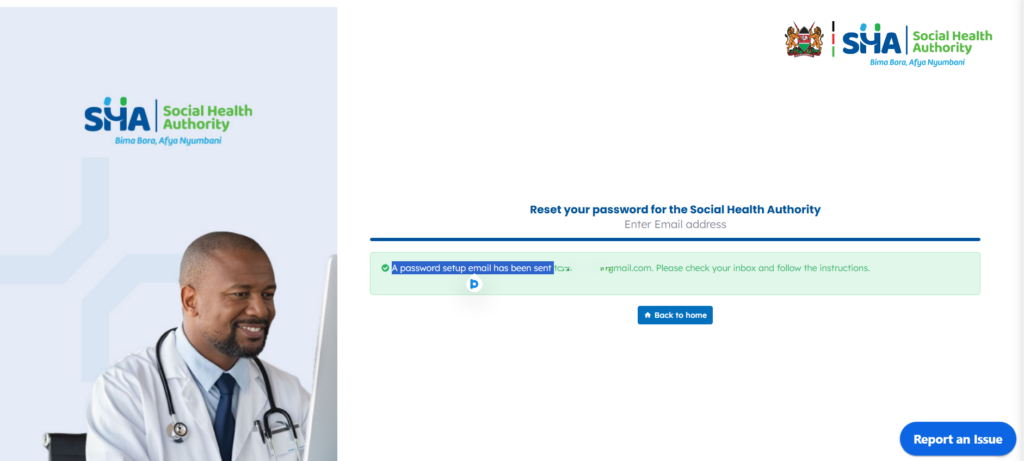
Go to the official SHIF portal at https://sha.go.ke. Click on the “Register” button to begin.

ADVERTISEMENT

Step 2: Create an Account

  • Enter your ID type (National ID, Alien ID, or Refugee ID) and the associated number.
  • Provide your phone number.
  • Click “Proceed”, and an OTP (One-Time Password) will be sent to your phone. Enter the OTP to verify your identity.

Step 3: Complete Registration

  • Provide additional personal details such as employment status, civil status, and disability status (if applicable).
  • Upload your recent passport-sized photo and required documents.
  • Choose your Primary Care Provider from the list of accredited facilities near your location.

Step 4: Confirm and Submit

ADVERTISEMENT
  • Review your information for accuracy.
  • Agree to the terms and conditions by checking the provided box.
  • Click “Submit” to finalize your registration. How to Register for SHIF in Kenya

Option 3: In-Person Registration

  1. Visit the nearest SHIF registration center or Huduma Centre.
  2. Request a registration form and provide the necessary details, including your name, contact information, and employment status.
  3. Submit the required documents for you and your dependents.
  4. Follow the agent’s guidance to complete biometric verification and finalize registration.

Post-Registration: Managing Your SHIF Account

After registration, it’s essential to keep your information updated and ensure timely contributions. Here’s how:

1. Update Personal Information

Log into your Afya Yangu account on the SHA portal using your ID number and PIN. Navigate to the “My Profile” section to update details like your contact information or address.

2. Add or Remove Dependents

To manage dependents, click on “Dependents” in your Afya Yangu dashboard. Provide necessary documents for additions or updates.

3. Monitor Contributions

Use the dashboard to check your contribution status, view payment history, and ensure your account remains active.


FAQs

1. What is the cost of registering for SHIF?
Registration is free. However, members must make monthly contributions based on their income bracket.

2. Can I add dependents later?
Yes, dependents can be added during or after registration by updating your account through the portal or visiting an SHA agent.

3. How do I access SHIF services?
Present your SHIF membership details at any accredited healthcare facility. Ensure your account contributions are up to date.

4. Can retirees join SHIF?
Yes, retirees and other non-formal sector workers can join SHIF through voluntary membership.

5. What happens if I miss contributions?
Missed contributions may result in a temporary suspension of benefits until payment is resumed.


Next Steps: Enjoy Your SHIF Benefits

Congratulations! By registering for SHIF, you’ve taken a crucial step toward securing your healthcare needs. Remember to make timely contributions to continue accessing comprehensive medical services for you and your dependents. How to Register for SHIF in Kenya

For further assistance, contact the SHIF support team through:

  • Toll-Free Number: 0800720601
  • Email: [email protected]

Together, let’s achieve a healthier Kenya!

Tags: How To
Share1Tweet1SendShareScanSharePinShareShare
Google Add as a Preferred Source on Google
Previous Post

How to Register for SHIF in Kenya: A 2025 Step-By-Step Guide

Next Post

How to File Nil Returns in Kenya 2025: 6 Easy Steps

NyongesaSande News Desk

NyongesaSande News Desk

Nyongesa Sande offers diverse content across news, technology, entertainment, and more, aiming to provide readers with a wide range of informative and engaging articles. NYONGESA SANDE's dedicated team provides our audience not only with the highly relevant news but also with outstanding interactive experience.

Related Posts

How to Weld a 2-Block Rectangular Hollow Block Mold: Measurements, Materials and Step-by-Step Guide
How To

How to Weld a 2-Block Rectangular Hollow Block Mold: Measurements, Materials and Step-by-Step Guide

1 month ago
How to Create a Facebook Account on iPhone App
How To

How to Fix Facebook Confirmation Email Not Received

1 month ago
How to Create a Facebook Account on iPhone App
How To

How to Fix Facebook Confirmation Code Not Received

1 month ago
How to Create a Facebook Account on iPhone App
How To

How to Confirm Your Facebook Email or Phone Number

1 month ago
How to Create a Facebook Account on iPhone App
How To

How to Understand Your Facebook Account and Profiles

1 month ago
How to Create a Facebook Account on iPhone App
How To

How to Fix Facebook Name Not Accepted

1 month ago
Load More
Next Post
How to File Nil Returns in Kenya 2025: 6 Easy Steps

How to File Nil Returns in Kenya 2025: 6 Easy Steps

2024 Mercedes-Benz CLE / CLE53 Price

How to Buy a Car in Mombasa: A Comprehensive Guide

Trending

  • Top 10 Richest People in Tripura (2026)

    Top 10 Richest People in Tripura (2026)

    171 shares
    Share 68 Tweet 43
  • Product Review: Bose Portable Smart Speaker

    187 shares
    Share 75 Tweet 47
  • Gillette Stadium World Cup 2026 Guide: Capacity, Location, Matches and Quarterfinal Venue

    1 shares
    Share 0 Tweet 0
  • Top 10 Richest People in Meru County

    88 shares
    Share 35 Tweet 22
  • Mukangala – Jacob Luseno (Lyrics)

    26 shares
    Share 10 Tweet 7
  • Colombia vs Uzbekistan: FIFA 2026 World Cup Preview

    2 shares
    Share 1 Tweet 1
  • Levi’s Stadium World Cup 2026 Guide: Capacity, Location, Matches and Round of 32 Venue

    2 shares
    Share 1 Tweet 1
  • MetLife Stadium World Cup 2026 Guide: Capacity, Location, Matches and Final Venue

    1 shares
    Share 0 Tweet 0
  • Top 10 Richest People in Manipur (2026)

    59 shares
    Share 24 Tweet 15
  • List of Elected MCAs in Narok County 2022-2027

    59 shares
    Share 24 Tweet 15
ADVERTISEMENT
ADVERTISEMENT

Who We Are

Nyongesa Sande

NyongesaSande.com is a digital news and media platform covering breaking news, business, technology, AI, politics, sports, world affairs and African innovation.

News Sections

  • News
    • World
    • Africa
  • Politics
  • Business
  • Tech
  • AI
  • Telecom
  • Sports
  • Opinion
  • Lifestyle
  • Live
  • World Cup 2026
    • World Cup 2026 Standings
    • World Cup 2026

Editorial Standards

  • Editorial Policy
  • Fact Checking Policy
  • Corrections Policy
  • Ethics Policy
  • AI Usage Policy
  • News Tips
  • Submit Press Release

Legal

  • Privacy Policy
  • Terms of Use
  • Cookie Policy
  • Risk Disclaimer
  • Disclaimer
  • DMCA
  • Ad Choices

Our Company

  • About Us
    • Nyosake Designers
      • Nyosake Webmasters
      • Nyosake Investment
  • Contact Us
    • Newsroom Contact
  • Ownership Disclosure
  • Advertise
  • Privacy Policy
  • Terms of Use
  • Cookie Policy
  • Risk Disclaimer
  • Disclaimer
  • DMCA
  • Ad Choices

NyongesaSande.com is an independent digital news and media platform covering Africa, business, technology, AI, politics and global developments.

© 2026 NyongesaSande.com. All rights reserved.

No Result
View All Result
  • News
    • World
    • Africa
  • Politics
  • Business
  • Tech
  • AI
  • Telecom
  • Sports
  • Opinion
  • Lifestyle
  • Live
  • World Cup 2026
    • World Cup 2026 Standings
    • World Cup 2026

NyongesaSande.com is an independent digital news and media platform covering Africa, business, technology, AI, politics and global developments.

© 2026 NyongesaSande.com. All rights reserved.
