


How to File Nil Returns in Kenya 2025: 6 Easy Steps. Filing nil returns in Kenya is a legal requirement for individuals with an active Personal Identification Number (PIN), even if they didn’t earn any income during the tax year. By submitting nil returns, you notify the Kenya Revenue Authority (KRA) that you have no taxable income. Failure to comply can result in penalties and limit access to essential government services.
Here’s a step-by-step guide to filing nil returns through the iTax platform:
Before You Begin: Requirements
- Active PIN: You must have a valid KRA PIN. If you don’t have one, register online via the KRA website.
- Tax Year: Nil returns cover the previous calendar year (January 1st to December 31st).
- Internet Access: Use a computer or smartphone with a stable connection for the best experience.
- No Tax Obligations: Nil returns apply only if you had no taxable income. If you earned income, file regular returns.
Step-by-Step Guide to Filing Nil Returns
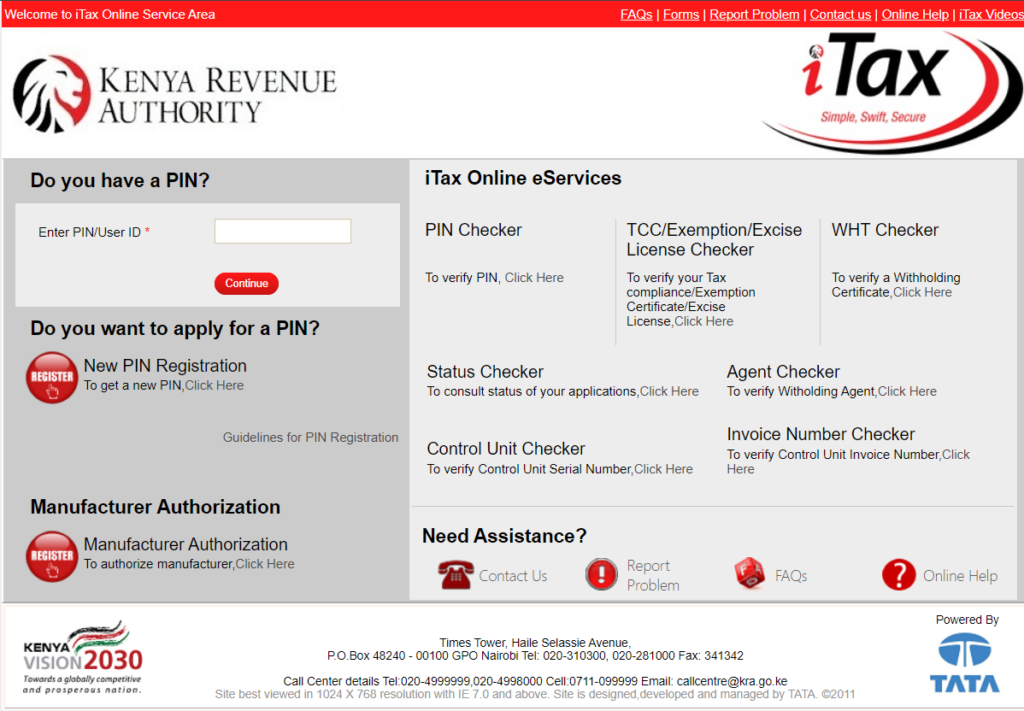
Step 1: Log in to iTax
- Visit the iTax portal.
- Enter your KRA PIN and password.
- If you forgot your password, use the “Forgot Password” option to reset it. A link will be sent to your email. Follow the instructions, then log in again.
Step 2: Navigate to the Returns Section
Once logged in, locate the “Returns” section in the main menu. Click it to view return filing options.
Step 3: Select “File Nil Returns”
Under the “Returns” section, choose the “File Nil Return” option. This will redirect you to a page where you’ll select your tax obligation.
Step 4: Choose Your Tax Obligation
- In the dropdown menu, select your tax status:
- Income Tax Resident: If you’re a Kenyan resident.
- Income Tax Non-Resident: If you’re a non-resident.
- Click “Next” to proceed.
Step 5: Confirm the Tax Dates
- Verify the tax period is correct.
- Click “Submit” to file your nil return.
- Confirm your submission by clicking “OK” on the popup window.
Step 6: Download the Acknowledgment Receipt
After submitting, you’ll see a confirmation page.
- Click “Download Returns Receipt” to save a copy as proof of submission.
Additional Tips
- File on Time: Submit returns by June 30th of the following year to avoid penalties.
- Seek Help: Contact the KRA support team via email ([email protected]) or phone (+254 20 499 9999 or +254 711 099 999) for assistance.
- Stay Updated: Monitor your tax obligations throughout the year to remain compliant.
- Regular Returns: If you earn any income, even below the taxable threshold, file regular tax returns instead of nil returns.
Final Remarks
Filing nil returns is a straightforward process that ensures compliance with tax laws and avoids unnecessary penalties. By following these six easy steps, you can submit your nil returns on the iTax platform with ease.
Happy filing!
Visual Representation:
An informative illustration featuring a Kenyan user navigating the iTax portal on a computer, filing nil returns. The interface shows sections like “File Nil Returns,” tax year selection, and a confirmation message. The image highlights the simplicity of the process.
How to File Nil Returns in Kenya 2025: 6 Easy Steps
Filing nil tax returns is a legal obligation for all individuals with an active Personal Identification Number (PIN) in Kenya, even if they have no taxable income. This process informs the Kenya Revenue Authority (KRA) that you did not earn any income in the previous year. Neglecting to file can result in penalties and hinder access to government services.
This step-by-step guide will show you how to file nil returns using the iTax platform with ease.
What You Need Before Filing
- Active KRA PIN: Ensure your PIN is valid and active. If not, you can apply for one via the KRA portal.
- Tax Year: You’ll be filing for the previous year (e.g., January 1 to December 31).
- Internet Access: A stable connection on a computer or smartphone is essential for a smooth process.
- No Taxable Income: Nil returns are for individuals with no taxable income. If you earned any income, even below the taxable threshold, you must file regular tax returns.
6 Steps to File Nil Returns
Step 1: Log in to the iTax Platform
- Visit the iTax portal.
- Enter your KRA PIN and password.
- If you forgot your password, click “Forgot Password”. Follow the instructions sent to your registered email to reset your password. Then log in using your new credentials.
Step 2: Access the Returns Section
After logging in, navigate to the “Returns” menu on the dashboard. Click to open the options.
Step 3: Select “File Nil Returns”
Under the “Returns” menu, you’ll find options like:
- File Return
- File Amended Return
- File Nil Return
- ITR for Employment Income
Select “File Nil Return” to proceed.
Step 4: Choose Your Tax Obligation
On the next page:
- Use the dropdown menu to select your tax obligation:
- Income Tax Resident: If you reside in Kenya.
- Income Tax Non-Resident: If you are a non-resident taxpayer.
- Click “Next” to continue.
Step 5: Confirm the Tax Period
- Confirm the tax period shown matches the year for which you are filing.
- Click “Submit” to file your nil return.
- A popup will appear asking for confirmation. Click “OK” to proceed.
Step 6: Download Your Acknowledgment Receipt
Once your submission is complete, you’ll be redirected to a confirmation page.
- Click “Download Returns Receipt” to save a copy as proof of submission.
Additional Tips
- File on Time: Submit your nil returns before the June 30th deadline to avoid penalties.
- KRA Support: If you encounter issues, contact the KRA helpdesk via email at [email protected] or call +254 20 499 9999 / +254 711 099 999.
- Monitor Obligations: Keep track of your tax obligations and consult a tax professional if needed.
- Regular Returns: Nil returns are only for individuals with no taxable income. If you earn any income, file regular tax returns instead.
Final Thoughts
Filing nil returns is simple and ensures compliance with tax laws. By following the steps above, you can easily complete the process on the iTax platform. Make it a priority to file your returns annually to avoid unnecessary penalties.
Happy Filing!




