
Nyongesa Sande
No Result
View All Result
  • News
    • World
    • Africa
  • Politics
  • Business
  • Tech
  • AI
  • Telecom
  • Sports
  • Opinion
  • Lifestyle
  • Live
  • World Cup 2026
    • World Cup 2026 Standings
    • World Cup 2026
Nyongesa Sande
  • About Us
    • Nyosake Designers
      • Nyosake Webmasters
      • Nyosake Investment
  • Contact Us
    • Newsroom Contact
  • Ownership Disclosure
  • Advertise
No Result
View All Result
Nyongesa Sande
No Result
View All Result
  • News
  • Politics
  • Business
  • Tech
  • AI
  • Telecom
  • Sports
  • Opinion
  • Lifestyle
  • Live
  • World Cup 2026
ADVERTISEMENT

Home » How to Check Your NSSF Number Online and via SMS in Kenya

How to Check Your NSSF Number Online and via SMS in Kenya

NyongesaSande News Desk by NyongesaSande News Desk
6 months ago
in How To
Reading Time: 7 mins read
A A
How to Check Your NSSF Number Online and via SMS in Kenya

If you are trying to recover your NSSF number in Kenya, you are not alone. Many Kenyans misplace or forget their National Social Security Fund number, yet it is required for making contributions, checking statements, and accessing retirement benefits.

  • How to Check Your NSSF Number Online and via SMS in Kenya
  • Why You Need Your NSSF Number
  • How to Check Your NSSF Number Online
    • Steps to Access the NSSF Portal
  • How to Check Your NSSF Number via SMS
  • How to Check Your NSSF Number in Person
    • Steps
  • How to Check Your NSSF Number Using Your ID
  • NSSF Registration Process (If You Don’t Have a Number)
    • Documents Required
    • How to Register
  • How to Check Your NSSF Contribution Status
    • Online Method
    • SMS Method
    • USSD Method (Statement via Email)
  • Using the NSSF Mobile App
  • NSSF Customer Care Contacts
  • Final Notes

Whether you are formally employed or self-employed, your NSSF number plays a critical role in securing your future retirement savings. This guide explains how to check your NSSF number online and via SMS in Kenya, clarifies current limitations, and outlines the most reliable alternatives.

How to Check Your NSSF Number Online and via SMS in Kenya

The National Social Security Fund Kenya was established in 1965 to manage retirement savings for Kenyan workers. Once registered, each member receives a unique NSSF number that permanently identifies their account.

ADVERTISEMENT

If you have forgotten this number, there are several recovery options—though not all are fully digital.

Why You Need Your NSSF Number

Your NSSF number is required to:

ADVERTISEMENT
  • Make monthly pension contributions
  • Check contribution statements and balances
  • Verify employment contribution records
  • Claim retirement, withdrawal, or disability benefits

Without it, you cannot access or manage your retirement savings.

How to Check Your NSSF Number Online

At the moment, there is no active online tool that allows members to retrieve their NSSF number directly.

However, if you already know your number and only need to access account services, you can use the NSSF Self-Service Portal.

ADVERTISEMENT

Steps to Access the NSSF Portal

  1. Visit the official NSSF Self-Service Portal using a phone or computer
  2. Select Member Self-Service
  3. Click Contributions Statement
  4. Log in using your NSSF credentials
  5. If credentials are forgotten, visit an NSSF office to obtain an encoded PIN for account recovery

While the portal does not show your NSSF number, it is useful once your number has been recovered.

How to Check Your NSSF Number via SMS

Currently, there is no SMS service that retrieves your NSSF number.

SMS services are only available for:

  • Checking balances
  • Requesting statements

To retrieve the actual NSSF number, physical verification is still required.

How to Check Your NSSF Number in Person

Visiting an NSSF office or Huduma Centre remains the most reliable and secure method.

Steps

  1. Visit the nearest Huduma Centre or NSSF branch
  2. Carry your original National ID or valid passport
  3. Request assistance to retrieve your NSSF number
  4. Verify your identity with an officer
  5. Receive your NSSF number and an encoded PIN key

This process is fast and protects your personal data.

How to Check Your NSSF Number Using Your ID

Yes, your National ID can be used to retrieve your NSSF number, but only in person.

Take your ID to:

  • Any NSSF office
  • Any Huduma Centre

After identity verification, staff will provide your NSSF number.

NSSF Registration Process (If You Don’t Have a Number)

If you have never registered, you must apply for an NSSF number.

Documents Required

  • National ID or valid passport
  • KRA PIN
  • Employer’s name and NSSF number (if employed)
  • Appointment letter (if applicable)

How to Register

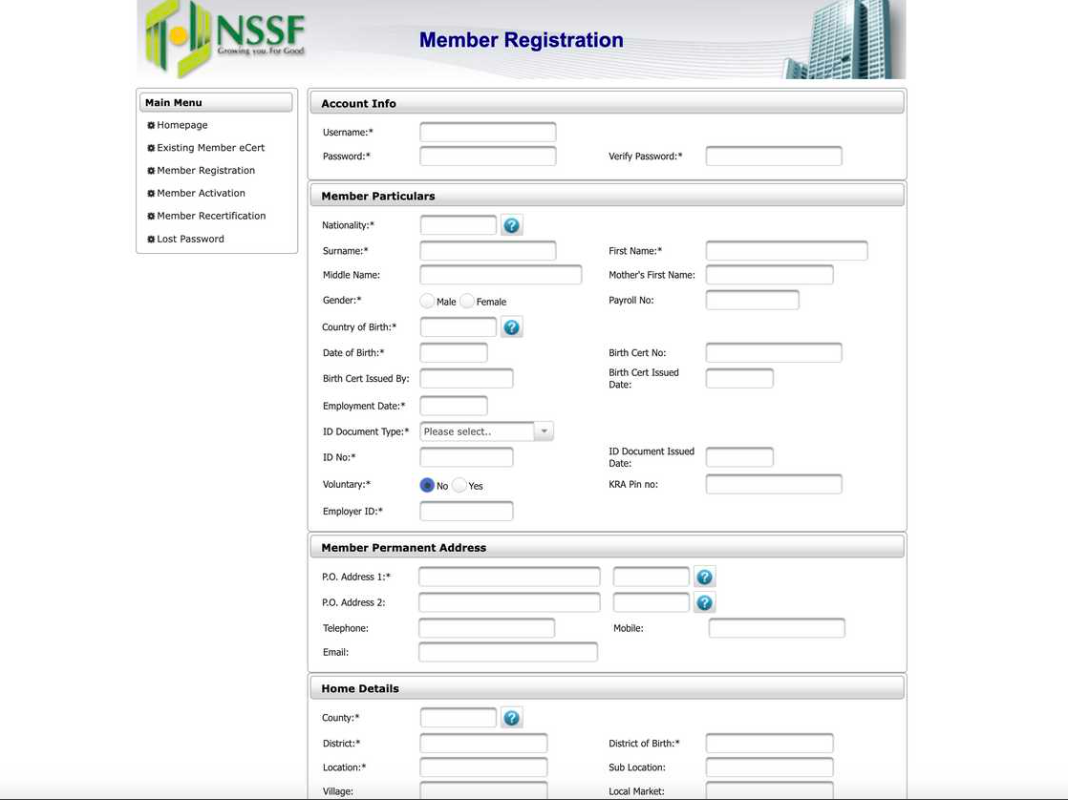
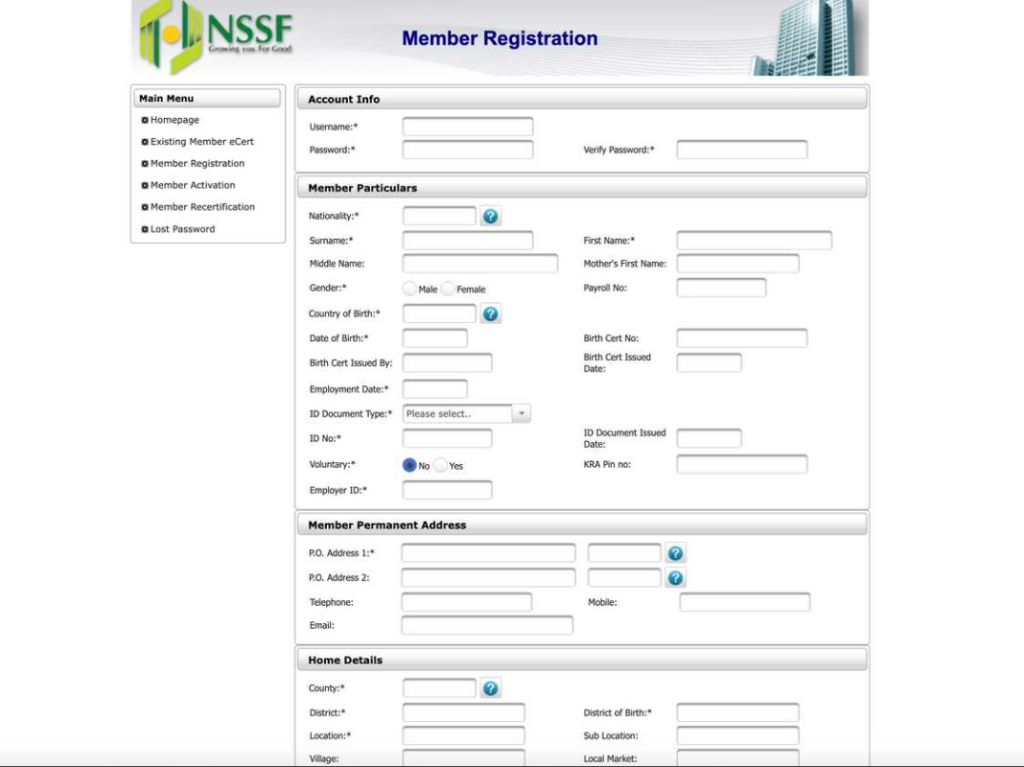
  1. Visit the NSSF website
  2. Click Member Registration under Member Self-Service
  3. Fill in personal and employment details
  4. Print the confirmation page
  5. Visit an NSSF office with the form and your ID
  6. Receive your NSSF number and encoded PIN

How to Check Your NSSF Contribution Status

Once you have your NSSF number, you can monitor your savings regularly.

Online Method

  1. Log in to the NSSF Self-Service Portal
  2. Select Contributions Statement
  3. View or download your statement

SMS Method

  1. Type:
    NSSF [NSSF Number] [DOB DD/MM/YYYY] [FULL NAME IN CAPS]
  2. Example:
    NSSF 12345678 01/01/1985 JOHN DOE
  3. Send to 6773
  4. Receive a PIN
  5. Type: BAL [PIN] and send to 6773

USSD Method (Statement via Email)

  1. Dial *303#
  2. Select Member Services
  3. Choose Contribution Information
  4. Select Email Contribution Statement

Using the NSSF Mobile App

The NSSF mobile app (Android) allows members to:

  • Check contribution status
  • Request statements
  • Manage account information

You still need your NSSF number to log in.

NSSF Customer Care Contacts

For assistance, contact NSSF through:

  • Main Lines: (020) 2729911 / 2710552
  • Toll-Free: 0800 2212744
  • Mobile: 0709 583000 / 0730 882000
  • WhatsApp: +254 704 303 303
  • Email: [email protected]
  • Physical Office: Social Security House, Bishops Road, Nairobi

Final Notes

If you have lost your NSSF number, visiting a Huduma Centre or NSSF office is currently the only guaranteed solution. Once retrieved, store it safely—on your phone, email, and physical documents—to avoid future inconvenience.
Share3Tweet2SendShareScanSharePin1ShareShare
Google Add as a Preferred Source on Google
Previous Post

Maize Farming In Kenya – How to Grow and Profit from Kenya’s Top Staple Crop

Next Post

How to Start Rosemary Farming in Kenya and Make Profits

NyongesaSande News Desk

NyongesaSande News Desk

Nyongesa Sande offers diverse content across news, technology, entertainment, and more, aiming to provide readers with a wide range of informative and engaging articles. NYONGESA SANDE's dedicated team provides our audience not only with the highly relevant news but also with outstanding interactive experience.

Related Posts

How to Weld a 2-Block Rectangular Hollow Block Mold: Measurements, Materials and Step-by-Step Guide
How To

How to Weld a 2-Block Rectangular Hollow Block Mold: Measurements, Materials and Step-by-Step Guide

2 months ago
How to Create a Facebook Account on iPhone App
How To

How to Fix Facebook Confirmation Email Not Received

2 months ago
How to Create a Facebook Account on iPhone App
How To

How to Fix Facebook Confirmation Code Not Received

2 months ago
How to Create a Facebook Account on iPhone App
How To

How to Confirm Your Facebook Email or Phone Number

2 months ago
How to Create a Facebook Account on iPhone App
How To

How to Understand Your Facebook Account and Profiles

2 months ago
How to Create a Facebook Account on iPhone App
How To

How to Fix Facebook Name Not Accepted

2 months ago
Load More
Next Post
How to Start Rosemary Farming in Kenya and Make Profits

How to Start Rosemary Farming in Kenya and Make Profits

Step-by-Step Guide on How To Pay NSSF Via M-Pesa

Step-by-Step Guide on How To Pay NSSF Via M-Pesa

ADVERTISEMENT

Who We Are

Nyongesa Sande

NyongesaSande.com is a digital news and media platform covering breaking news, business, technology, AI, politics, sports, world affairs and African innovation.

News Sections

  • News
    • World
    • Africa
  • Politics
  • Business
  • Tech
  • AI
  • Telecom
  • Sports
  • Opinion
  • Lifestyle
  • Live
  • World Cup 2026
    • World Cup 2026 Standings
    • World Cup 2026

Editorial Standards

  • Editorial Policy
  • Fact Checking Policy
  • Corrections Policy
  • Ethics Policy
  • AI Usage Policy
  • News Tips
  • Submit Press Release

Legal

  • Privacy Policy
  • Terms of Use
  • Cookie Policy
  • Risk Disclaimer
  • Disclaimer
  • DMCA
  • Ad Choices

Our Company

  • About Us
    • Nyosake Designers
      • Nyosake Webmasters
      • Nyosake Investment
  • Contact Us
    • Newsroom Contact
  • Ownership Disclosure
  • Advertise
  • Privacy Policy
  • Terms of Use
  • Cookie Policy
  • Risk Disclaimer
  • Disclaimer
  • DMCA
  • Ad Choices

NyongesaSande.com is an independent digital news and media platform covering Africa, business, technology, AI, politics and global developments.

© 2026 NyongesaSande.com. All rights reserved.

No Result
View All Result
  • News
    • World
    • Africa
  • Politics
  • Business
  • Tech
  • AI
  • Telecom
  • Sports
  • Opinion
  • Lifestyle
  • Live
  • World Cup 2026
    • World Cup 2026 Standings
    • World Cup 2026

NyongesaSande.com is an independent digital news and media platform covering Africa, business, technology, AI, politics and global developments.

© 2026 NyongesaSande.com. All rights reserved.