
Nyongesa Sande
No Result
View All Result
  • News
    • World
    • Africa
  • Politics
  • Business
  • Tech
  • AI
  • Telecom
  • Sports
  • Opinion
  • Lifestyle
  • Live
  • World Cup 2026
    • World Cup 2026 Standings
    • World Cup 2026
Nyongesa Sande
  • About Us
    • Nyosake Designers
      • Nyosake Webmasters
      • Nyosake Investment
  • Contact Us
    • Newsroom Contact
  • Ownership Disclosure
  • Advertise
No Result
View All Result
Nyongesa Sande
No Result
View All Result
  • News
  • Politics
  • Business
  • Tech
  • AI
  • Telecom
  • Sports
  • Opinion
  • Lifestyle
  • Live
  • World Cup 2026
ADVERTISEMENT

Home » How to Change Your Profile Picture, Name, and Nickname in Apple Music

How to Change Your Profile Picture, Name, and Nickname in Apple Music

NyongesaSande News Desk by NyongesaSande News Desk
2 years ago
in How To
Reading Time: 3 mins read
A A
How to Change Your Profile Picture, Name, and Nickname in Apple Music

Apple Music profile

Customizing your Apple Music profile allows you to personalize your music listening experience and connect with friends. Here’s how you can update your profile information on iPhones and iPads with iOS 11 and later:

Setting Up Your Profile:

  1. Open the Music app and navigate to the “Listen Now” section at the bottom of the screen.
  2. Tap on the Account button located at the top of the screen, represented by a silhouette of a head with a circle around it.
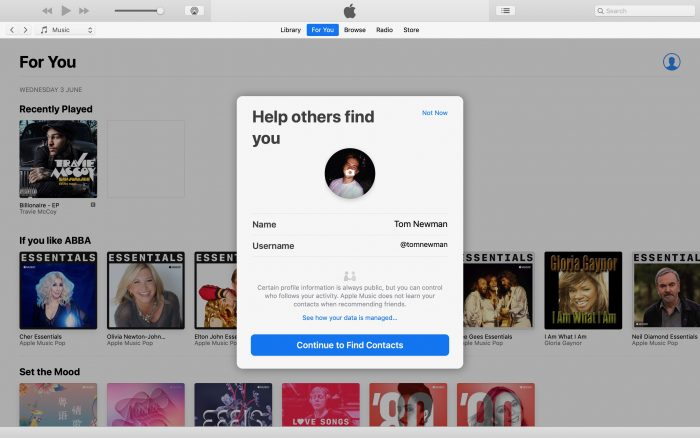
  3. Select “See What Friends Are Listening To” and then tap on “Get Started.”
  4. Choose a profile picture by tapping the camera icon to take a new photo or selecting one from your Photos app.
  5. Edit your name or nickname by selecting the respective field and typing in your desired name or nickname.
    • Note: The nickname cannot include spaces, but you can use an underscore instead.
  6. Tap “Continue to Find Contacts” to proceed.

Customizing Privacy Settings:

ADVERTISEMENT
  1. On the next screen, you’ll see your contacts who are currently sharing their information on Apple Music.
  2. Tap “Follow” next to your friends’ names to share music with them and see what they’re listening to, or tap “Invite” to invite other contacts to create profiles.
  3. Tap “Next” to proceed to privacy settings.
  4. Choose whether anyone can follow you or only people you approve, and adjust other notification preferences as desired.
  5. Tap “Next” to continue.

Sharing Playlists and Receiving Notifications:

  1. If you’ve created playlists on Apple Music, you’ll have the option to share them with your contacts. Select “Next” to proceed.
  2. Decide whether you want to receive notifications when you get new followers or when artists you like release new music.
  3. Tap “Done” to complete the setup process.

Editing Your Profile:

ADVERTISEMENT
  1. To change your profile picture, name, or nickname later on, tap on your profile picture or icon.
  2. Select “View Profile” and then tap the “Edit” button to open the Edit Profile screen.
  3. Make the desired changes to your profile information and tap “Done” to save your updates.

Understanding Apple Music Connect:

Apple Music previously featured a social feature called Connect, allowing users to interact with their favorite artists and share updates. However, Apple removed Connect from Apple Music at the end of 2018. Despite its removal, Apple Music still offers social elements, such as sharing playlists and seeing what your friends are listening to.

By following these steps, you can easily customize your Apple Music profile to reflect your preferences and connect with friends through music.

Tags: Apple Music profileHow To
Share2Tweet1SendShareScanSharePinShareShare
Google Add as a Preferred Source on Google
Previous Post

How to Know If You Have an SSD or HDD Hard Drive

Next Post

How to Capture an iPad Screenshot

NyongesaSande News Desk

NyongesaSande News Desk

Nyongesa Sande offers diverse content across news, technology, entertainment, and more, aiming to provide readers with a wide range of informative and engaging articles. NYONGESA SANDE's dedicated team provides our audience not only with the highly relevant news but also with outstanding interactive experience.

Related Posts

How to Weld a 2-Block Rectangular Hollow Block Mold: Measurements, Materials and Step-by-Step Guide
How To

How to Weld a 2-Block Rectangular Hollow Block Mold: Measurements, Materials and Step-by-Step Guide

1 month ago
How to Create a Facebook Account on iPhone App
How To

How to Fix Facebook Confirmation Email Not Received

2 months ago
How to Create a Facebook Account on iPhone App
How To

How to Fix Facebook Confirmation Code Not Received

2 months ago
How to Create a Facebook Account on iPhone App
How To

How to Confirm Your Facebook Email or Phone Number

2 months ago
How to Create a Facebook Account on iPhone App
How To

How to Understand Your Facebook Account and Profiles

2 months ago
How to Create a Facebook Account on iPhone App
How To

How to Fix Facebook Name Not Accepted

2 months ago
Load More
Next Post
Exciting Updates Await: iPad Pro 2024 – Expected Features, Release Date, and Pricing Insights

How to Capture an iPad Screenshot

Is an M3 MacBook Air Worth It? 3 Reasons Why You Should Buy One

How to Delete Apps on a Mac That Won't Delete

ADVERTISEMENT

Trending

  • List of Elected MCAs in Mombasa County for the 2017 General Elections

    List of Elected MCAs in Kajiado County for the 2017 General Elections

    7 shares
    Share 3 Tweet 2
  • South Korea FIFA World Cup 2026 Kits: Home, Away, Release Dates & Prices

    5 shares
    Share 2 Tweet 1
  • Top 10 Richest People in Tripura (2026)

    181 shares
    Share 72 Tweet 45
  • List of Elected MCAs in Siaya County for the 2017 General Elections

    7 shares
    Share 3 Tweet 2
  • List of 2022 – 2027 mps contacts in Kenya

    594 shares
    Share 238 Tweet 149
  • How to Check UHR and GHRIS Payslips Online

    134 shares
    Share 54 Tweet 34
  • Top 10 Richest People in Manipur (2026)

    64 shares
    Share 26 Tweet 16
  • Top 25 Richest People in Kisii and Nyamira Counties in 2026

    41 shares
    Share 16 Tweet 10
  • Top 10 Richest People in Meru County

    91 shares
    Share 36 Tweet 23
  • List of Elected MCAs in Kwale County for the 2017 General Elections

    4 shares
    Share 2 Tweet 1
ADVERTISEMENT

Who We Are

Nyongesa Sande

NyongesaSande.com is a digital news and media platform covering breaking news, business, technology, AI, politics, sports, world affairs and African innovation.

News Sections

  • News
    • World
    • Africa
  • Politics
  • Business
  • Tech
  • AI
  • Telecom
  • Sports
  • Opinion
  • Lifestyle
  • Live
  • World Cup 2026
    • World Cup 2026 Standings
    • World Cup 2026

Editorial Standards

  • Editorial Policy
  • Fact Checking Policy
  • Corrections Policy
  • Ethics Policy
  • AI Usage Policy
  • News Tips
  • Submit Press Release

Legal

  • Privacy Policy
  • Terms of Use
  • Cookie Policy
  • Disclaimer
  • Risk Disclaimer
  • DMCA
  • Ad Choices

Our Company

  • About Us
    • Nyosake Designers
      • Nyosake Webmasters
      • Nyosake Investment
  • Contact Us
    • Newsroom Contact
  • Ownership Disclosure
  • Advertise
  • Privacy Policy
  • Terms of Use
  • Cookie Policy
  • Disclaimer
  • Risk Disclaimer
  • DMCA
  • Ad Choices

NyongesaSande.com is an independent digital news and media platform covering Africa, business, technology, AI, politics and global developments.

© 2026 NyongesaSande.com. All rights reserved.

No Result
View All Result
  • News
    • World
    • Africa
  • Politics
  • Business
  • Tech
  • AI
  • Telecom
  • Sports
  • Opinion
  • Lifestyle
  • Live
  • World Cup 2026
    • World Cup 2026 Standings
    • World Cup 2026

NyongesaSande.com is an independent digital news and media platform covering Africa, business, technology, AI, politics and global developments.

© 2026 NyongesaSande.com. All rights reserved.
