Nyongesa Sande
No Result
View All Result
  • News
    • World
    • Africa
  • Politics
  • Business
  • Tech
  • AI
  • Telecom
  • Sports
  • Opinion
  • Lifestyle
  • Live
  • World Cup 2026
    • World Cup 2026 Standings
    • World Cup 2026
Nyongesa Sande
  • About Us
    • Nyosake Designers
      • Nyosake Webmasters
      • Nyosake Investment
  • Contact Us
    • Newsroom Contact
  • Ownership Disclosure
  • Advertise
No Result
View All Result
Nyongesa Sande
No Result
View All Result
  • News
  • Politics
  • Business
  • Tech
  • AI
  • Telecom
  • Sports
  • Opinion
  • Lifestyle
  • Live
  • World Cup 2026
ADVERTISEMENT

Home » How to Get a New York State ID

How to Get a New York State ID

NyongesaSande News Desk by NyongesaSande News Desk
2 years ago
in How To
Reading Time: 3 mins read
A A
New York State ID

New York State ID

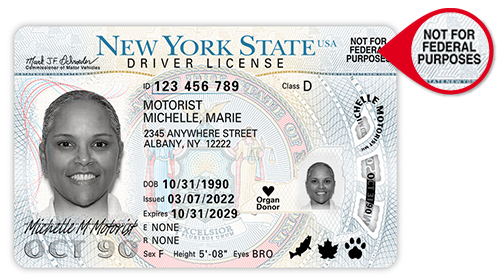
Obtaining a New York State identification card, commonly referred to as a non-driver’s ID, is a straightforward process if you follow the proper application procedures. This ID card, issued by the New York State Department of Motor Vehicles (DMV), is different from a driver’s license and is available to anyone who meets the requirements. Here’s a detailed guide to help you get your New York State ID.

  • Part 1: Finding and Visiting a DMV
    • Step 1: Eligibility for Application
    • Step 2: Locate a DMV Office
    • Step 3: Mailing in Your Application
  • Part 2: Completing the Application Form
    • Step 1: Fill Out the MV-44 Form
    • Step 2: Gather Required Documents
  • Part 3: Presenting Secondary Proof and Payment
    • Step 1: Provide 4 Points of Proof
    • Step 2: Present a Signed Document
    • Step 3: Pay the Application Fee

Part 1: Finding and Visiting a DMV

Step 1: Eligibility for Application

You can apply for a non-driver’s ID at any age in New York. This ID is available even if your driver’s license has been revoked or suspended, although you will need to surrender your suspended license with your application. If you are under 16, you will need a parent or guardian’s consent, and they must accompany you to the DMV office. For those under 16 mailing in their learner’s permit to exchange it for a non-driver’s ID, a parent or guardian must complete the “Parent/Guardian Consent” section on the MV-44 form.

Step 2: Locate a DMV Office

You must visit a physical DMV office to apply for your ID. There are numerous DMV offices throughout New York State. For a list of DMV offices, including those in New York City, you can visit the DMV’s official website or search online for locations and hours of operation.

ADVERTISEMENT

Step 3: Mailing in Your Application

If you are exchanging an expired, suspended, or revoked driver’s license for a non-driver’s ID, you can mail your application. Include the completed MV-44 application form and a check made out to the “Commissioner of Motor Vehicles.” You do not need to include your expired or revoked driver’s license. While mailing is more convenient, it may involve longer processing times due to postal delays. Remember to add a few extra days for mailing and processing time.

Part 2: Completing the Application Form

Step 1: Fill Out the MV-44 Form

The MV-44 form, also known as the “Application for Permit, Driver License, or Non-driver ID Card,” is essential for your application. You can download and complete this form online from the DMV website.

ADVERTISEMENT

Step 2: Gather Required Documents

You will need your birth certificate and Social Security card to prove your U.S. citizenship or legal residency. If you do not have these documents, you can use other valid documents that verify your legal resident status. If you are mailing your application, include photocopies of your birth certificate and Social Security card with your MV-44 form.

Part 3: Presenting Secondary Proof and Payment

Step 1: Provide 4 Points of Proof

In addition to your birth certificate and Social Security card, you need to present documents totaling 4 points of proof to verify your identity. Different documents carry different point values. For example, a university ID card is worth 2 points, while a utility bill is worth 1 point. For a complete list of acceptable documents and their point values, visit the NYC ID documentation page.

Step 2: Present a Signed Document

At least one of your documents must have your signature. Examples include a marriage or divorce certificate (worth 2 points) or a voided check with your signature (worth 1 point).

ADVERTISEMENT

Step 3: Pay the Application Fee

The fee for a non-driver’s ID varies depending on the ID’s validity period. A 4-year ID costs $9 USD, and an 8-year ID costs $13 USD. Payments can be made at DMV offices using cash, credit card, or check.

By following these steps, you can efficiently apply for and receive a New York State ID, ensuring you have the necessary identification for various purposes.

Tags: How To
Share1Tweet1SendShareScanSharePinShareShare
Google Add as a Preferred Source on Google
Previous Post

How to Get an Illinois State ID

Next Post

How to Contact HUD

NyongesaSande News Desk

NyongesaSande News Desk

Nyongesa Sande offers diverse content across news, technology, entertainment, and more, aiming to provide readers with a wide range of informative and engaging articles. NYONGESA SANDE's dedicated team provides our audience not only with the highly relevant news but also with outstanding interactive experience.

Related Posts

How to Weld a 2-Block Rectangular Hollow Block Mold: Measurements, Materials and Step-by-Step Guide
How To

How to Weld a 2-Block Rectangular Hollow Block Mold: Measurements, Materials and Step-by-Step Guide

1 month ago
How to Create a Facebook Account on iPhone App
How To

How to Fix Facebook Confirmation Email Not Received

1 month ago
How to Create a Facebook Account on iPhone App
How To

How to Fix Facebook Confirmation Code Not Received

1 month ago
How to Create a Facebook Account on iPhone App
How To

How to Confirm Your Facebook Email or Phone Number

1 month ago
How to Create a Facebook Account on iPhone App
How To

How to Understand Your Facebook Account and Profiles

1 month ago
How to Create a Facebook Account on iPhone App
How To

How to Fix Facebook Name Not Accepted

1 month ago
Load More
Next Post
The U.S. Department of Housing and Urban Development (HUD)

How to Contact HUD

How to Start a Micronation

How to Start a Micronation

Trending

  • Top 10 Richest People in Tripura (2026)

    Top 10 Richest People in Tripura (2026)

    171 shares
    Share 68 Tweet 43
  • Product Review: Bose Portable Smart Speaker

    187 shares
    Share 75 Tweet 47
  • Gillette Stadium World Cup 2026 Guide: Capacity, Location, Matches and Quarterfinal Venue

    1 shares
    Share 0 Tweet 0
  • Top 10 Richest People in Meru County

    88 shares
    Share 35 Tweet 22
  • Mukangala – Jacob Luseno (Lyrics)

    26 shares
    Share 10 Tweet 7
  • Colombia vs Uzbekistan: FIFA 2026 World Cup Preview

    2 shares
    Share 1 Tweet 1
  • Levi’s Stadium World Cup 2026 Guide: Capacity, Location, Matches and Round of 32 Venue

    2 shares
    Share 1 Tweet 1
  • MetLife Stadium World Cup 2026 Guide: Capacity, Location, Matches and Final Venue

    1 shares
    Share 0 Tweet 0
  • Top 10 Richest People in Manipur (2026)

    59 shares
    Share 24 Tweet 15
  • List of Elected MCAs in Narok County 2022-2027

    59 shares
    Share 24 Tweet 15
ADVERTISEMENT
ADVERTISEMENT

Who We Are

Nyongesa Sande

NyongesaSande.com is a digital news and media platform covering breaking news, business, technology, AI, politics, sports, world affairs and African innovation.

News Sections

  • News
    • World
    • Africa
  • Politics
  • Business
  • Tech
  • AI
  • Telecom
  • Sports
  • Opinion
  • Lifestyle
  • Live
  • World Cup 2026
    • World Cup 2026 Standings
    • World Cup 2026

Editorial Standards

  • Editorial Policy
  • Fact Checking Policy
  • Corrections Policy
  • Ethics Policy
  • AI Usage Policy
  • News Tips
  • Submit Press Release

Legal

  • Privacy Policy
  • Terms of Use
  • Cookie Policy
  • Disclaimer
  • Risk Disclaimer
  • DMCA
  • Ad Choices

Our Company

  • About Us
    • Nyosake Designers
      • Nyosake Webmasters
      • Nyosake Investment
  • Contact Us
    • Newsroom Contact
  • Ownership Disclosure
  • Advertise
  • Privacy Policy
  • Terms of Use
  • Cookie Policy
  • Disclaimer
  • Risk Disclaimer
  • DMCA
  • Ad Choices

NyongesaSande.com is an independent digital news and media platform covering Africa, business, technology, AI, politics and global developments.

© 2026 NyongesaSande.com. All rights reserved.

No Result
View All Result
  • News
    • World
    • Africa
  • Politics
  • Business
  • Tech
  • AI
  • Telecom
  • Sports
  • Opinion
  • Lifestyle
  • Live
  • World Cup 2026
    • World Cup 2026 Standings
    • World Cup 2026

NyongesaSande.com is an independent digital news and media platform covering Africa, business, technology, AI, politics and global developments.

© 2026 NyongesaSande.com. All rights reserved.