


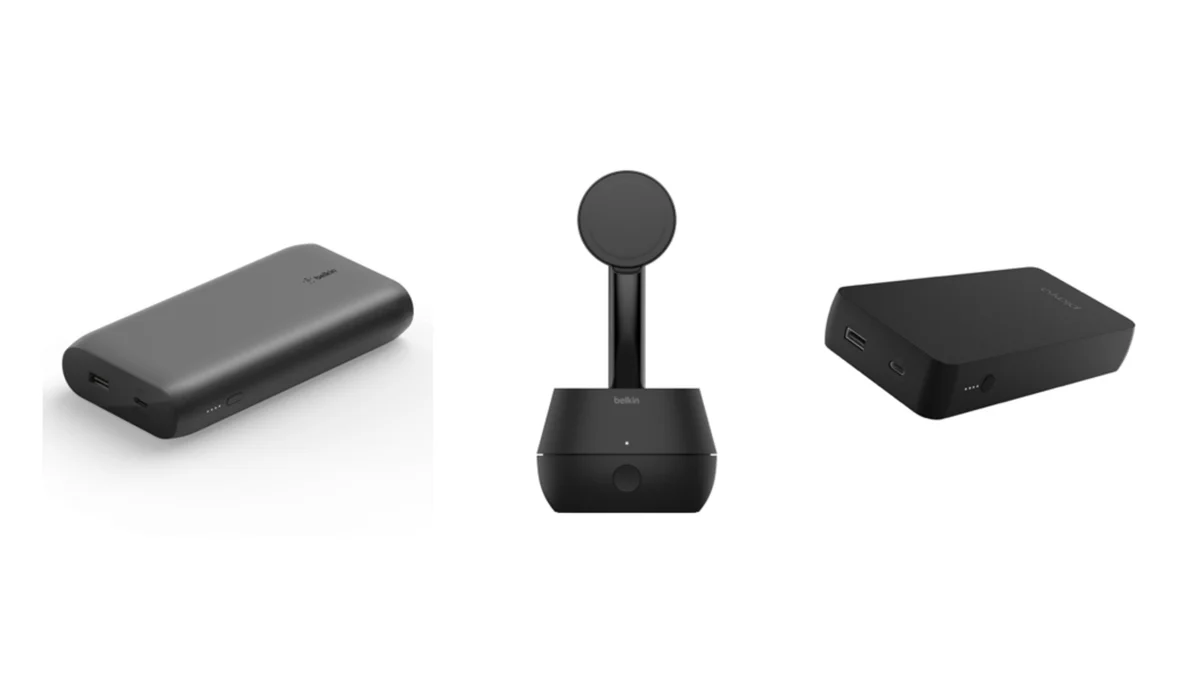
Belkin has issued a recall for three of its charging products due to faulty lithium-ion batteries that pose a potential safety risk. The affected devices, which include power banks and wireless charging stands, were sold between August 2020 and August 2025. The recall is a precautionary measure following one confirmed fire incident and several other cases internationally.
This article will guide you on how to check if your device is impacted by the Belkin charger recall and the steps you can take to secure a refund or store credit.
Which Belkin Products Are Affected by the Recall?
The recall affects the following Belkin charging products:
- MMA008 Wireless Charging Stand
- Recall Criteria: Only units with serial numbers starting with “57X” are affected.
- BPB002 Power Bank
- Recall Criteria: Only units with serial numbers starting with “35S” are affected.
- PB0003 Power Bank
- Recall Criteria: All serial numbers are being recalled.
These products were sold in major retail outlets, including Best Buy, Target, Walmart, Amazon, and Belkin’s own website. Roughly 83,500 units were sold in the U.S., and 2,385 units were sold in Canada.
How to Check If Your Belkin Charger is Affected
To check if your device is part of the recall, follow these steps:
- Find the Model and Serial Number
- The model number and serial number can be found on the underside or back of your device.
- Compare the Numbers
- If you have a MMA008 wireless charging stand, check for serial numbers starting with “57X”.
- For the BPB002 power bank, look for serial numbers starting with “35S”.
- If you own the PB0003 power bank, all serial numbers are part of the recall.
- Stop Using the Affected Devices
- If your device matches the recalled models, immediately stop using it to prevent any potential risk of fire or injury.
How to Claim Your Refund or Store Credit
If your device is affected by the recall, Belkin is offering a refund or store credit. Here’s how to claim it:
- Stop Using the Device
- Disconnect the device from the wall and refrain from using it until you complete the recall process.
- Visit the Product Recall Pages
- Head over to Belkin’s official website and visit the dedicated recall pages for the MMA008, BPB002, and PB0003 models.
- You can access these recall pages through the “Product Recalls” link on Belkin’s site.
- Upload Required Photos
- Upload clear photos of the front, back, and serial number of the recalled product. This helps Belkin verify your claim.
- Request a Refund or Credit
- Refund: If you have a receipt, you’ll receive the full purchase amount.
- Store Credit: Without a receipt, Belkin offers an optional store credit worth 20% more than the average selling price.
- Contact Belkin Support
- For assistance, reach out to Belkin’s support team at 00-223-5546 (Monday-Friday, 9 a.m. to 9 p.m. ET).
How to Safely Dispose of Recalled Lithium-Ion Batteries
It is important not to throw recalled lithium-ion devices in the trash or standard recycling bins. To safely dispose of these products:
- Find a Local Battery Disposal Location
- Use local municipal programs or drop-off locations to dispose of lithium-ion batteries safely.
- Follow Disposal Guidelines
- Ensure the battery is disposed of in accordance with local environmental safety standards to minimize environmental harm.
Conclusion: Ensuring Tech Safety in Everyday Devices
Belkin’s decision to recall these products reflects the importance of consumer safety, especially when it comes to electronic devices with lithium-ion batteries. While the Belkin charger recall is an inconvenience, the company is addressing the issue transparently by offering refunds and store credits, ensuring that customers are compensated for the faulty units.
As we continue to rely on smart devices, safety should always be a priority. If you own an affected Belkin product, be sure to follow the steps outlined above and take the necessary actions for a refund or replacement. Keep in mind that faulty batteries are not a trivial matter, and it’s always better to err on the side of caution.




