


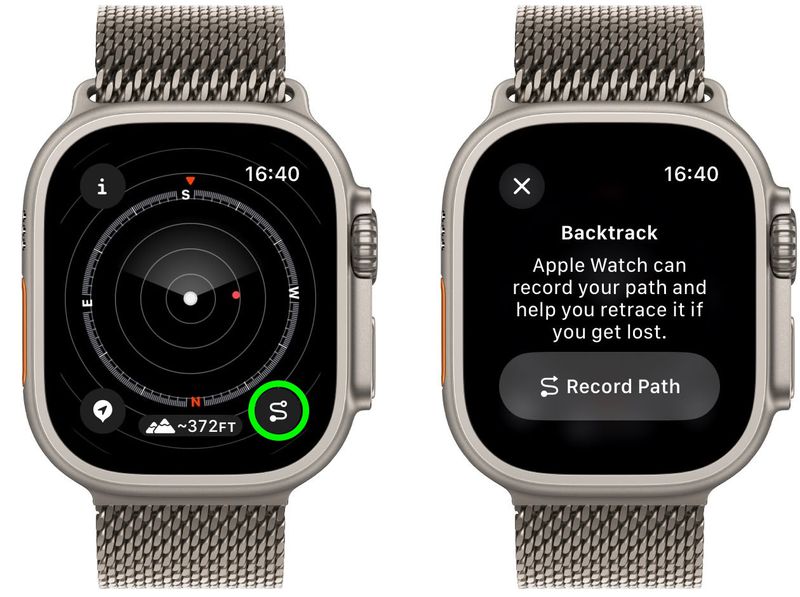
If you ever find yourself off the beaten path and worried about losing your way, the Apple Watch Backtrack feature is your perfect hiking companion. Available on Apple Watch Ultra, SE, and Series 6 or later running watchOS 9 and above, this Compass app tool creates a GPS breadcrumb trail that lets you easily retrace your steps.
Designed for remote or unfamiliar settings where Wi-Fi and cellular signals may be limited, Backtrack is an essential tool for outdoor enthusiasts, travelers, and adventurers alike.
What Is Apple Watch Backtrack?
Backtrack uses your Apple Watch’s built-in GPS to record your path as you move, displaying a virtual trail on your screen. When you’re ready to return to your starting point, it will guide you back step-by-step using this visual path.
Although Backtrack shines in remote environments like hiking trails, campsites, and backcountry excursions, you can also use it in parks or urban areas without GPS interference. However, it doesn’t adjust for elevation, weather, or obstacles.
How to Use Backtrack on Apple Watch
To start using Apple Watch Backtrack, follow these steps:
- Open the Compass app on your Apple Watch.
- Tap the Backtrack button (lower-right corner).
- Tap Record Path to begin tracking your route.
- As you move, your path is automatically recorded in the background.
When you’re ready to retrace your steps:
- Tap the highlighted Backtrack button again.
- Tap Retrace Steps. Your route will display as a line, with a white dot marking where you began.
- Follow the trail back to your starting location.
Once you’re back:
- Tap the Backtrack button again, then select Delete Path to clear the GPS trail.
Pro Tip for Apple Watch Ultra Users
The Apple Watch Ultra includes an Action button for quick access to Backtrack. Here’s how to set it up:
- Go to Settings ➝ Action Button ➝ Action ➝ Backtrack.
- Press the Action button to start recording your path.
- To retrace, press the Action and Side buttons together to switch between modes.
This shortcut makes it even easier to stay focused on your surroundings.
When to Use Apple Watch Backtrack
- Hiking in unfamiliar terrain
- Exploring new cities or parks
- Traveling in areas without maps or signal
- Camping or trail running in forests
- Recording exploratory walks you want to retrace later
Things to Keep in Mind
- WatchOS 9 or later is required for Backtrack.
- Only available on Series 6 or newer, SE, and Ultra models.
- Works best in open environments with good GPS access.
- Not designed for dense city navigation or vertical tracking like stairs.
Conclusion
The Apple Watch Backtrack feature is a game-changing tool for explorers, hikers, and anyone who values navigation safety. With just a few taps, you can confidently wander — and then find your way back, no matter how far you roam. Add it to your outdoor routine and experience peace of mind on every adventure.


