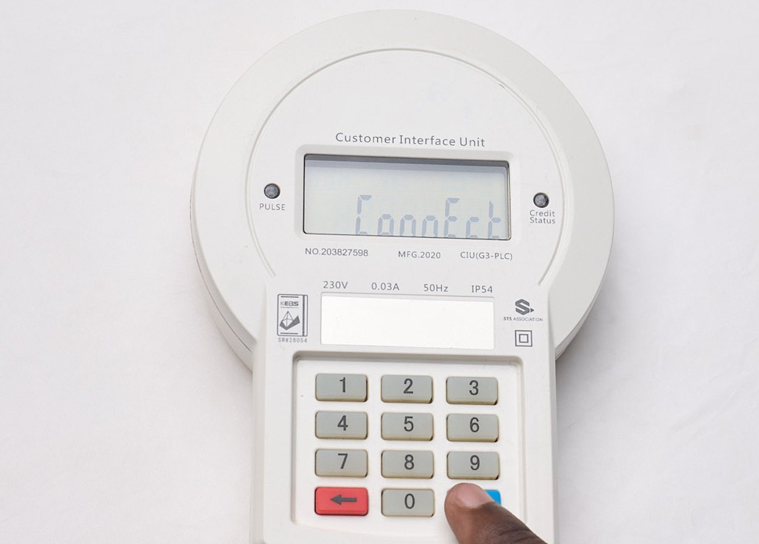
KPLC token meters play a key role in managing prepaid electricity in many Kenyan households. They allow users to load tokens, monitor usage, and control power spending. However, when the token meter or CIU (Customer Interface Unit) fails to connect, it can be both stressful and confusing.
This guide explains why your KPLC token meter is not connecting and provides clear, practical solutions to help you fix the issue quickly.
Common Reasons Why KPLC Token Meters Fail to Connect
Connection problems can arise from simple power issues or more technical meter faults. Identifying the exact cause makes troubleshooting easier.
Low or Dead CIU Batteries
If your CIU uses batteries, depleted or poorly fitted batteries will prevent it from communicating with the main meter.
Power Outlet Not Supplying Electricity
A faulty or switched-off wall socket means the CIU has no power, making connection impossible.
Faulty CIU Cable or Adapter
Damaged cables or adapters can interrupt communication between the CIU and the meter.
Disconnection Between Meter and CIU
Technical faults or internal wiring issues may break the link between the CIU and the meter.
Expired or Invalid Token
Entering an already-used or expired token can trigger a temporary lockout, preventing further entries.
Token Balance Exceeds Meter Limit
If the token value pushes your balance beyond the meter’s maximum allowed units, the system will reject it.
Power Outage in the Area
Without electricity supply, the meter cannot sync. Area-wide outages often cause temporary connection failures.
Tripped Circuit Breakers
A tripped breaker cuts power to the meter, making it appear non-responsive.
Tamper Errors or Open Terminal Cover
Tamper alerts—such as an open terminal cover or wiring interference—automatically disable the meter for safety.
Damaged Internal Meter Components
Old age, moisture, or physical interference can damage internal components, leading to persistent connection problems.
How to Fix Your KPLC Token Meter Connection Error
Once you identify the likely cause, try the relevant solution below.
Replace Batteries in Your CIU
Remove old batteries, insert fresh ones correctly, and restart the CIU to restore communication.
Plug CIU Directly Into a Wall Socket
Avoid extension cables. Plug the CIU straight into a working wall socket for stable power.
Use the Original Socket
Many CIUs sync best when used with the original socket they were first paired with.
Change the Cable or Adapter
Replace worn-out or damaged cables and adapters with certified or original replacements.
Wait for the Lockout Period to Expire
If you entered an invalid token, wait for the lockout timer to finish before trying again.
Store the Token for Future Use
If the meter rejects a valid token due to excess balance, keep it and load it later when units reduce.
Confirm Power Supply
Check if neighbors or streetlights have power. If not, wait for Kenya Power and Lighting Company to restore supply.
Reset Your Circuit Breaker
Switch the breaker back on if it has tripped to restore power to the meter.
Call a Certified Electrician
Tamper codes, wiring faults, or open terminal issues should be handled by trained professionals.
Request a Meter Replacement
If the meter is internally damaged, contact KPLC customer care to request inspection or replacement.
How to Reset Your KPLC Token Meter Online
Some connection issues require a meter reset, which can be done automatically or manually.
Automatic Reset
In certain cases, KPLC sends reset tokens directly to affected customers. Follow the provided instructions carefully.
Manual Reset Steps
- Dial *977# on your phone
- Select Option 1 – Prepaid Services
- Choose Option 4 – Update Meter Yako
- Follow prompts to receive a reset token
- Enter the reset token on your CIU like a normal token
This often restores meter communication.
Frequently Asked Questions
Why is my KPLC token meter not connecting?
Common causes include low batteries, faulty sockets, power outages, expired tokens, or tamper errors.
Why is my CIU not working?
Dead batteries, damaged cables, or using the wrong socket are the usual reasons.
Why is my meter not accepting a valid token?
The token value may exceed the meter’s maximum credit limit. Save it for later use.
What does *977# do?
It provides access to KPLC prepaid services, including buying tokens, requesting reset codes, and reporting issues.
Why is my token meter not updating?
This may be due to software or backend issues. A meter reset usually resolves it.
Final Takeaway
KPLC token meter connection problems range from simple battery issues to serious tamper or hardware faults. By following this step-by-step troubleshooting guide, you can quickly identify the cause and apply the right fix. If problems persist, always contact Kenya Power or a certified electrician for safe and permanent solutions.