The anxiety and helplessness are indescribable when we accidentally delete precious photos, important contacts or work files on our iPhone. Data loss is a difficult problem that many iPhone users can encounter, but luckily, there is now an efficient and reliable iPhone data recovery software – FoneTool.
Common scenarios of iPhone data loss permanently
Files in your iPhone or other iOS device may be considered permanently lost in the following cases:
1. File was accidentally deleted
When sorting out albums, mistakenly select important photos and videos and clear “Recent Deleted”
Operation errors result in important contacts being deleted and unable to be retrieved
Inadvertently delete important information or work documents from memos
2. Data loss caused by system problems
Data is abnormal or lost if the iOS system has failed to upgrade
The device suddenly has a white apple or is stuck, and the data is missing after recovery
Some data is not visible after the phone is automatically restarted
3. Physical damage to the equipment
iPhone is flooded, fallen, and the data is not backed up
The screen is damaged and cannot be operated to export important data
Data backup is not completed in time before the device is lost or stolen
Professional iPhone data recovery solution – FoneTool
FoneTool is a data management software designed for iOS devices, not only to recover lost data, but also to provide comprehensive functions such as data transfer, backup, and management. Its powerful data recovery capabilities support the recovery of up to 20 different types of data from the device itself, iTunes backup, and iCloud backup.
l Fully compatible data types
Support to recover more than 20 different types of files, including photos, videos, contacts, messages, memos, etc. Whether it is work documents or life records, you can get comprehensive recovery protection.
l Powerful deep scanning technology
Uses advanced algorithms to perform a deep scan of the device’s storage space, which can track and rebuild the deleted file directory, greatly improving the success rate of precious data recovery.
l Accurate preview and selection
Before recovery, you can clearly preview the contents of all recoverable items. This feature allows you to accurately check the files you need and avoid recovering a large amount of useless data, which is efficient and convenient.
l Intuitive and simple user interface
The software design is user-friendly and the process guidance is clear. From connecting devices to completing recovery, there are clear instructions at every step, making it easy for even non-technical users to get started.
Now learn how to recover deleted files on iPhone in just 4 steps:
Step 1. Download and install FoneTool on Windows PC, connect iPhone to computer using the original data cable.
Step 2. Launch the software, select Toolbox in the taskbar of the main interface of FoneTool, and then click iOS Data Recovery to continue.

Step 3. After FoneTool recognizes your iPhone, select the type of data you need to recover, such as photos, and click the Start Scan button.

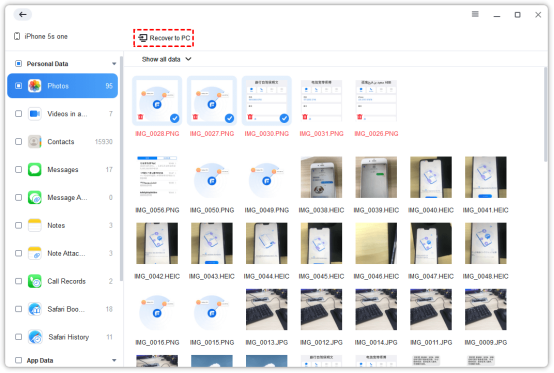
Step 4. After the scan is complete, all recoverable files will be listed by category. You can browse and check the specific items you want to recover. Click the Recovert to PC button to select a secure storage path for the retrieved files to complete the entire process.
Suggestions for improving the success rate of data recovery
1. Stop using the device immediately: After your data is deleted, please try to avoid continuing to use your iPhone or iPad to prevent new data from overwriting the storage space of the deleted files during use.
2. Regularly back up important data: We strongly recommend using FoneTool’s iPhone backup feature to create regular backups to save important data to multiple locations, ensuring that data is never lost.
In the end
In short, data loss is worrying, but it is not a desperate situation. With its comprehensive recovery support, diverse recovery modes, high success rates and absolute security, FoneTool provides you with the best way to retrieve lost data. It is not only a data recovery tool, but also a trusted guardian of digital assets. It is recommended that you use FoneTool regularly for data backup to prevent problems before they happen, so that you can be safe and worry-free anytime, anywhere.