iOS 27 beta 2 is now available for developers, and Apple is using the second test release to refine some of the biggest features announced at WWDC. The update adds a new Write with Siri shortcut, improves RCS messaging between iPhone and Android users, expands Apple Wallet’s Spending Insights feature and fixes several early beta issues.
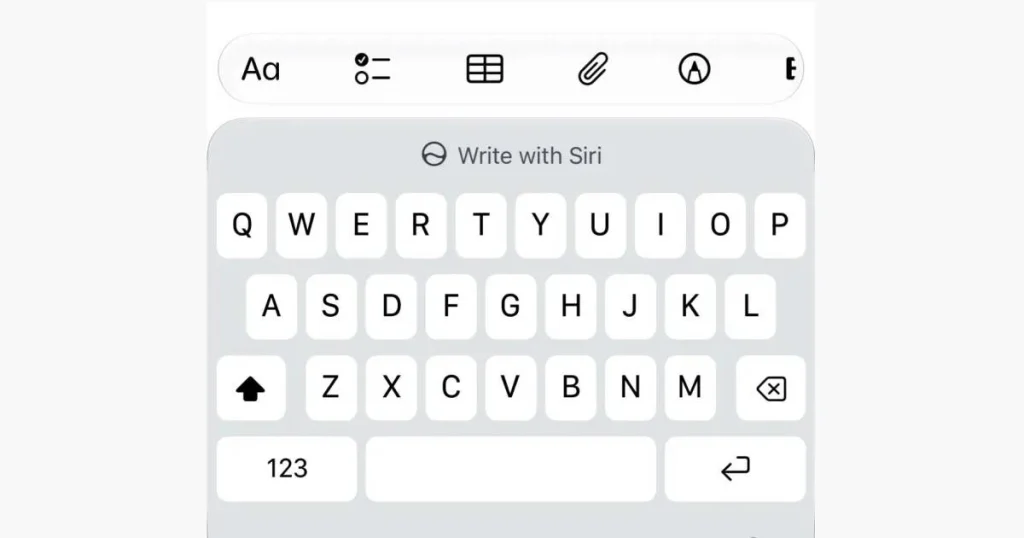
The most visible change is Write with Siri, a new keyboard-based tool designed to replace the older standalone Writing Tools experience. Instead of using a separate writing assistant, users will now be able to access Siri’s writing help directly from the keyboard. The feature can generate text from instructions, proofread writing and rewrite text in different styles.
The larger change is not only the name. Write with Siri is more deeply connected to Apple’s new Siri AI system. That means it can use information Siri is allowed to access across messages, email, documents and other supported areas of the device. In practical terms, Apple is trying to make writing assistance feel less like a separate AI feature and more like part of the iPhone’s core input experience.
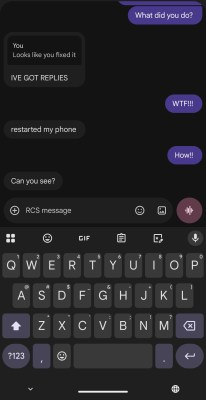
iOS 27 beta 2 also brings an important upgrade for cross-platform messaging. Messages now supports inline replies in RCS conversations, allowing iPhone users to reply directly to a specific message from an Android user. The update also improves how tapbacks and reaction emojis appear in RCS chats.
Other additions include wider availability of Wallet Spending Insights, support for updating AirPods Max 2 beta firmware and the ability to update Apple TV 4K through the Apple Home app. These changes make beta 2 more than a simple bug-fix release, although Apple still warns that developer betas are not intended for everyday use on primary devices.
Write with Siri Replaces Standalone Writing Tools
Write with Siri is one of the biggest software changes in iOS 27 beta 2. Apple has been moving toward deeper AI integration across iPhone, iPad and Mac, and this feature shows how the company wants Siri to become more useful inside daily workflows.
Earlier Apple Intelligence features included Writing Tools that could rewrite, proofread and summarize text in supported apps. Those tools were useful, but they often felt separate from Siri itself. With iOS 27 beta 2, Apple is bringing writing support closer to the keyboard and tying it more directly to Siri AI.
The new Write with Siri shortcut appears on the keyboard, making it easier to use when typing messages, emails, notes, documents or other text. A user can ask Siri to write a reply, improve tone, correct grammar or rewrite text more clearly.
This matters because writing assistance is one of the most practical uses of AI on a phone. People do not always need dramatic AI features. Sometimes they simply want a cleaner message, a better email, a shorter reply or help turning rough thoughts into clear sentences.
The deeper Siri integration may also make the feature more context-aware. For example, if Siri has permission to understand relevant information from messages or mail, Write with Siri could help draft responses that are more useful than generic AI text.
Apple is clearly trying to turn Siri into more than a voice assistant. With iOS 27, Siri becomes a systemwide assistant that can write, understand context and help users act across apps.
Read Also: Honor Working on Privacy Display for Next Flagships
Why Write with Siri Could Matter More Than Writing Tools
The change from Writing Tools to Write with Siri may sound small, but it reflects a bigger shift in Apple’s AI strategy.
Writing Tools were useful but somewhat limited in identity. They were part of Apple Intelligence, but users still had to think of them as a separate set of text tools. Write with Siri makes the experience easier to understand. The user is no longer choosing between Siri and writing tools. Siri becomes the writing assistant.
This gives Apple a simpler message: Siri can help you write anywhere you type.
That matters because AI features must become easy to use if they are going to reach mainstream users. Many people do not explore hidden menus or advanced settings. A keyboard shortcut gives the feature a direct place in the daily typing experience.
It also gives Apple a way to compete with other AI assistants that already offer writing help. Chatbots, productivity apps and Android AI features have made text generation and rewriting common. Apple’s advantage is system-level integration. If Write with Siri works smoothly across iOS, users may not need to leave their current app to get help.
The biggest test will be accuracy and privacy. Users will want Siri to understand context without exposing sensitive information unnecessarily. Apple is likely to position its privacy architecture as a key advantage, especially because writing assistance may involve personal conversations, emails and documents.
RCS Messaging Gets Inline Replies
iOS 27 beta 2 also improves messaging between iPhone and Android users by adding inline reply support for RCS conversations.
Until now, inline replies were mainly associated with iMessage chats between Apple users. In iOS 27 beta 2, users can long-press a specific message in an RCS conversation and reply directly to it. This creates a clearer threaded context inside chats, especially in busy group conversations.
The change matters because RCS has become the main upgrade path for iPhone-to-Android messaging. RCS offers richer messaging features than SMS and MMS, including better media sharing and more reliable group chat support. Apple added RCS support in earlier iOS releases, and iOS 27 continues improving the experience.
Inline replies may sound like a small feature, but it makes conversations easier to follow. In group chats, several people may speak at once. Direct replies help users understand which message is being answered. This is especially useful when iPhone and Android users are in the same chat.
The feature also reduces the gap between iMessage and green-bubble conversations. Apple is not turning RCS into iMessage, but it is making mixed-platform chats less awkward.
For users, the result should be simple: replying to Android messages on iPhone should feel more like replying inside an iMessage conversation.
Tapbacks and Reaction Emojis Improve in RCS Chats
Alongside inline replies, iOS 27 beta 2 improves how reactions appear in RCS messages.
Reaction emojis, often called tapbacks in Apple’s messaging ecosystem, can now display more naturally in RCS conversations. Instead of appearing as awkward text descriptions, reactions can appear visually on supported content, closer to the way they work in iMessage.
This is another quality-of-life improvement for iPhone and Android communication. For years, mixed-platform messaging has been frustrating because basic reactions, media and group features did not always translate well between ecosystems.
Better reaction handling makes chats feel cleaner. It also reduces confusion when users react to photos, videos or messages. A proper emoji reaction is faster to read than a text description explaining that someone liked or laughed at a message.
The experience will still depend on RCS support from both devices and carriers. Not every messaging feature works equally everywhere, and cross-platform messaging can still vary by region, phone model and network. But iOS 27 beta 2 moves the experience in the right direction.
For many users, this may be one of the most practical changes in the beta. AI features get more attention, but messaging improvements are used every day.
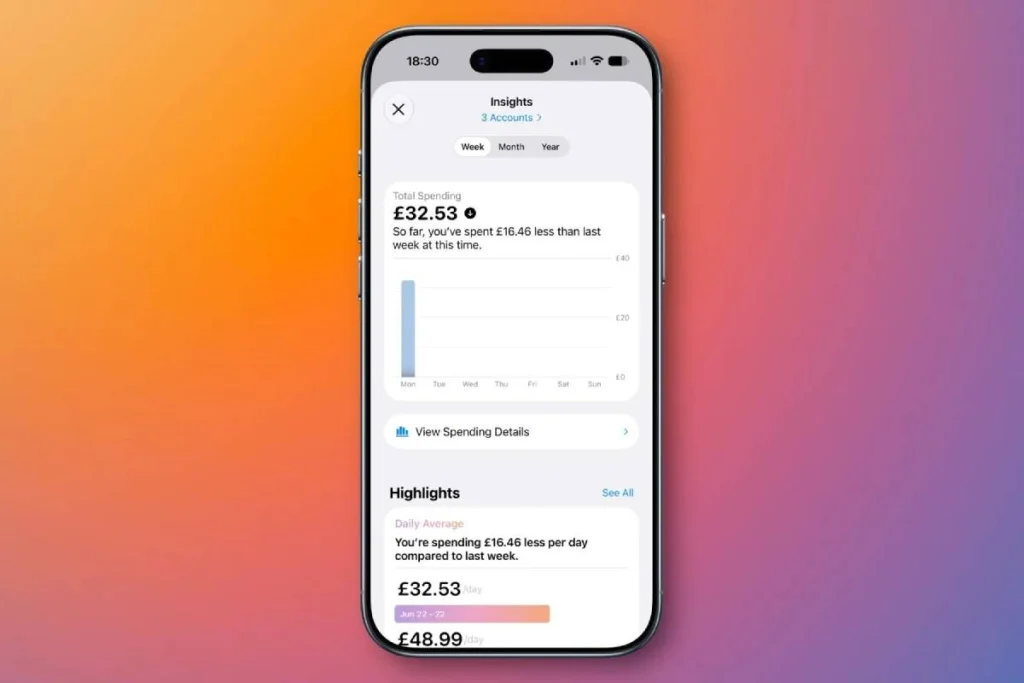
Apple Wallet Spending Insights Expands
Apple Wallet is also gaining attention in iOS 27 beta 2 through Spending Insights.
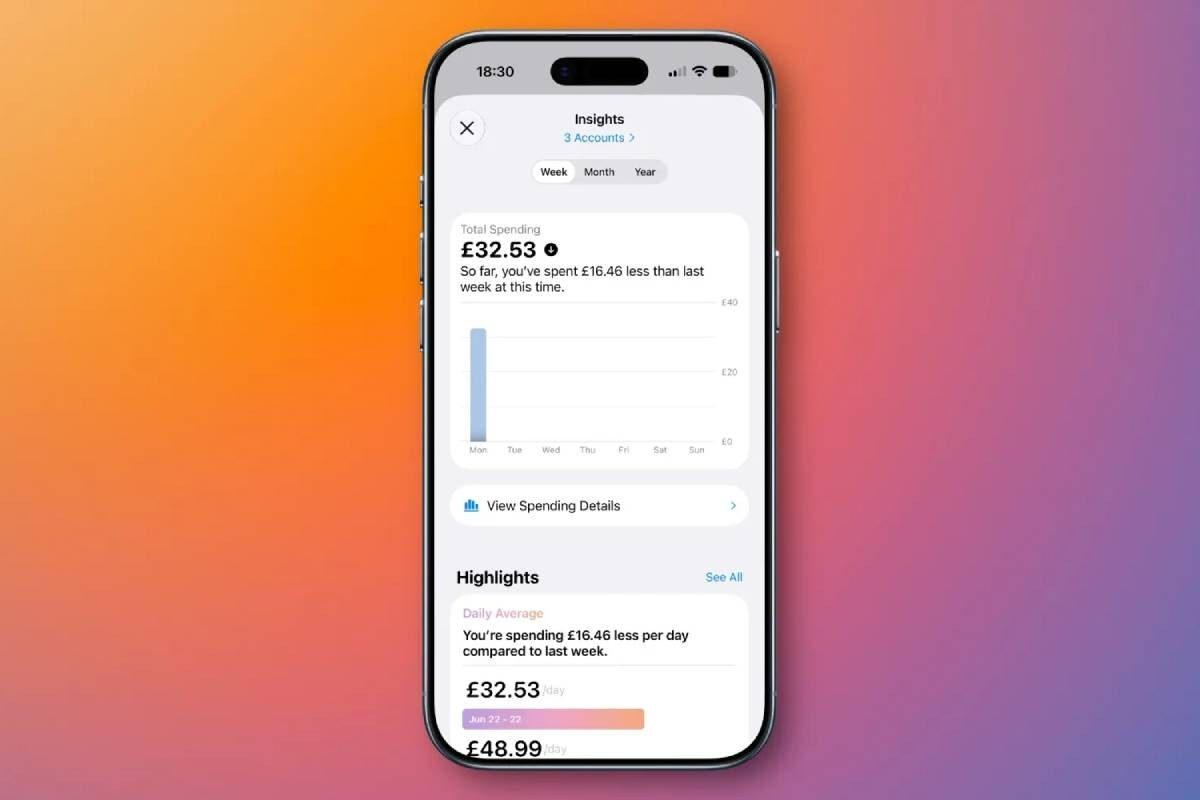
The feature is designed to help users see a clearer breakdown of spending over time. According to early beta information, Spending Insights can show daily, monthly or yearly spending views and may support account-related summaries such as recurring transactions and balances when connected financial accounts are available.
The feature appeared in the first iOS 27 beta, but beta 2 expands availability to more regions. That suggests Apple is gradually testing the system before making it more widely available.
Spending Insights fits Apple’s broader push to make Wallet more than a place for cards, passes and tickets. Over time, Apple Wallet has become a hub for payments, IDs in supported regions, transit cards, keys, Apple Pay activity and financial features. Spending Insights could make it more useful as a personal finance dashboard.
The value of the feature will depend on supported banks, regions and account connections. A spending summary is only useful if it reflects real activity accurately and presents it clearly.
For users, this could reduce the need to open separate banking apps for a quick overview of spending patterns. For Apple, it strengthens Wallet as a daily financial tool.
AirPods Max 2 Firmware Update Issue Gets Fixed
iOS 27 beta 2 also fixes an issue affecting AirPods Max 2 beta firmware updates.
In the first developer beta, AirPods Max 2 firmware beta updates were not working properly. Apple’s developer notes indicate that beta 2 supports those firmware updates, which means developers testing AirPods features can continue working with the latest software.
This is exactly the kind of issue beta releases are meant to catch. Developer betas are not final software. They often include bugs, missing features or broken device interactions. By fixing the AirPods Max 2 update problem in beta 2, Apple is smoothing out the testing process before the public beta and final release.
AirPods firmware is important because Apple often connects new audio features to iOS updates. Improvements in Siri, audio switching, accessibility, call quality or spatial features can depend on both iPhone software and AirPods firmware.
For regular users, this fix is mostly background maintenance. For developers and early testers, it matters because it keeps the wider Apple ecosystem working during the iOS 27 testing cycle.
Apple Home Can Update Apple TV 4K Remotely
Another useful change in iOS 27 beta 2 is support for updating Apple TV through the Apple Home app.
This means users can manage Apple TV software updates from the Home app in a way similar to how HomePod updates are handled. For households with multiple Apple TV devices, this could make maintenance easier.
Instead of manually going to each Apple TV and updating through the device interface, users may be able to manage updates more centrally. That is useful for homes where Apple TV acts as part of a wider smart-home setup.
The change also reflects Apple’s continued effort to make the Home app a central control point for connected devices. Apple TV is not just a streaming box. It can also act as part of the Apple home ecosystem, especially for smart-home control and media integration.
This is not the flashiest feature in iOS 27 beta 2, but it is practical. Apple often uses smaller updates like this to reduce friction across its ecosystem.
Developer Beta Warning: Do Not Treat It as Stable Software
iOS 27 beta 2 is still intended for developers. It is not final software and should not be treated as a stable daily driver.
Developer betas are released so app makers and technical testers can prepare their software, report issues and check compatibility. They can include battery drain, app crashes, broken features, performance problems and unexpected bugs.
That is why most users should wait for the public beta or the stable release. A public beta is usually more polished than the first developer builds, although it can still include issues. The final public version is expected later in the year, likely around the next major iPhone launch cycle.
Users who rely on their iPhone for school, work, banking, communication or travel should be cautious about installing developer beta software on their main device. A spare test device is safer.
The new features in iOS 27 beta 2 are interesting, but they are still part of an unfinished system. Apple may change, delay, rename or refine features before the final release.
Why iOS 27 Beta 2 Is Important
iOS 27 beta 2 is important because it shows Apple’s direction after the first WWDC reveal.
The first beta introduced the broad vision: Siri AI, deeper Apple Intelligence integration and major platform changes. The second beta begins showing how Apple is refining that vision into daily-use features.
Write with Siri is the clearest example. Apple is not just adding AI as a separate app or assistant. It is placing AI directly into the keyboard and writing flow. That could make Siri more useful for ordinary users who write messages, emails and notes every day.
The RCS upgrades show that Apple is continuing to improve communication with Android users. Inline replies and better reactions may not sound dramatic, but they address real frustrations in mixed-device chats.
Wallet Spending Insights shows Apple’s interest in personal finance organization. The Home app Apple TV update option shows ecosystem polish. The AirPods Max 2 firmware fix shows Apple tightening device compatibility during testing.
Together, these changes make iOS 27 beta 2 a meaningful refinement release rather than a minor update.
What to Expect Next
Apple will likely continue releasing new iOS 27 betas throughout the summer. Each beta may add features, remove unfinished parts, improve performance and fix bugs.
Public beta testers should get access later, while the stable iOS 27 release is expected closer to Apple’s next iPhone launch. By then, features such as Write with Siri, RCS inline replies, Wallet Insights and Home app Apple TV updates should be more polished.
The biggest area to watch is Siri AI. Apple is making Siri central to iOS 27, but the quality of the experience will depend on speed, accuracy, privacy and app integration. If Siri can understand personal context and help users write or act across apps reliably, iOS 27 could become one of Apple’s most important AI updates.
RCS is another area to monitor. Apple has been improving iPhone-to-Android messaging step by step, and beta 2 suggests more iMessage-like features are coming to RCS conversations.
Conclusion
iOS 27 beta 2 adds several practical improvements as Apple continues preparing its next major iPhone software release. Write with Siri brings AI writing assistance directly to the keyboard, making Siri more useful for drafting, proofreading and rewriting text. RCS messaging gains inline replies and improved reaction support, helping iPhone and Android conversations feel more natural.
Apple Wallet’s Spending Insights feature is expanding to more regions, while AirPods Max 2 firmware beta updates now work properly after issues in beta 1. The Home app also gains support for updating Apple TV 4K remotely, adding another layer of convenience for users inside Apple’s ecosystem.
The update is still a developer beta, so it is not recommended for most users as everyday software. Bugs, missing features and performance issues are expected during this stage. Still, iOS 27 beta 2 gives a strong preview of where Apple is heading: deeper Siri integration, better cross-platform messaging, smarter Wallet tools and tighter control across Apple devices.
For iPhone users waiting for the stable release, the most important takeaway is clear. iOS 27 is shaping up to be an AI-focused update, but Apple is also using it to fix everyday experiences that matter, from writing and messaging to home control and device updates.