
Nyongesa Sande
No Result
View All Result
  • News
    • World
    • Africa
  • Politics
  • Business
  • Tech
  • AI
  • Telecom
  • Sports
  • Opinion
  • Lifestyle
  • Live
  • World Cup 2026
    • World Cup 2026 Standings
    • World Cup 2026
Nyongesa Sande
  • About Us
    • Nyosake Designers
      • Nyosake Webmasters
      • Nyosake Investment
  • Contact Us
    • Newsroom Contact
  • Ownership Disclosure
  • Advertise
No Result
View All Result
Nyongesa Sande
No Result
View All Result
  • News
  • Politics
  • Business
  • Tech
  • AI
  • Telecom
  • Sports
  • Opinion
  • Lifestyle
  • Live
  • World Cup 2026
ADVERTISEMENT

Home » How to Use the Metro in Montreal

How to Use the Metro in Montreal

NyongesaSande News Desk by NyongesaSande News Desk
9 months ago
in How To
Reading Time: 4 mins read
A A
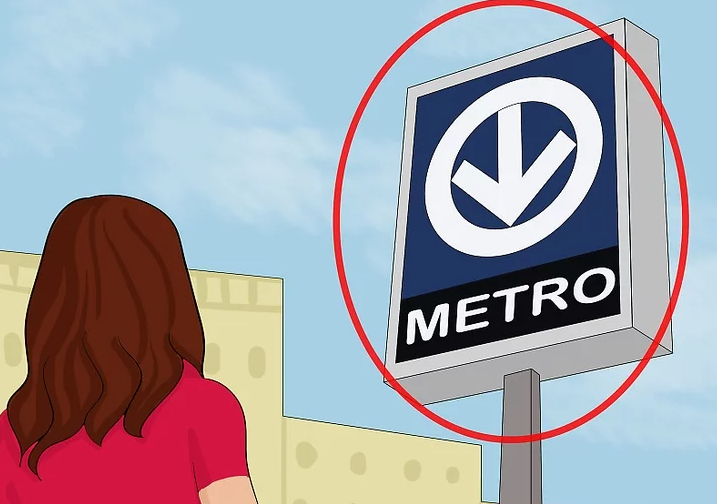
Illustration of a woman looking up at a metro station sign with a blue arrow symbol and the word “METRO.”

A woman observes a metro station sign marked with a blue downward arrow, indicating the entrance to an underground transit system. Credit WikiHow.com

The Montreal Metro is a quick, affordable, and convenient way to travel across the city. With four color-coded lines and frequent service, it connects downtown to neighborhoods and attractions across the island. If you’re new to the city, understanding how to use the Montreal Metro will make exploring Montreal easy and efficient. This guide covers everything from finding your nearest station to navigating transfers and purchasing tickets.

  • Step-by-Step Guide: How to Use the Montreal Metro
    • 1. Find Your Nearest Metro Station
    • 2. Identify Your Destination
    • 3. Buy a Ticket or Pass
    • 4. Choose the Correct Train Direction
    • 5. Transfer Between Lines if Needed
    • 6. Board the Train
  • Tips
  • Warnings

Step-by-Step Guide: How to Use the Montreal Metro

1. Find Your Nearest Metro Station

Look for the distinctive blue sign with a white downward arrow—this marks a Metro entrance. Downtown stations are often connected through Montreal’s famous underground city, so you may find entrances inside malls or office buildings. The Metro lines generally run beneath major streets like de Maisonneuve (Green Line) and Viger/Saint-Jacques (Orange Line).


2. Identify Your Destination

Before entering, know which station you’re heading to. Metro maps are available at stations, bus stops, and inside every train car. You can also ask the booth operator for a pocket-sized Metro map.

ADVERTISEMENT

If you’re unsure, use Google Maps or the STM (Société de transport de Montréal) website to plan your route.


3. Buy a Ticket or Pass

Purchase your ticket from a vending machine or the ticket booth near the turnstiles. You can buy:

ADVERTISEMENT
  • Single rides (valid for 120 minutes, including transfers to buses)
  • 1-day or 3-day passes for unlimited travel
  • A reloadable Opus card, which you can fill with tickets or passes

Keep your ticket or card—it serves as proof of payment and allows you to transfer to buses.


4. Choose the Correct Train Direction

Each line direction is identified by its last station name. For example, if you’re at Berri-UQAM going toward Pie-IX, take the Green Line, Direction Honoré-Beaugrand.
Check the overhead signs to ensure you’re heading in the right direction.


5. Transfer Between Lines if Needed

Montreal’s Metro network allows easy transfers at major interchange stations such as Berri-UQAM, Lionel-Groulx, and Snowdon. Follow the color-coded signs and arrows to reach your connecting line. You can switch directions within the station without leaving the paid area.

ADVERTISEMENT

6. Board the Train

Once you reach your platform, wait behind the yellow line until the train arrives. Metro trains come every 2–3 minutes during rush hour and every 6–11 minutes late at night. Doors open automatically, and station names are announced in French as the train departs and arrives.


Tips

  • Save money with daily or multi-day passes if you plan frequent rides.
  • Avoid rush hours (7–9 a.m. and 4–6 p.m.)—trains get crowded.
  • The Metro runs until about 12:30 a.m. on weekdays and 1 a.m. on weekends.
  • Download the STM app for real-time updates on schedules and delays.

Warnings

  • Do not assume that the Metro station with your street’s name is nearby—many Montreal streets are long. Always double-check on a map.
  • The Mile End area is not directly served by the Metro; take Bus 80 from Place-des-Arts or Parc Station instead.
  • Never share your Opus card—each rider must have their own.

By learning how to use the Montreal Metro, you can explore the city efficiently, save money on transportation, and travel like a local—whether you’re heading to Old Montreal, downtown shops, or neighborhood cafés.

Share2Tweet1SendShareScanSharePinShareShare
Google Add as a Preferred Source on Google
Previous Post

How to Ride the New York City Subway

Next Post

How to Ride Caltrain

NyongesaSande News Desk

NyongesaSande News Desk

Nyongesa Sande offers diverse content across news, technology, entertainment, and more, aiming to provide readers with a wide range of informative and engaging articles. NYONGESA SANDE's dedicated team provides our audience not only with the highly relevant news but also with outstanding interactive experience.

Related Posts

How to Weld a 2-Block Rectangular Hollow Block Mold: Measurements, Materials and Step-by-Step Guide
How To

How to Weld a 2-Block Rectangular Hollow Block Mold: Measurements, Materials and Step-by-Step Guide

1 month ago
How to Create a Facebook Account on iPhone App
How To

How to Fix Facebook Confirmation Email Not Received

2 months ago
How to Create a Facebook Account on iPhone App
How To

How to Fix Facebook Confirmation Code Not Received

2 months ago
How to Create a Facebook Account on iPhone App
How To

How to Confirm Your Facebook Email or Phone Number

2 months ago
How to Create a Facebook Account on iPhone App
How To

How to Understand Your Facebook Account and Profiles

2 months ago
How to Create a Facebook Account on iPhone App
How To

How to Fix Facebook Name Not Accepted

2 months ago
Load More
Next Post
Illustration of a laptop showing a train route map online with a magnified section displaying station names and routes.

How to Ride Caltrain

Bob Chacha’s Sh4.3M BMW S1000 RR Motorcycle

200+ Motorcyclist Names to Help You Stand Out

Trending

  • Top 10 Richest People in Tripura (2026)

    Top 10 Richest People in Tripura (2026)

    171 shares
    Share 68 Tweet 43
  • Product Review: Bose Portable Smart Speaker

    187 shares
    Share 75 Tweet 47
  • Gillette Stadium World Cup 2026 Guide: Capacity, Location, Matches and Quarterfinal Venue

    1 shares
    Share 0 Tweet 0
  • Top 10 Richest People in Meru County

    88 shares
    Share 35 Tweet 22
  • Mukangala – Jacob Luseno (Lyrics)

    26 shares
    Share 10 Tweet 7
  • Colombia vs Uzbekistan: FIFA 2026 World Cup Preview

    2 shares
    Share 1 Tweet 1
  • Levi’s Stadium World Cup 2026 Guide: Capacity, Location, Matches and Round of 32 Venue

    2 shares
    Share 1 Tweet 1
  • MetLife Stadium World Cup 2026 Guide: Capacity, Location, Matches and Final Venue

    1 shares
    Share 0 Tweet 0
  • Top 10 Richest People in Manipur (2026)

    59 shares
    Share 24 Tweet 15
  • List of Elected MCAs in Narok County 2022-2027

    59 shares
    Share 24 Tweet 15
ADVERTISEMENT
ADVERTISEMENT

Who We Are

Nyongesa Sande

NyongesaSande.com is a digital news and media platform covering breaking news, business, technology, AI, politics, sports, world affairs and African innovation.

News Sections

  • News
    • World
    • Africa
  • Politics
  • Business
  • Tech
  • AI
  • Telecom
  • Sports
  • Opinion
  • Lifestyle
  • Live
  • World Cup 2026
    • World Cup 2026 Standings
    • World Cup 2026

Editorial Standards

  • Editorial Policy
  • Fact Checking Policy
  • Corrections Policy
  • Ethics Policy
  • AI Usage Policy
  • News Tips
  • Submit Press Release

Legal

  • Privacy Policy
  • Terms of Use
  • Cookie Policy
  • Disclaimer
  • Risk Disclaimer
  • DMCA
  • Ad Choices

Our Company

  • About Us
    • Nyosake Designers
      • Nyosake Webmasters
      • Nyosake Investment
  • Contact Us
    • Newsroom Contact
  • Ownership Disclosure
  • Advertise
  • Privacy Policy
  • Terms of Use
  • Cookie Policy
  • Disclaimer
  • Risk Disclaimer
  • DMCA
  • Ad Choices

NyongesaSande.com is an independent digital news and media platform covering Africa, business, technology, AI, politics and global developments.

© 2026 NyongesaSande.com. All rights reserved.

No Result
View All Result
  • News
    • World
    • Africa
  • Politics
  • Business
  • Tech
  • AI
  • Telecom
  • Sports
  • Opinion
  • Lifestyle
  • Live
  • World Cup 2026
    • World Cup 2026 Standings
    • World Cup 2026

NyongesaSande.com is an independent digital news and media platform covering Africa, business, technology, AI, politics and global developments.

© 2026 NyongesaSande.com. All rights reserved.
