
Nyongesa Sande
No Result
View All Result
  • News
    • World
    • Africa
  • Politics
  • Business
  • Tech
  • AI
  • Telecom
  • Sports
  • Opinion
  • Lifestyle
  • Live
  • World Cup 2026
    • World Cup 2026 Standings
    • World Cup 2026
Nyongesa Sande
  • About Us
    • Nyosake Designers
      • Nyosake Webmasters
      • Nyosake Investment
  • Contact Us
    • Newsroom Contact
  • Ownership Disclosure
  • Advertise
No Result
View All Result
Nyongesa Sande
No Result
View All Result
  • News
  • Politics
  • Business
  • Tech
  • AI
  • Telecom
  • Sports
  • Opinion
  • Lifestyle
  • Live
  • World Cup 2026
ADVERTISEMENT

Home » How To Apply For the New Number Plate in Kenya?

How To Apply For the New Number Plate in Kenya?

NyongesaSande News Desk by NyongesaSande News Desk
2 years ago
in How To
Reading Time: 6 mins read
A A
How To Get A Tape Lifting Report In Kenya

How To Apply For the New Number Plate in Kenya?. Kenyans can apply for the new digital number plates online through the National Transport and Safety Authority (NTSA) portal. The process involves logging in, selecting “Motor Vehicle Registration” and “Apply for Reflective Plates,” choosing your vehicle and reason (new generation plates), picking a notification method and plate format, uploading PDFs of your logbook and old plates, selecting a collection center, paying the Ksh. 3,050 fee, and waiting for a collection notification via SMS. Remember, you’ll need to surrender your old plates upon collecting the new ones.

  • Step 1. Login To Your eCitizen Account
  • Step 2. Apply For Reflective Plate
  • Step 3. Enter the Vehicle Particulars
  • Step 4. Make Payment

Application of the new generation digital plates is done via the eCitizen portal. 

It will cost you Ksh 3,050 to apply for the new plates for a motor vehicle and Ksh 1,550 for a motorcycle.

ADVERTISEMENT

Ensure you have pictures of the current number plate(s) and a colored copy of your logbook. You’re required to attach everything in one PDF file.

The application process is a 4 step process that shouldn’t take you more than 5 minutes to complete. Let’s get started.

ADVERTISEMENT

Step 1. Login To Your eCitizen Account

The eCitizen portal can be accessed through this link https://accounts.ecitizen.go.ke/

Key in your details & login
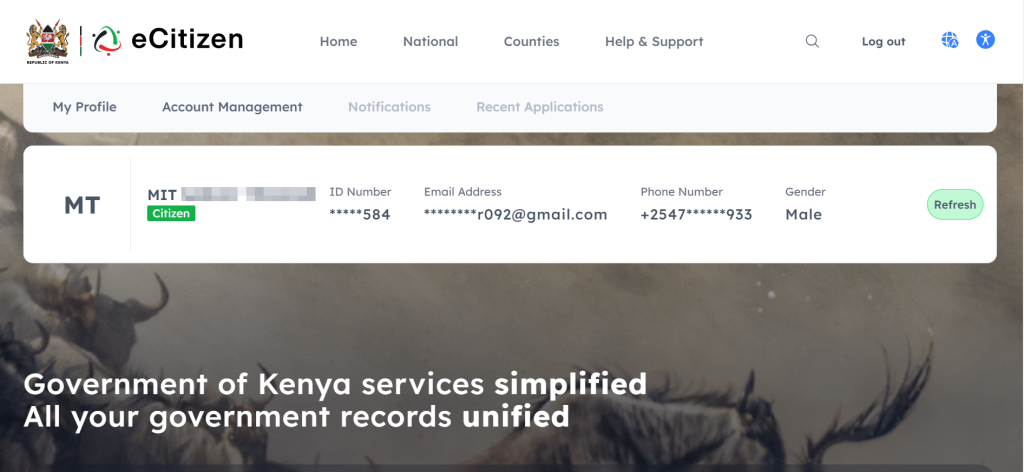
Your details will be shown on top of the page, you can therefore be sure you’re logged into the correct account.

ADVERTISEMENT

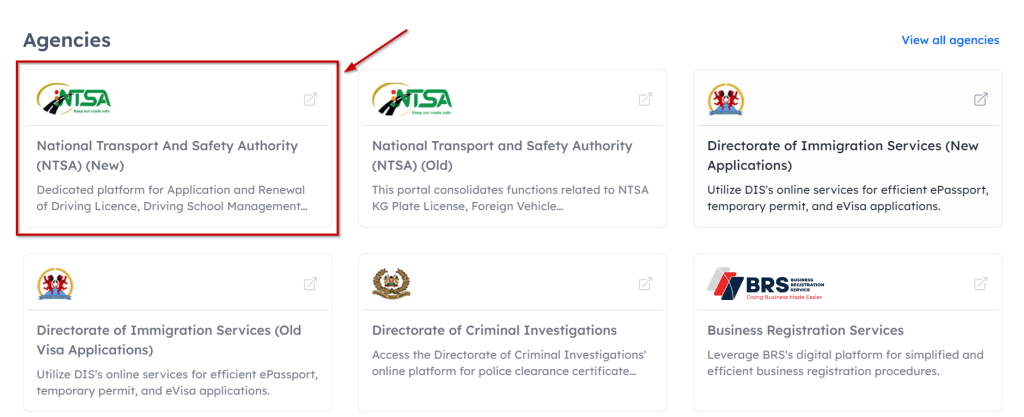
Scroll down to the agencies section and click on National Transport And Safety Authority (NTSA) (New).
Follow the prompts until you’re logged into the NTSA portal it should look like the image below.
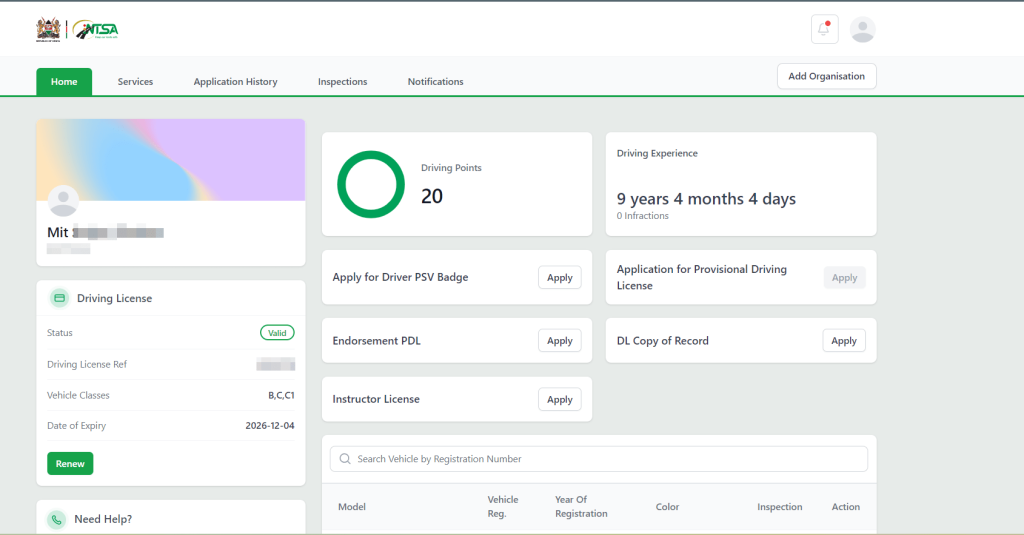
Your details will also be shown here so you can be sure you’re logged into the correct account.

Scroll down until you see the vehicles/Motorcycles registered in your name.
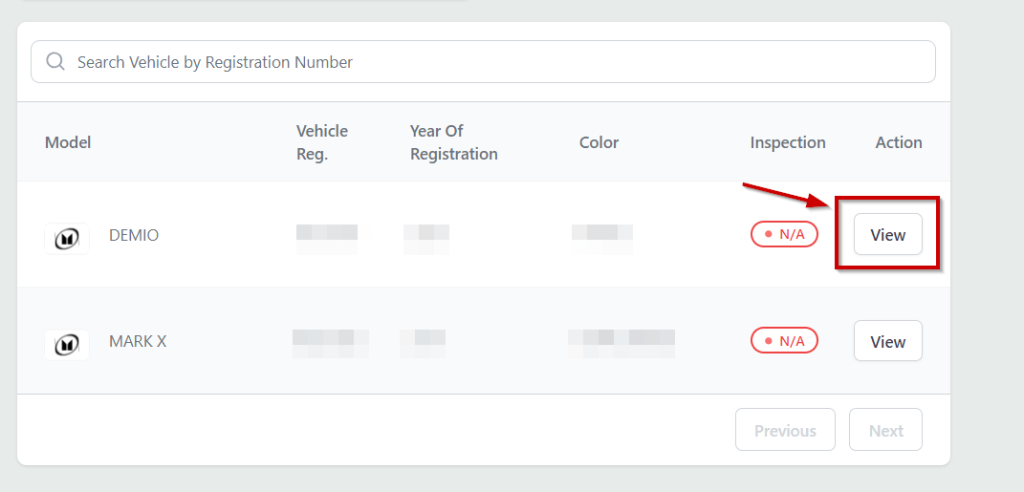
Click View against the vehicle/Motorcycle.
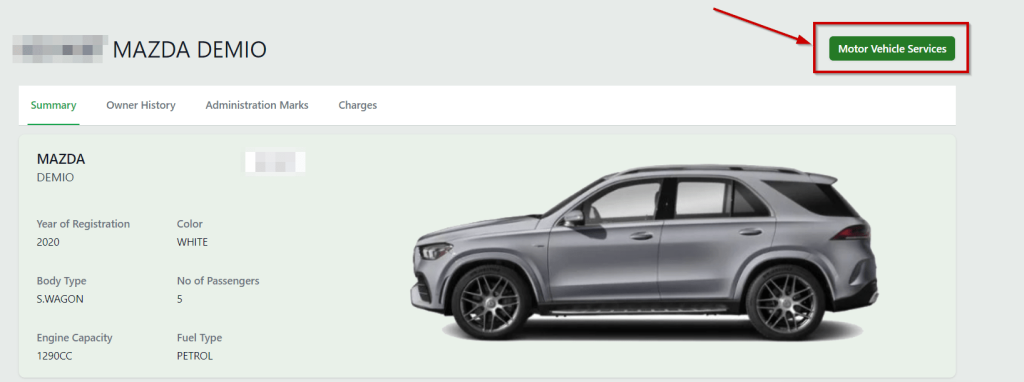
Step 2. Apply For Reflective Plate
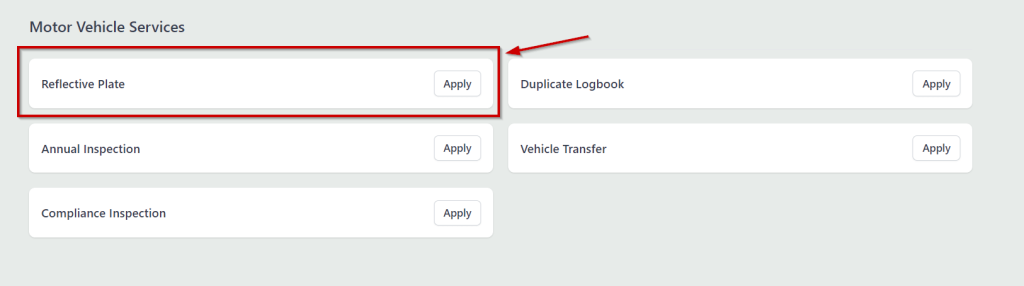
Click Apply against the Reflective Plate option
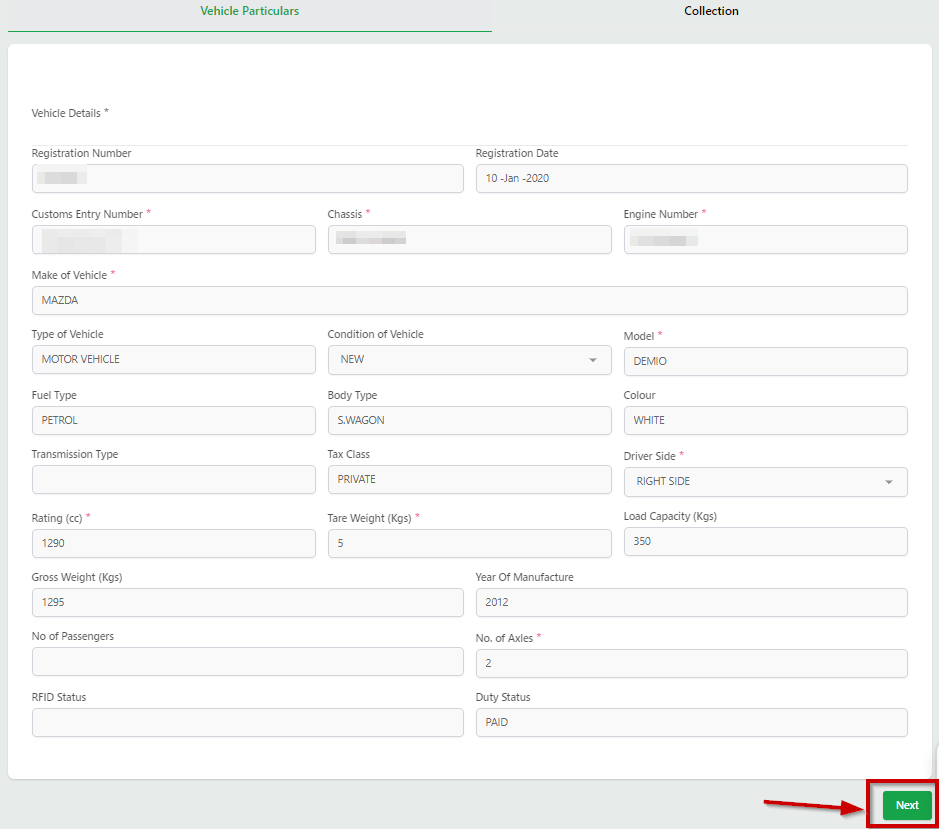
Confirm the vehicle details and click next below.

Step 3. Enter the Vehicle Particulars
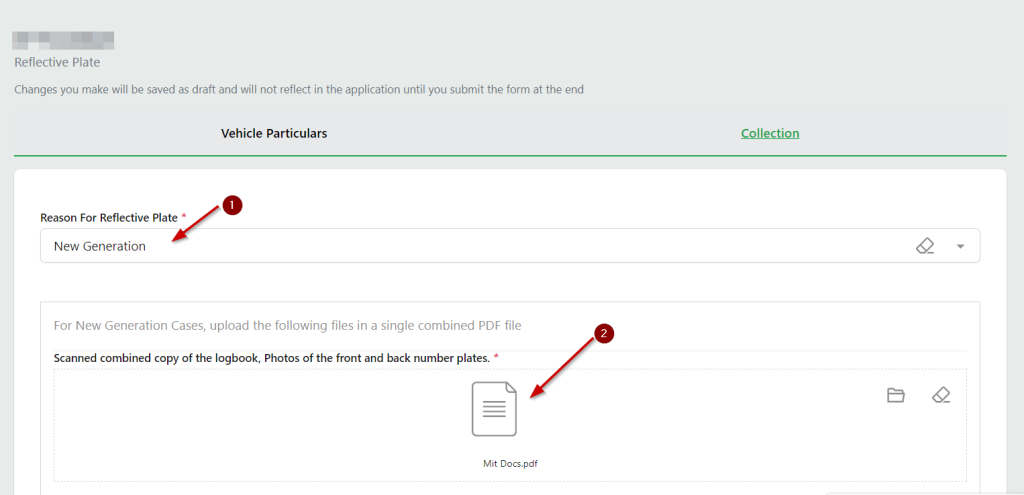
Start by selecting New Generation under Reason For Reflective Plate. 

Then attach the PDF file with both number plates and the logbook combined.

The easiest way to do this is to take photos of the front and back of your car with the number plates visible, using your phone. Then, take a picture of the logbook and attach all three photos to a Word document then save the document as a PDF.
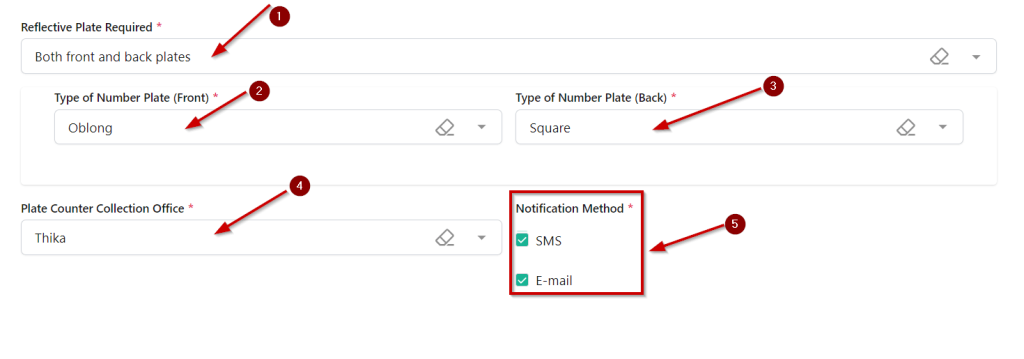
Scroll down and choose the Reflective Plate Required. If for a car choose both front and back but if for a Motorcycle choose the back plate only.

Choose the Type of Number Plate both front and back. Oblong means rectangle.

Then choose a Notification Method, You can select both SMS and Email no harm.
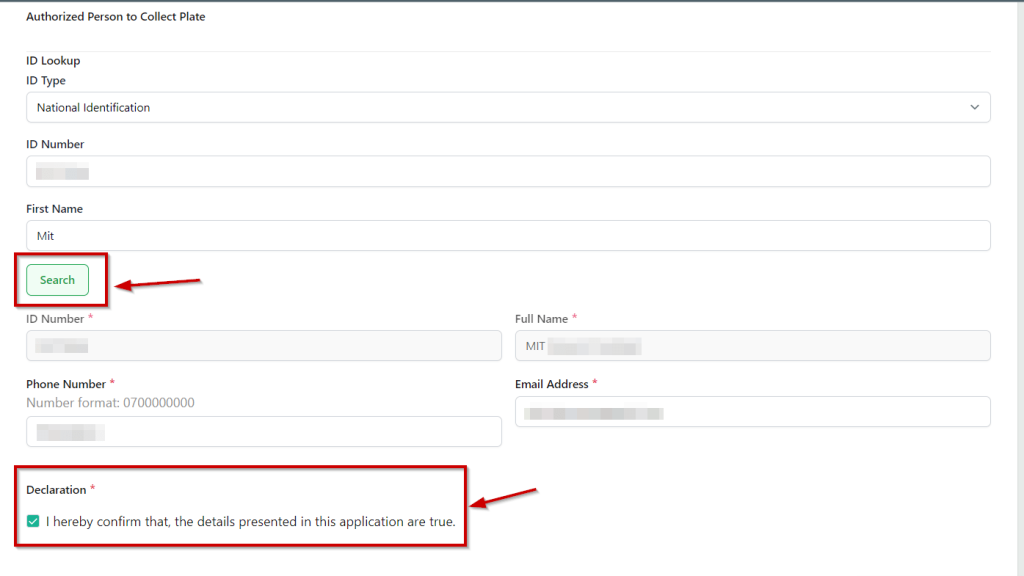
Scroll down and enter the details of the Authorized Person to Collect Plate.

Under ID Lookup select national identification if you’re a Kenyan citizen or any other preferred option.

Proceed to enter your ID number on the option provided as well as your first name.

Then click the Search button. The rest of your details will populate if the information provided above is accurate.

Lastly, enter your phone number and email address and tick the declaration box to confirm that the details you provided in the application are true.

Scroll down and click on preview.
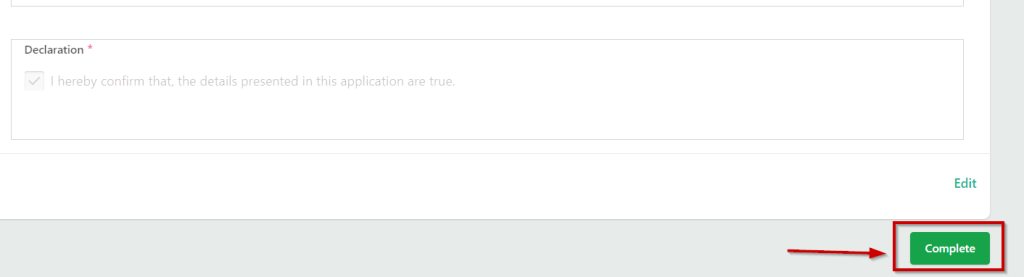
After you’re satisfied the information you entered is correct scroll down and click the complete button.

Step 4. Make Payment
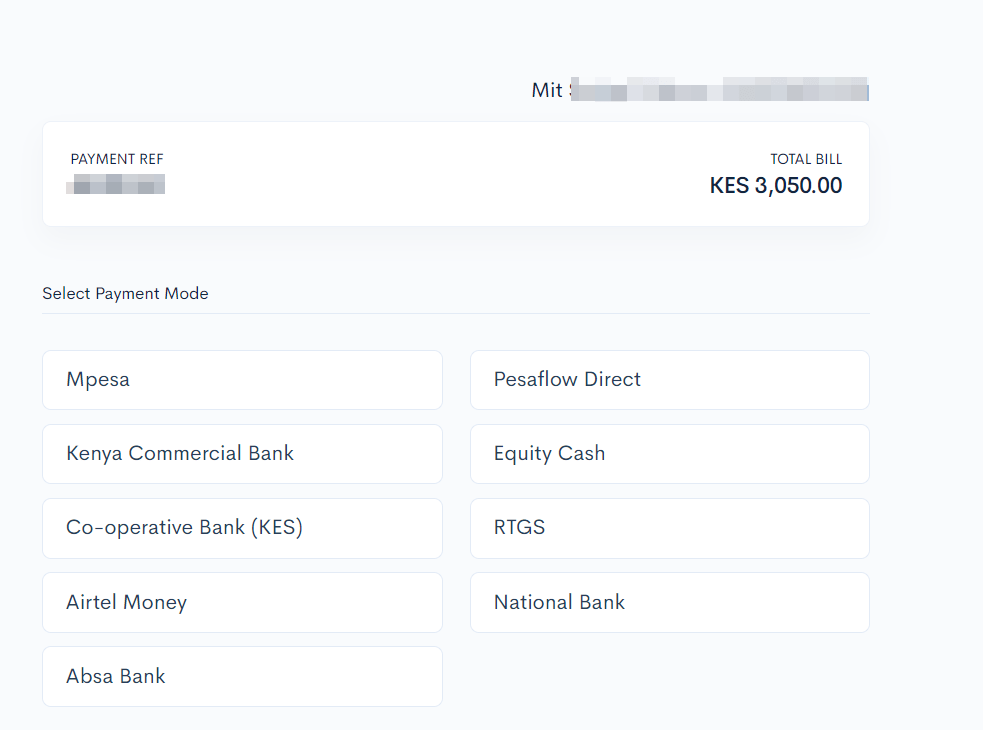
Select a preferred payment partner and pay the indicated amount.

Do not Over/Under pay the indicated amount.

Once done click on complete to finish the process.
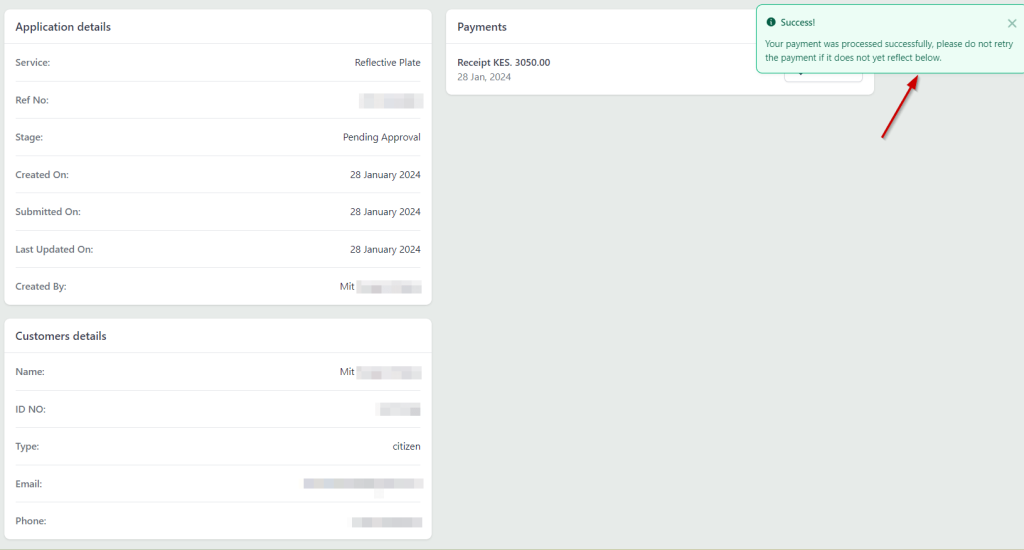
You’ll see a success message confirming that payment has been processed successfully 

From this point you now have to wait for 7 working days then NTSA will notify you to go collect the number plate once it’s ready.

When going to collect the new number plates ensure you carry your original ID as well as the old plates.

Mwafrikah Blogs, “How to Apply for the New Number Plate in Kenya?,” Mwafrikah, February 2024, https://www.mwafrikah.com/how-to-apply-for-the-new-number-plate-in-kenya/.

Tags: How ToNumber Plate in Kenya
Share2Tweet1SendShareScanSharePinShareShare
Google Add as a Preferred Source on Google
Previous Post

List of Top Filipino comedians

Next Post

List of KPLC Paybill Number Alternatives To Buy Tokens

NyongesaSande News Desk

NyongesaSande News Desk

Nyongesa Sande offers diverse content across news, technology, entertainment, and more, aiming to provide readers with a wide range of informative and engaging articles. NYONGESA SANDE's dedicated team provides our audience not only with the highly relevant news but also with outstanding interactive experience.

Related Posts

How to Weld a 2-Block Rectangular Hollow Block Mold: Measurements, Materials and Step-by-Step Guide
How To

How to Weld a 2-Block Rectangular Hollow Block Mold: Measurements, Materials and Step-by-Step Guide

1 month ago
How to Create a Facebook Account on iPhone App
How To

How to Fix Facebook Confirmation Email Not Received

1 month ago
How to Create a Facebook Account on iPhone App
How To

How to Fix Facebook Confirmation Code Not Received

1 month ago
How to Create a Facebook Account on iPhone App
How To

How to Confirm Your Facebook Email or Phone Number

1 month ago
How to Create a Facebook Account on iPhone App
How To

How to Understand Your Facebook Account and Profiles

1 month ago
How to Create a Facebook Account on iPhone App
How To

How to Fix Facebook Name Not Accepted

1 month ago
Load More
Next Post
How to Know Your KPLC Prepaid Meter Number

List of KPLC Paybill Number Alternatives To Buy Tokens

List of Best and Affordable Places To Celebrate Valentine’s Day In Nairobi

List of Best and Affordable Places To Celebrate Valentine’s Day In Nairobi

Trending

  • Bose Portable Smart Speaker

    Product Review: Bose Portable Smart Speaker

    187 shares
    Share 75 Tweet 47
  • Top 10 Richest People in Tripura (2026)

    171 shares
    Share 68 Tweet 43
  • Gillette Stadium World Cup 2026 Guide: Capacity, Location, Matches and Quarterfinal Venue

    1 shares
    Share 0 Tweet 0
  • Top 10 Richest People in Meru County

    87 shares
    Share 35 Tweet 22
  • MetLife Stadium World Cup 2026 Guide: Capacity, Location, Matches and Final Venue

    1 shares
    Share 0 Tweet 0
  • Mukangala – Jacob Luseno (Lyrics)

    25 shares
    Share 10 Tweet 6
  • List of Elected MCAs in Narok County 2022-2027

    59 shares
    Share 24 Tweet 15
  • iPhone 18 Pro Max Rumored Specs, Features, Camera and Release Window

    1 shares
    Share 0 Tweet 0
  • Colombia vs Uzbekistan: FIFA 2026 World Cup Preview

    2 shares
    Share 1 Tweet 1
  • Levi’s Stadium World Cup 2026 Guide: Capacity, Location, Matches and Round of 32 Venue

    2 shares
    Share 1 Tweet 1
ADVERTISEMENT
ADVERTISEMENT

Who We Are

Nyongesa Sande

NyongesaSande.com is a digital news and media platform covering breaking news, business, technology, AI, politics, sports, world affairs and African innovation.

News Sections

  • News
    • World
    • Africa
  • Politics
  • Business
  • Tech
  • AI
  • Telecom
  • Sports
  • Opinion
  • Lifestyle
  • Live
  • World Cup 2026
    • World Cup 2026 Standings
    • World Cup 2026

Editorial Standards

  • Editorial Policy
  • Fact Checking Policy
  • Corrections Policy
  • Ethics Policy
  • AI Usage Policy
  • News Tips
  • Submit Press Release

Legal

  • Privacy Policy
  • Terms of Use
  • Cookie Policy
  • Risk Disclaimer
  • Disclaimer
  • DMCA
  • Ad Choices

Our Company

  • About Us
    • Nyosake Designers
      • Nyosake Webmasters
      • Nyosake Investment
  • Contact Us
    • Newsroom Contact
  • Ownership Disclosure
  • Advertise
  • Privacy Policy
  • Terms of Use
  • Cookie Policy
  • Risk Disclaimer
  • Disclaimer
  • DMCA
  • Ad Choices

NyongesaSande.com is an independent digital news and media platform covering Africa, business, technology, AI, politics and global developments.

© 2026 NyongesaSande.com. All rights reserved.

No Result
View All Result
  • News
    • World
    • Africa
  • Politics
  • Business
  • Tech
  • AI
  • Telecom
  • Sports
  • Opinion
  • Lifestyle
  • Live
  • World Cup 2026
    • World Cup 2026 Standings
    • World Cup 2026

NyongesaSande.com is an independent digital news and media platform covering Africa, business, technology, AI, politics and global developments.

© 2026 NyongesaSande.com. All rights reserved.