
Nyongesa Sande
No Result
View All Result
  • News
    • World
    • Africa
  • Politics
  • Business
  • Tech
  • AI
  • Telecom
  • Sports
  • Opinion
  • Lifestyle
  • Live
Nyongesa Sande
No Result
View All Result
Nyongesa Sande
No Result
View All Result
  • News
  • Politics
  • Business
  • Tech
  • AI
  • Telecom
  • Sports
  • Opinion
  • Lifestyle
  • Live
ADVERTISEMENT

Home » How to Find a BIC Code

How to Find a BIC Code

NyongesaSande News Desk by NyongesaSande News Desk
2 years ago
in How To
Reading Time: 4 mins read
A A
Bill.com

BIC Code Bill.com

BIC (Bank Identifier Code) codes, also known as SWIFT codes, are essential for international transactions. They help identify banks worldwide. If you need to find a BIC code, follow these steps:

  • Method 1: Searching for BIC Codes Online
  • Method 2: Checking Your Account or Contacting Your Bank
  • Method 3: Recognizing and Using BIC Codes

Method 1: Searching for BIC Codes Online

Step 1: Use a Search Engine

  • Action: Open a search engine and enter the bank’s name, the country it’s located in, the city (if possible), and “BIC code”.
  • Example: Search “PNC Bank Pittsburgh USA BIC code”.
  • Result: You should find the BIC code in the search results previews without even clicking on a link.
  • Format: BIC codes are 8 or 11 characters long, starting with 6 letters followed by a mix of letters and/or numbers.

Step 2: Identify the BIC Code in the Previews

ADVERTISEMENT
  • Action: Look for the BIC code in the search result previews.
  • Example: You might see “PNCCUS33” or “PNCCUS33XXX”.

Step 3: Use a BIC Code Locator Website

  • Action: Go to websites like iban.com or theswiftcodes.com to search for BIC codes.
  • Process: Enter the bank’s name and location or scroll through the lists by country.
  • Example: For Bank of China’s UK operations, the BIC code is “BKCHGB2L”.

Method 2: Checking Your Account or Contacting Your Bank

Step 1: Look Over Your Bank Statement

ADVERTISEMENT
  • Action: Check your paper or digital bank statement for the BIC code, usually in the fine print.

Step 2: Log Into Your Online Banking Account

  • Process:
    • Log in to your online banking.
    • Navigate to account details or wire transfer information.
    • Example: For PNC Bank, log in, select the account, and find the code under “Show Account and Routing Numbers”.

Step 3: Visit a Bank Branch

  • Action: Go to the bank and ask a teller for the BIC code. They can usually provide it quickly.

Step 4: Call the Bank’s Customer Service Line

ADVERTISEMENT
  • Action: Call the customer service number of the bank and ask for their BIC code.

Method 3: Recognizing and Using BIC Codes

Step 1: Ensure the Code Length

  • Format: BIC codes must be 8 or 11 characters long.
  • Example: “PNCCUS33” or “PNCCUS33XXX”.

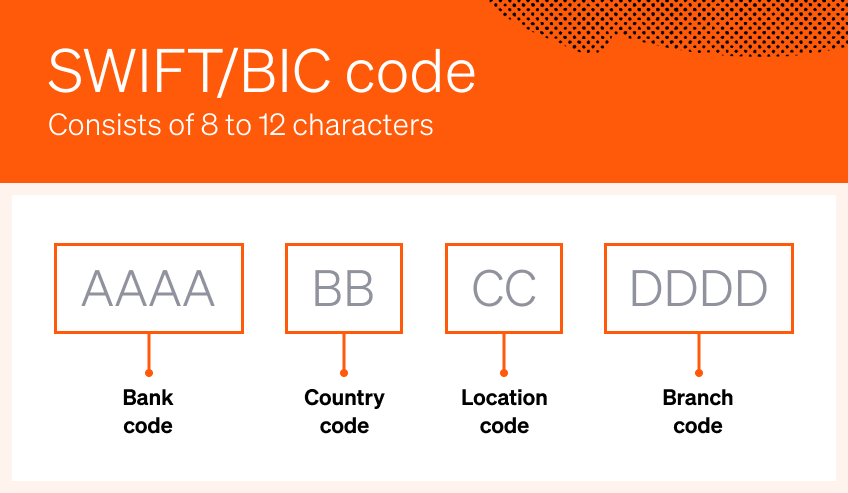
Step 2: Identify the Components of BIC Codes

  • Structure:
    • AAAA: Bank code (4 letters).
    • BB: Country code (2 letters).
    • CC: Location code (2 characters – letters or numbers).
    • DDD: Branch code (3 characters – letters or numbers, optional).
  • Example: “BARBGB2LMAN” for Bank of Baroda, Manchester.

Step 3: Use the Receiving Bank’s BIC Code for International Transfers

  • Process:
    • Provide the recipient bank’s BIC code when transferring money internationally.
    • Example: For transferring money to PNC Bank, use “PNCCUS33”.

By following these steps, you can easily find and use BIC codes for international financial transactions.

Tags: Find a BIC CodeHow To
Google Add as a Preferred Source on Google
Previous Post

How to Transfer an IRA from One Bank to Another

Next Post

How to Lock and Unlock Your Bank of America Charge Card via the Bank of America Mobile App

NyongesaSande News Desk

NyongesaSande News Desk

Nyongesa Sande offers diverse content across news, technology, entertainment, and more, aiming to provide readers with a wide range of informative and engaging articles. NYONGESA SANDE's dedicated team provides our audience not only with the highly relevant news but also with outstanding interactive experience.

Related Posts

How to Weld a 2-Block Rectangular Hollow Block Mold: Measurements, Materials and Step-by-Step Guide
How To

How to Weld a 2-Block Rectangular Hollow Block Mold: Measurements, Materials and Step-by-Step Guide

1 month ago
How to Create a Facebook Account on iPhone App
How To

How to Fix Facebook Confirmation Email Not Received

1 month ago
How to Create a Facebook Account on iPhone App
How To

How to Fix Facebook Confirmation Code Not Received

1 month ago
How to Create a Facebook Account on iPhone App
How To

How to Confirm Your Facebook Email or Phone Number

1 month ago
How to Create a Facebook Account on iPhone App
How To

How to Understand Your Facebook Account and Profiles

1 month ago
How to Create a Facebook Account on iPhone App
How To

How to Fix Facebook Name Not Accepted

1 month ago
Load More
Next Post
Bank of America

How to Lock and Unlock Your Bank of America Charge Card via the Bank of America Mobile App

How to Put Money in Escrow

How to Put Money in Escrow

ADVERTISEMENT

Who We Are

Nyongesa Sande

NyongesaSande.com is a digital news and media platform covering breaking news, business, technology, AI, politics, sports, world affairs and African innovation.

News Sections

  • News
    • World
    • Africa
  • Politics
  • Business
  • Tech
  • AI
  • Telecom
  • Sports
  • Opinion
  • Lifestyle
  • Live

Editorial Standards

  • Editorial Policy
  • Fact Checking Policy
  • Corrections Policy
  • Ethics Policy
  • AI Usage Policy
  • News Tips
  • Submit Press Release

Legal

  • Privacy Policy
  • Terms of Use
  • Cookie Policy
  • Risk Disclaimer
  • Disclaimer
  • DMCA
  • Ad Choices

Our Company

  • About Us
    • Nyosake Designers
      • Nyosake Webmasters
      • Nyosake Investment
  • Contact Us
    • Newsroom Contact
  • Ownership Disclosure
  • Advertise
  • Privacy Policy
  • Terms of Use
  • Cookie Policy
  • Risk Disclaimer
  • Disclaimer
  • DMCA
  • Ad Choices

NyongesaSande.com is an independent digital news and media platform covering Africa, business, technology, AI, politics and global developments.

© 2026 NyongesaSande.com. All rights reserved.

No Result
View All Result
  • News
    • World
    • Africa
  • Politics
  • Business
  • Tech
  • AI
  • Telecom
  • Sports
  • Opinion
  • Lifestyle
  • Live

NyongesaSande.com is an independent digital news and media platform covering Africa, business, technology, AI, politics and global developments.

© 2026 NyongesaSande.com. All rights reserved.