ColorOS 16 update is now rolling out to select Oppo Find and Reno series smartphones, bringing a wider set of AI-powered tools, smoother lock-screen interactions, improved cross-device connectivity and several user experience upgrades.
Oppo says the May 2026 software release began rolling out in phases on May 5 and is expected to reach eligible devices by May 31. The update focuses on making ColorOS smarter, more fluid and more useful for daily tasks, especially for users who rely on translation, recording, file sharing and productivity features.
The biggest highlights include AI Mind Pilot, an improved Live Space experience, better Live Translation, an updated O+ Connect feature, enhanced App Cloner support and new AI-powered summary tools.
ColorOS 16 update improves Live Space
One of the most visible changes in the ColorOS 16 update is the improved Live Space experience.
Live Space now offers smoother animations and a more responsive lock-screen interface. Oppo says the feature has been refined to feel more immersive, especially when showing real-time updates through capsule-style notifications.
The updated capsule notifications are designed to provide important information without cluttering the screen. This should make it easier for users to check live activities, alerts and ongoing updates at a glance.
The new version also adds seamless animations when switching between apps such as Messages, Weather and Calendar. This gives the system a more polished feel and helps reduce the visual gap between everyday actions.
AI Mind Pilot leads Oppo’s new AI features
The ColorOS 16 update also introduces several AI-powered tools aimed at improving organization, creativity and productivity.
AI Mind Pilot is one of the headline additions. The feature appears designed to help users manage information more intelligently, especially when dealing with notes, summaries and content organization.
Oppo is also adding AI Grouping, AI Menu Translation, AI Popout and AI Scan. Together, these features show Oppo’s growing focus on practical AI tools inside its Android skin.
Instead of only using AI for image editing or voice commands, Oppo is pushing AI into daily smartphone tasks. These include translating menus, organizing content, scanning information and helping users interact with apps more efficiently.

Live Translation becomes smarter
Live Translation is also getting a useful upgrade in the ColorOS 16 update.
The feature now supports AI-powered summaries for translated conversations. This means the phone can generate automatic titles and summaries after a translated conversation, making it easier to review key points later.
Oppo has also improved context awareness in Live Translation. This should help the feature deliver more accurate real-time interpretation by better understanding the meaning of a conversation instead of translating words in isolation.
For users who travel, work across languages or communicate with international contacts, this could be one of the most useful improvements in the update.
O+ Connect now works better with Apple devices
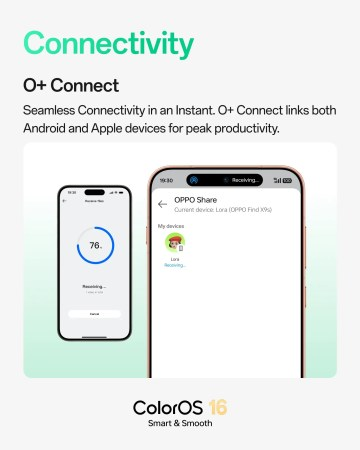
Another important change is the updated O+ Connect feature.
With the ColorOS 16 update, O+ Connect now supports smoother cross-platform file sharing and connectivity between Oppo and Apple devices. This is a major improvement for users who own an Oppo smartphone but also use an iPhone, iPad or Mac.
Cross-platform sharing has often been one of the biggest challenges for Android and Apple users. Oppo’s update appears to reduce that friction by making it easier to move files between ecosystems.
This could be especially useful for students, creators, business users and families who use different devices from different brands.
AI Recording Sticker and richer summaries added
Oppo has also added an AI Recording Sticker feature.
This tool allows users to add text and image markers while recording or reviewing audio. The goal is to help users capture important moments more clearly during meetings, interviews, lectures or voice notes.
Recording summaries have also been improved. The system can now combine text and image markers to highlight key information more clearly.
In supported markets, ColorOS 16 can also generate rich visual summaries with images, tables, flowcharts and diagrams. Oppo says this feature is supported in markets including Belarus, Russia, Thailand, Taiwan, Singapore, Hong Kong, India, Indonesia, Vietnam, Pakistan, Bangladesh and Malaysia.
This makes ColorOS 16 more useful for people who need structured summaries instead of plain text notes.
App Cloner now supports up to three clones
The ColorOS 16 update also improves App Cloner.
Users can now run up to three clones of supported apps. This makes it easier to separate work, personal and entertainment accounts on the same phone.
For example, a user may want one messaging account for work, another for personal communication and another for a separate project or business. With expanded cloning support, Oppo is giving users more flexibility without forcing them to constantly log in and out of apps.
This is a practical upgrade for business owners, creators, social media managers and users who manage multiple accounts.
More visual and comfort improvements
The update also includes smaller but useful design improvements.
Users can now find apps by color in Drawer mode, which may help people locate apps faster based on icon appearance. Oppo has also improved the Eye Comfort settings page with a cleaner layout and simpler controls.
The ColorOS 16 update adds the LUMO watermark for enhanced image branding. This could be useful for users who want a more recognizable style on images shared from their Oppo devices.
The update also supports swiping up or down to browse stacked AI Suggest widgets while editing. Oppo says the visual design and interactions now align more closely with home screen widgets, giving the system a more consistent feel.

Eligible Oppo phones and rollout timeline
Oppo says the ColorOS 16 May 2026 update started rolling out in phases on May 5. The rollout is expected to be completed by May 31 for eligible Find and Reno series smartphones.
As usual, availability may vary by region, carrier and device model. Users who have not received the update yet can check manually by going to the phone’s settings and opening the software update section.
Because the rollout is happening in stages, some users may receive the update earlier than others.
Why the ColorOS 16 update matters
The ColorOS 16 update shows Oppo’s continued effort to make its Android software more intelligent and connected.
The update is not only about visual polish. It adds features that can improve real-world use, including smarter translation, better summaries, improved audio recording tools, enhanced cross-device sharing and more flexible app cloning.
The improved Live Space experience also makes the lock screen more useful by giving users cleaner access to real-time information.
For Oppo Find and Reno users, this is a meaningful update that makes ColorOS feel more modern, more productive and more competitive with other Android skins.
Bottom line
The ColorOS 16 update brings a strong mix of AI features, smoother animations, better lock-screen tools and improved device connectivity.
AI Mind Pilot, improved Live Space, smarter Live Translation, O+ Connect upgrades, AI Recording Sticker and expanded App Cloner support are the biggest additions in the May 2026 release.
For eligible Oppo Find and Reno users, this update is worth installing once it becomes available. It makes ColorOS more powerful for productivity, communication, creativity and everyday smartphone use.
Read Also: One UI 8.5 Rolls Out Globally for Galaxy S24 Series