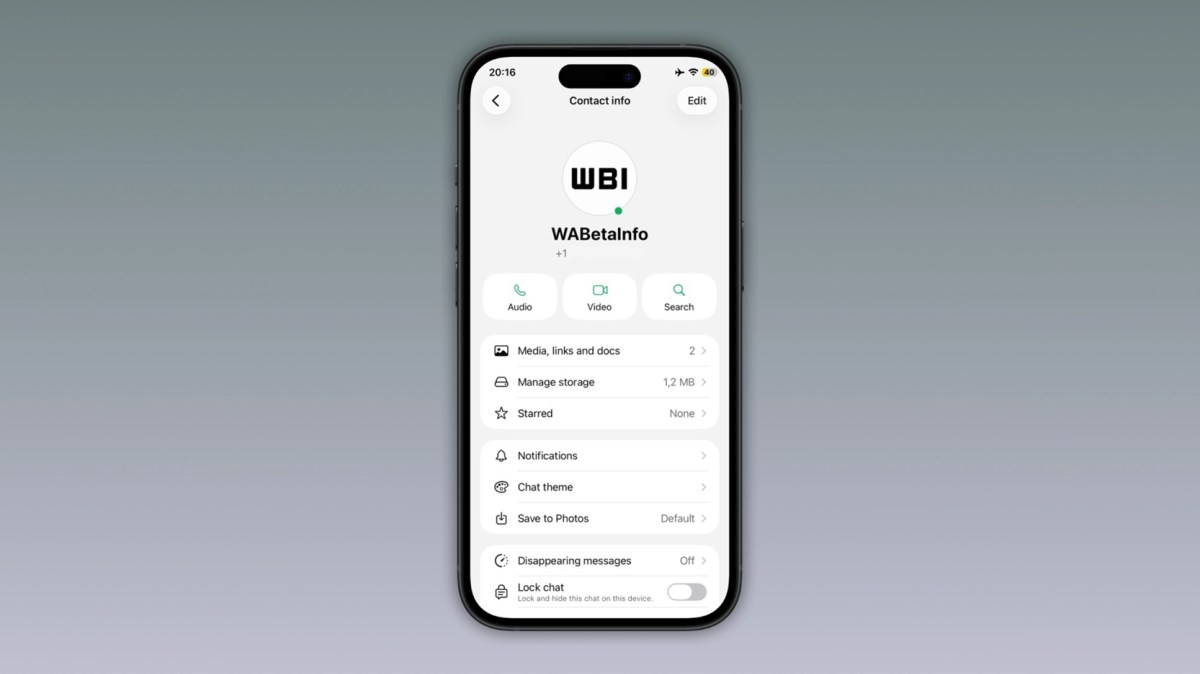
WhatsApp green dot testing has now reached iPhone users, giving selected iOS beta testers a new visual way to see when a contact is online.
The Meta-owned messaging platform is testing a small green dot that appears on a contact’s profile photo when that person is currently active on WhatsApp. The feature was spotted in WhatsApp beta for iOS version 26.26.10.72, available through Apple’s TestFlight program, according to WABetaInfo.
The update follows a similar Android beta rollout that began in June, when WhatsApp started testing the same green online indicator for selected Android beta users.
WhatsApp Green Dot Arrives on iOS Beta
WhatsApp is now testing the green dot online indicator on iOS after first introducing it to some Android beta users.
The feature appears as a small green circle on the bottom-right side of a contact’s profile photo. It is designed to show that the person is currently online and actively using WhatsApp. Once the contact goes offline, the green dot disappears in real time.
For now, the feature is limited to selected beta testers. That means most iPhone users will not see it immediately, even if they are using WhatsApp on iOS.
The feature is part of WhatsApp beta for iOS 26.26.10.72, which is distributed through TestFlight. WABetaInfo says the rollout is currently available to some beta users and may expand to more accounts in the future.
How the WhatsApp Green Dot Works
The WhatsApp green dot works as a real-time online indicator.
When a contact is online, a small green circle appears on their profile image. When that contact leaves WhatsApp or is no longer active, the dot disappears.
This gives users a faster visual clue about whether someone is available before sending a message.
Until now, WhatsApp users have usually relied on the text-based “online” status shown inside a chat or contact view. The green dot makes that information more visible by adding a simple icon to the contact photo.
The feature is not a new availability system. It is more like a visual shortcut for information WhatsApp already shows through online status settings.
Where the Green Dot Appears
At this stage, the green dot appears only in the “Contact info” screen.
Users can open that screen by tapping a contact’s photo or profile area inside WhatsApp. WABetaInfo reports that the dot does not currently appear in the main chats list or the Chats tab.
That makes the current version somewhat limited.
For many users, the feature would be more useful if it appeared directly in the chat list, where people usually decide which conversation to open. However, WhatsApp appears to be starting with a smaller placement before deciding whether to expand it elsewhere.
This cautious rollout is common for WhatsApp beta features. The company often tests new interface elements with limited users before deciding how widely to deploy them.
Privacy Settings Still Apply
The WhatsApp green dot follows the same privacy rules as “last seen” and “online” status.
That means the dot will not appear if a contact has chosen to hide their online status from other users. In other words, WhatsApp is not bypassing existing privacy controls with the new indicator.
This is important because online status can be sensitive. Some users do not want others to know when they are active on the app.
By applying existing privacy settings, WhatsApp is trying to make the green dot useful without weakening user control.
Users who already limit who can see their “last seen” or online presence should expect those choices to apply to the new indicator as well.
Why WhatsApp Is Testing This Feature
WhatsApp appears to be making online availability easier to see.
Many messaging and social platforms already use small status indicators to show when someone is active. Instagram, Messenger, Telegram and other apps use visual cues to show real-time availability or recent activity.
For WhatsApp, the green dot could help users decide when to send a message or start a conversation.
It may be especially useful in fast-moving chats, work conversations, group coordination or urgent one-to-one messages.
Instead of opening a chat and checking the online label, users can see availability more quickly from the contact info view.
Android Users Saw It First
WhatsApp first started testing the green dot on Android before expanding it to iOS.
WABetaInfo reported in June that WhatsApp beta for Android version 2.26.24.5 introduced the green dot for some beta testers. The indicator appeared in the chat info screen when a contact was online.
The iOS rollout now brings feature parity between Android and iPhone beta users.
This is common for WhatsApp. Some features appear first on Android, while others arrive first on iOS. Once testing begins on both platforms, public rollout becomes more likely, although not guaranteed.
The fact that the green dot is now being tested on both major mobile platforms suggests WhatsApp is seriously evaluating the feature for wider use.
Why the Feature Could Be Useful
The green dot could make WhatsApp feel more immediate.
Users often want to know whether someone is active before sending a message, especially when the message is urgent. A real-time visual indicator can reduce guessing.
For example, a user may check whether a friend, colleague or family member is online before starting a conversation. Businesses using WhatsApp for customer communication may also find availability indicators useful in some contexts.
The feature could also reduce unnecessary follow-up messages such as “Are you there?” or “Are you online?”
By making online presence more visible, WhatsApp may improve conversational timing.
Why Some Users May Not Like It
Not everyone will welcome the green dot.
Online indicators can create social pressure. Some people may feel expected to reply immediately if others can see they are online.
That is why privacy controls matter.
WhatsApp’s decision to link the green dot to existing online visibility settings is important. Users who prefer more privacy can restrict who sees their online status.
The feature may be useful for some users and uncomfortable for others. WhatsApp will likely need to maintain clear privacy options if it releases the indicator publicly.
The Green Dot Does Not Replace Last Seen
The green dot does not replace the “last seen” feature.
“Last seen” shows when a user was last active, depending on privacy settings. The green dot, by contrast, appears only when the contact is currently online.
This makes the green dot more immediate but less detailed.
If a contact is offline, users may still rely on “last seen” if that information is visible. If the contact hides last seen and online status, neither the traditional status nor the green dot should be visible.
The green dot is therefore best understood as an online presence badge, not a full status history feature.
Current Limitations
The feature has several limitations in its current beta form.
First, it is available only to some beta testers. Second, it appears only on the contact info screen. Third, it depends on existing privacy settings. Fourth, WhatsApp has not confirmed when it will roll out to all users.
These limits mean users should not expect the feature to appear immediately.
Even beta users may not receive it at the same time because WhatsApp often enables features gradually from the server side.
A public launch may take weeks or months, and WhatsApp could still change the design before release.
What It Means for iPhone Users
For iPhone users, the green dot is a small but noticeable interface change.
If released widely, it will make WhatsApp more similar to other messaging apps that display online presence using visual indicators.
The change may be especially helpful for users who frequently check whether contacts are active.
However, iPhone users who value privacy should review their WhatsApp “last seen and online” settings. Since the green dot follows those rules, privacy settings will determine whether others can see the indicator.
This gives users control over whether they appear as online through the new visual badge.
How to Control Online Visibility on WhatsApp
WhatsApp users can control who sees their online status through privacy settings.
The option is usually found under WhatsApp Settings, then Privacy, then Last Seen & Online. From there, users can choose who can see their last seen and online status.
Depending on the available settings, users may be able to limit visibility to everyone, contacts only, selected contacts or nobody.
Because the green dot follows online status privacy rules, adjusting this setting should affect whether the dot appears for other users.
This makes privacy settings more important as WhatsApp tests more visible online indicators.
Possible Public Release Timeline
WhatsApp has not announced a public release date for the green dot online indicator.
For now, the feature is available only to selected beta testers on Android and iOS. WABetaInfo says it is rolling out to some iOS beta users through version 26.26.10.72.
Beta testing does not guarantee immediate public release.
WhatsApp may expand the test, adjust the design, change where the dot appears or delay the feature depending on feedback.
Still, because the feature is now being tested on both Android and iOS, a wider rollout is possible if testing goes well.
Why WhatsApp May Keep Expanding Online Presence Features
WhatsApp has been gradually improving its interface and discovery features.
The green dot could be part of a wider effort to make the app more useful for real-time communication. WABetaInfo has previously reported that WhatsApp has tested online contact discovery features and interface changes that could make active contacts easier to find.
This would fit broader messaging-app trends.
Users increasingly expect apps to show availability, activity and status in simple visual ways. WhatsApp has historically been more private and minimal, but it is gradually adding more social-style indicators while keeping privacy controls.
The green dot is a small example of that shift.
What to Watch Next
The next thing to watch is whether WhatsApp expands the green dot beyond the contact info screen.
If the indicator appears in the main chat list or a future Contacts tab, it would become much more visible and useful. For now, its placement is limited.
Users should also watch whether WhatsApp changes the design, adds more privacy prompts or improves control over online visibility.
Another key question is whether the feature will remain limited to beta users or reach the stable version of WhatsApp on iOS and Android.
Conclusion: WhatsApp Green Dot Moves From Android to iOS Beta
WhatsApp is testing a green dot online contact indicator on iOS, giving selected iPhone beta users a real-time visual signal when a contact is active.
The feature was spotted in WhatsApp beta for iOS 26.26.10.72 and appears as a small green circle on a contact’s profile photo in the Contact info screen. It disappears when the contact goes offline and follows the same privacy rules as WhatsApp’s existing last seen and online status settings.
The iOS test follows an earlier Android beta rollout, where WhatsApp introduced the same indicator for selected users in June.
For now, the feature remains limited, but it could become a useful addition if WhatsApp expands it to more visible parts of the app, such as the chat list. Its success will likely depend on whether users see it as helpful for real-time communication or too intrusive for privacy.