


The Best CRM Software helps businesses manage customer relationships, improve communication, automate workflows, increase sales, and streamline operations. Modern Customer Relationship Management (CRM) platforms have become essential tools for startups, small businesses, enterprises, sales teams, marketers, customer support departments, and service providers worldwide.
As businesses increasingly rely on digital customer engagement, the demand for the Best CRM Software continues to grow rapidly. CRM platforms now go far beyond simple contact management. Today’s systems integrate marketing automation, AI-powered analytics, pipeline management, customer support ticketing, forecasting, and real-time collaboration tools into one centralized platform.
Read Also: Influencer Outreach Using AI CRM: A Smart Strategy for Startups
Whether you run a small startup, an ecommerce store, a real estate company, a financial institution, or a multinational enterprise, choosing the Best CRM Software can dramatically improve productivity, customer retention, and revenue growth.
This guide explores the top CRM software solutions available in 2026, including features, pricing, strengths, weaknesses, and how to choose the right CRM for your business.
What Is CRM Software?
Customer Relationship Management software is a digital platform designed to help businesses organize, track, and improve interactions with customers and prospects.
The Best CRM Software centralizes customer data from multiple communication channels such as:
- Emails
- Phone calls
- Websites
- Social media
- Live chat
- Marketing campaigns
- Ecommerce platforms
By collecting and organizing this information, CRM software creates a unified customer profile that helps businesses personalize engagement and improve customer experience.
Read Also: How to Choose the Best Real Estate CRM Software for Your Business
Why Businesses Need the Best CRM Software
The Best CRM Software delivers several important advantages for businesses.
Improved Sales Performance
CRM platforms help sales teams track leads, manage pipelines, and close deals faster.
Better Customer Retention
Businesses can respond quickly to customer needs using centralized communication and support tools.
Automation of Repetitive Tasks
CRM systems automate tasks such as:
- Follow-up emails
- Lead assignments
- Appointment reminders
- Sales notifications
- Workflow approvals
Marketing Optimization
The Best CRM Software helps marketers manage campaigns, analyze conversions, and personalize customer outreach.
Real-Time Analytics
CRM dashboards provide actionable insights into sales performance, customer behavior, and marketing effectiveness.
Read Also: Best CRM Hosting for Small-to-Mid Businesses
How CRM Software Works
CRM software functions as a centralized customer management hub.
Data Collection
The CRM gathers customer data from various touchpoints.
Customer Segmentation
Businesses can organize customers into categories based on demographics, behavior, or purchasing history.
Workflow Automation
The system automates sales and marketing processes to improve efficiency.
Read Also: littlefish Raises $9.5M
Reporting and Forecasting
CRM platforms generate reports that help businesses make data-driven decisions.
Integration
The Best CRM Software integrates with tools such as:
- Email platforms
- Accounting software
- Ecommerce systems
- Customer support tools
- Project management software
Here is a List of Top 10 CRM software for 2026
With so many different CRM software options available, choosing the best one for your business can be challenging. To help narrow the field, here’s a breakdown of the top 10 CRM’s key features, pros, cons, and pricing.
Read Also: Best CRM Software for Small Businesses in 2025
1. monday sales CRM
monday sales CRM is one of the Best CRM Software solutions for modern sales organizations. The platform is fully customizable and designed to centralize the entire sales cycle.
Best for: Sales teams
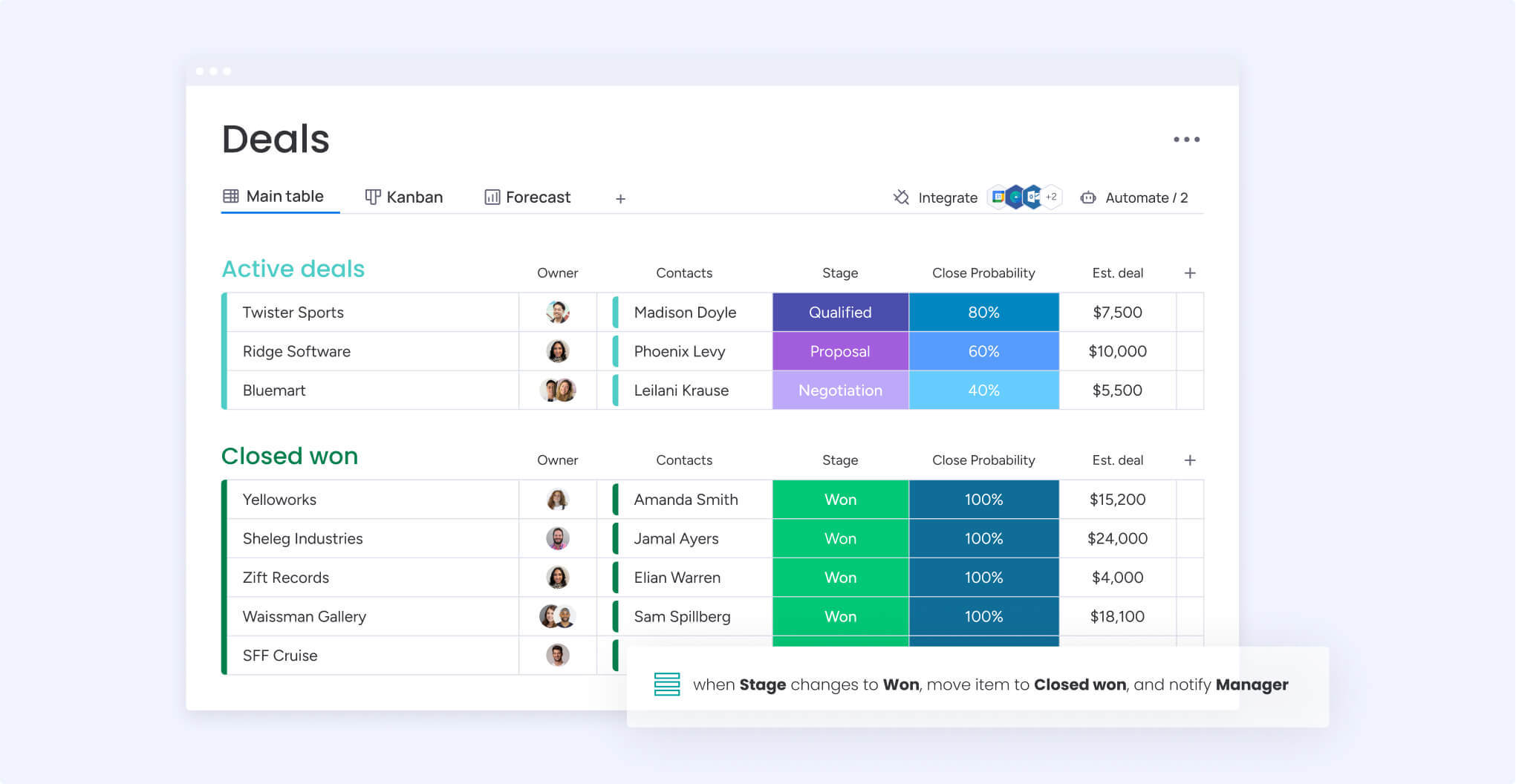
monday sales CRM is a fully customizable, no-code sales platform that lets you centralize your entire sales cycle. You can organize and manage your pipeline, automate your sales processes, streamline communication, and gain valuable insights into your entire sales cycle and forecasting.
Key features of monday sales CRM
- Customization: Easily tailor your CRM software to work for you without any development help. Edit deal stages, add as many columns as you’d like, and manage multiple pipelines simultaneously.
- Automation: Save valuable time and close more deals by automatically assigning leads to reps, setting reminders for upcoming activities, and getting notified when a lead opens an email.
- Communication: Automatically keep track of client interactions and log sent emails in one central location. Save time with personalized email templates and AI-powered suggestions.
monday sales CRM pros
- Templates for lead, contact, and deal management.
- Deal stages widget for a 360-degree view of opportunities.
- Leaderboard for sales rep performance.
- Integrates with the tools and apps you already use.
- Syncs with Google Calendar.
- iOS and Android apps.
monday sales CRM cons
- Premium plans have a three-user minimum.
- Certain features only available on higher plans.
monday sales CRM pricing
- $10/seat/month billed annually (minimum 3 users).
- No free plan.
- 14-day free trial available.
More info: monday sales CRM pricingTry monday sales CRM
2. Zoho CRM
Zoho CRM remains one of the most popular CRM platforms for startups and growing businesses.
Best for: Startups and small businesses
Zoho CRM helps businesses manage their sales, marketing, and customer service operations from a single platform. It’s ideal for small to mid-sized teams and offers a variety of integrated options and customizable CRM solutions for growing companies. The built-in AI-powered assistant, Zia, assists in predicting leads and deals, spotting potential customers for conversion, as well as guiding large sales teams in their efforts.
Key features of Zoho CRM
- Lead management: Capture leads from various sources and nurture them through the sales pipeline. Prioritize sales teams’ efforts with lead scoring and lead assignment.
- Integration: Connect third-party applications such as Google Workspace, Office 365, MailChimp, and Zendesk to provide a seamless user experience.
- Communication: Converse in real-time with customers and prospects from one platform via emails, live chat messages, phone conversations, and social media interactions.
Zoho CRM pros
- Offers a free plan for up to 3 users.
- Conduct meetings and presentations from within the CRM.
Zoho CRM cons
- AI-powered assistant only available on the more expensive Enterprise plan.
- Customer support outside of business hours costs extra.
Zoho CRM pricing
- $14/user/month billed annually.
- Forever free plan available.
- 15-day free trial.
Related: Zoho CRM pricing
3. HubSpot CRM
HubSpot CRM is widely recognized for integrating sales, marketing, and customer service into one platform.
Best for: Small businesses looking to scale
HubSpot CRM is designed to improve all aspects of a business by incorporating sales, marketing, and customer service processes into one comprehensive platform. It empowers businesses to manage customer relationships, streamline sales processes, and integrate marketing efforts effectively.
Key features of HubSpot CRM
- Marketing automation: Enables businesses to align their sales and marketing campaigns for a complete view of each prospect and client.
- Email tracking: Allows users to seamlessly integrate email communication with their CRM and track interactions with contacts.
- Reporting and analytics: Offers insights into sales performance, customer interactions, and marketing campaigns.
HubSpot CRM pros
- Unified dashboard for marketing, sales, and customer service teams.
- Works with individual or integrated hubs to make business processes smoother.
HubSpot CRM cons
- Limited functionality in the free plan.
- Limited customization capabilities.
HubSpot CRM pricing
- $20/month billed annually.
- Free plan available.
- 14-day free trial.
Related: HubSpot pricing
HubSpot remains one of the Best CRM Software solutions for businesses focused on inbound marketing and growth.
4. Salesforce Sales Cloud
Salesforce is among the most powerful CRM platforms globally and serves both small businesses and large enterprises.
Best for: Both small businesses and large enterprises
Salesforce Sales Cloud is a comprehensive CRM platform designed to support sales, marketing, and customer service in both business-to-business (B2B) and business-to-customer (B2C) contexts. It combines all customer information in an integrated platform that incorporates marketing, lead generation, sales, customer service, and business analytics.
Key features of Salesforce Sales Cloud
- Customization: Access thousands of applications via the AppExchange to tailor the platform to your specific needs.
- Sales process management: Keeps all prospects, customers, contacts, leads, opportunities, and purchase history organized and easily accessible.
- AI-powered insights: Provides visibility into customer behavior, sales performance, and revenue management.
Salesforce Sales Cloud pros
- Centralizes customer information.
- Automates and streamlines sales processes.
Salesforce Sales Cloud cons
- Steeper learning curve than other CRMs.
- Setup and implementation can be time-consuming.
Salesforce Sales Cloud pricing
- $25/user/month billed annually.
- No free plan.
- 14-day free trial.
Related: Salesforce pricing
5. Freshsales CRM
Freshsales CRM offers AI-driven lead scoring and customer engagement tools.
Best for: Lead management
Freshsales CRM helps businesses manage leads, customer engagement, and sales automation. It offers sales pipeline management, AI-powered insights (via Freddy), automation, and a unified CRM for sales, marketing, and support teams.
Key features of Freshsales CRM
- Sales pipeline management: Includes tools to build and manage sales pipelines, helping you score leads, track deals, and close sales more efficiently.
- AI-powered insights: Freddy (the AI Assistant) provides deal insights, smart recommendations, and predictions by analyzing historical sales data, activities, and engagement.
- Automation: Allows users to automate tasks such as lead assignment, sending emails, task creation, and field updates, enabling more efficient and scalable outreach.
Freshsales CRM pros
- Free forever plan.
- Getting started is easy.
Freshsales CRM cons
- May lack advanced features for some teams.
- Limited customization options compared to other CRMs.
Freshsales CRM pricing
- $15/user/month billed annually.
- Free plan available.
- 21-day free trial.
Related: Freshsales pricing
6. Zendesk Sell
Zendesk Sell works particularly well for businesses already using Zendesk’s support suite.
Best for: Businesses already using Zendesk Suite
Zendesk Sell is a sales CRM software tool that enhances productivity, streamlines processes, and provides pipeline visibility for sales teams. Its unified platform, real-time pipeline management, and mobile accessibility make it a valuable tool for businesses looking to optimize their sales processes and improve sales performance.
Key features of Zendesk Sell
- Pipeline management: Provides real-time visibility into the sales pipeline, enabling accurate forecasting and control.
- Unified platform: Offers an all-in-one sales platform, including contact and deal management, activity tracking, lead generation, and automation to keep sales representatives on target.
- Integration: Customize Zendesk to fit business requirements and integrate it with other applications and platforms to enhance its capabilities.
Zendesk Sell pros
- iOS and Android apps.
- Automatically fills lead info from an email address.
Zendesk Sell cons
- Does not integrate with email services like Constant Contact and Mailchimp.
- Lacks quotes or proposal features, which may be a drawback for some businesses.
Zendesk Sell pricing
- $19/user/month billed annually.
- No free plan.
- 14-day free trial.
7. SugarCRM
SugarCRM is designed for organizations requiring advanced customization and automation.
Best for: Large enterprises with in-house development teams
SugarCRM connects sales, marketing, and service teams on one platform to boost productivity, engage more customers, and increase revenue. The on-premises and cloud-based web application enhances interactions with prospects and customers while accelerating sales processes.
Key features of SugarCRM
- Automation: Sales-force automation enables businesses to streamline their sales processes and improve productivity.
- Customization: Allows users to tailor the platform to fit their sales and marketing processes.
- AI-engine: Accelerate deals with AI-powered lead conversion, Ideal Customer Profile (ICP), and sales predictions.
SugarCRM pros
- Integrates well with various third-party apps and systems.
- Provides workflow automation and advanced reporting features.
SugarCRM cons
- More complex to set up and has a steep learning curve.
- Pricing can be relatively high, especially for advanced features.
SugarCRM pricing
- $49/user/month billed annually (minimum 3 users).
- No free plan.
- 7-day free trial.
8. Less Annoying CRM
Less Annoying CRM focuses on simplicity and affordability.
Best for: Small business owners and entrepreneurs
Less Annoying CRM is a simple, affordable, and user-friendly solution designed specifically for small businesses. In fact, the average account has 2.5 users.
Key features of Less Annoying CRM
- Simplicity: Its ease of use makes it an ideal choice for small businesses looking for an uncomplicated CRM solution.
- Affordability: Its affordable pricing model makes it accessible for small businesses with budget constraints.
- Contact Management: View all notes, files, tasks, events, and pipeline information related to a contact on one screen.
Less Annoying CRM pros
- Simple to set up and use.
- Integrates with other apps to enhance its functionality.
Less Annoying CRM cons
- Lacks some advanced features required by larger enterprises.
- Limited customization options.
Less Annoying CRM pricing
- $15/user/month billed annually.
- No free plan.
- 30-day free trial.
9. Pipedrive CRM
Pipedrive is highly popular among sales teams because of its visual sales pipeline interface.
Best for: Pipeline management
Pipedrive CRM is a pipeline-focused platform designed by salespeople to streamline the sales and relationship-building process. It’s best known for its ease of use, customization, and comprehensive customer support.
Key features of Pipedrive CRM
- Pipeline management: Track leads, spot opportunities, and measure critical activities by customizing pipelines (with stages and fields) to match your sales cycle.
- Reporting and dashboard: Get detailed reporting on sales and key activities and track progress against goals in the dashboard.
- Integrations: Extend Pipedrive’s capabilities by connecting with 350+ third-party programs, platforms, and services.
Pipedrive CRM pros
- Intuitive drag-and-drop visual interface.
- iOS and Android mobile apps.
Pipedrive CRM cons
- No free plan.
- Security rules and alerts only available on the Enterprise plan.
Pipedrive CRM pricing
- $14.90/user/month billed annually.
- No free plan.
- 14-day free trial.
Related: Pipedrive pricing
10. Keap
Keap combines CRM functionality with powerful marketing automation.
Best for: Marketing automation
Keap, formerly known as Infusionsoft, is an all-in-one CRM, business automation, and email marketing platform designed to help small businesses grow by simplifying sales and marketing processes, providing personalized automations, and offering coaching and support to ensure user success.
Key features of Keap
- Client management: Collects new leads, organizes customer records, and triggers the subsequent actions to move people through the sales process seamlessly.
- Automation: Offers personalized automations to create repeatable sales processes and marketing campaigns, saving time while moving businesses forward.
- Integration: Connects with over 2,500 platforms and tools, including partner-level, certified, and third-party integrations for email, lead generation, specialty apps, pre-built campaigns, and more.
Keap pros
- Email and text marketing.
- iOS and Android mobile apps.
Keap cons
- Challenging to set up and use, especially for beginners.
- Pricing can be higher, particularly with advanced features.
Keap pricing
- $159/month billed annually (1500 contacts and 2 users).
- No free plan.
- 14-day free trial.
Related: Keap pricing
Who uses CRM software?
Not all businesses have the exact same customer relationship management needs. Some choose a general CRM based on their company size, while others opt for an industry-specific CRM. Both have their advantages and disadvantages.
For instance, generic CRM software allows companies of all sizes, from startups and small businesses to large-scale enterprises, to:
- Tailor it to their requirements.
- Adapt it to various teams and departments.
- Access a more comprehensive feature set.
On the other hand, industry-specific CRM software enables organizations to:
- Implement work-specific niche features.
- Comply with industry safety requirements.
- Access the industry expertise of the CRM vendor.
Here are some examples of different industries that use CRM software:
- Financial services: Banks, insurance agents, mortgage providers, and venture capitalist firms.
- Customer services: Hotels, restaurants, lawyers, and recruitment firms.
- Public services: Educational institutions, healthcare organizations, sports teams, and nonprofits.
- Industrial services: Automotive, construction, manufacturing, and logistics companies.
Related: Read more about choosing a CRM for your industry.
What top features should a CRM have?
We’ve already mentioned a few functions of a CRM, including marketing and workflow automation, sales management, and advanced analytics. But here are the top features to consider.
- Contact management: Allows departments — such as sales, marketing, and support — to organize and manage their contacts, including customer profiles, communication history, and other relevant information, in one place and eliminate inaccurate information.
- Pipeline management: Helps businesses manage their sales pipeline, including lead tracking, opportunity management, and sales forecasting, and define stages for your customer journey so every team — not just sales — can stay on the same page.
- Workflow automation: Eliminates repetitive tasks, such as sending follow-up emails or scheduling appointments, and frees up time for sales and customer service teams to focus on more important tasks.
- Marketing automation: Helps businesses manage their marketing campaigns, including email marketing, social media marketing, and lead generation.
- Customization: Allows businesses to tailor the software to their specific needs, like adding custom fields, creating custom reports, and choosing which features to include or exclude in the package.
- Integration: Connects with other apps, such as email marketing software and ecommerce platforms, to extend the functionality and manage everything in one place.
- Mobile app: Lets remote workers and field-based teams, like sales reps and insurance agents, access and update data on the go.
- Analytics and reporting: Provides businesses with insights into their sales and marketing efforts, allowing them to make data-driven decisions.
- Customer service management: Helps businesses manage customer service requests, including case management, customer support, and analytics.
- Call center management: Allows businesses to run their call center from a single platform.
Make sure you choose the CRM software that meets your specific needs and budget.Try monday sales CRM
What are the benefits of using CRM vs ERP software?
CRM (Customer Relationship Management) and ERP (Enterprise Resource Planning) are different software solutions that help businesses manage their operations and customer interactions. While both systems aim to improve a company’s performance, they have contrasting objectives and benefits.
A CRM platform controls customer interactions and relationships. It supports and connects front-office business functions, like marketing, sales, advertising, and customer service. CRM software helps businesses create customer profiles, automate marketing campaigns, build out self-service resources, and improve the customer experience. The benefits of using CRM software include improved customer service and satisfaction, higher profits, better customer retention, enhanced analytics, and increased efficiency levels.
An ERP system, on the other hand, primarily supports and connects back-office functions, such as HR, finance, and supply chain operations. ERP software helps companies run successfully by linking their financial and operational systems to a central database. The benefits of using ERP software include improved automation, centralized finance and HR processes, increased productivity, and revenue generation.
While CRM and ERP software share common benefits that help businesses make informed decisions, they are not interchangeable since they have different purposes. However, integrating CRM and ERP systems can provide a more holistic view of the customer and improve communication, efficiency, and accuracy throughout the company.
Read also: ERP vs CRM compared
5 qualities to consider when choosing a CRM
Now that we’ve covered some of the features and benefits of CRM software, let’s explore some of the characteristics that make these solutions efficient and effective — so you can choose wisely.
1. Choose a flexible workflow builder
Any functional CRM system you choose must adapt to your existing processes and operations, not vice versa. For instance, monday sales CRM is fully customizable with over 36 drag-and-drop columns, more than 25 dashboard widgets, and 200+ pre-made templates for any use case.
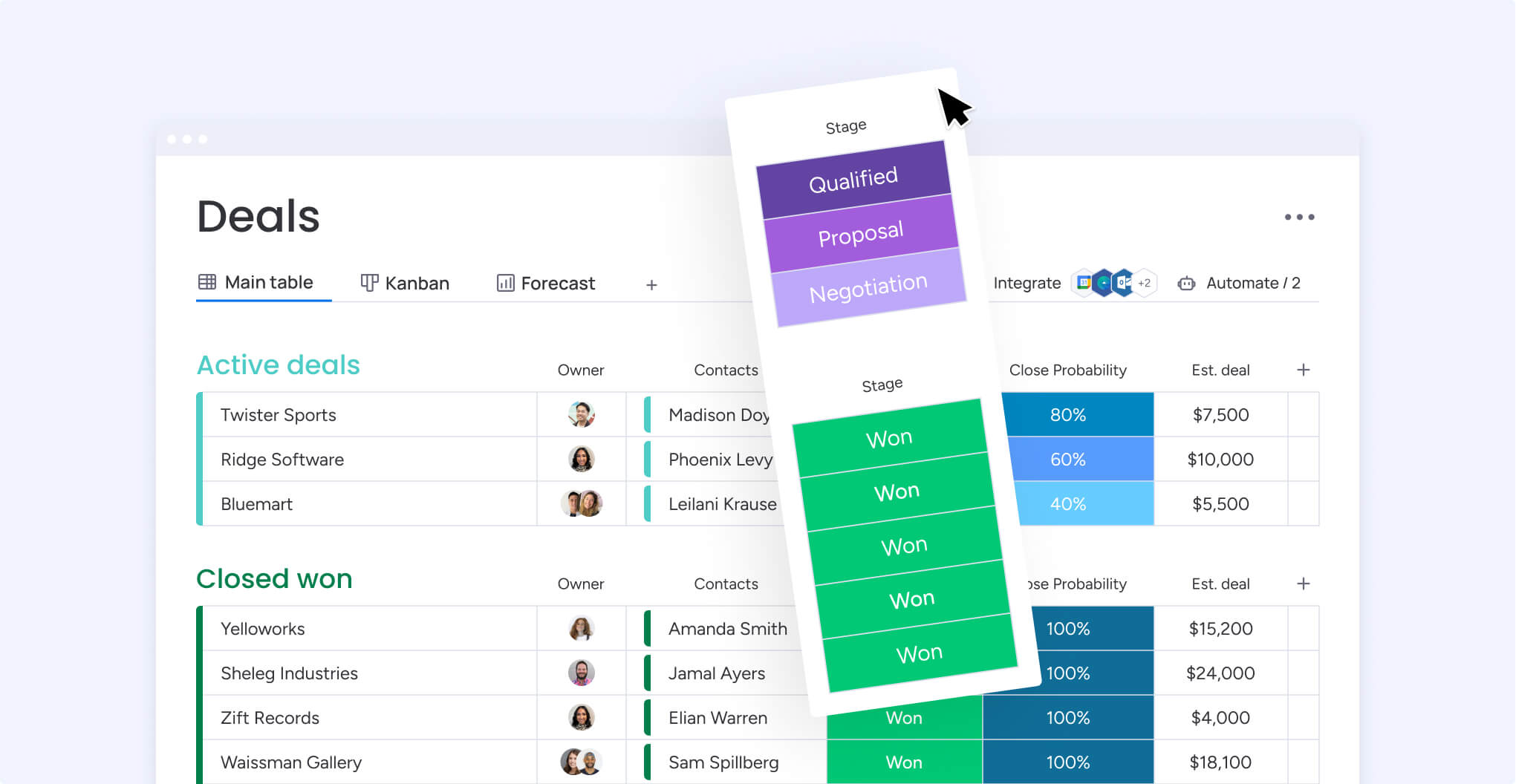
You can also build no-code apps within our platform and get support from an active community of users sharing their creations. You can play with these elements and design any workflow, sales process, or operation you can imagine.
Whether you’re tracking leads, managing sales pipelines, or onboarding customers, monday sales CRM lets you design your perfect workflow and get started instantly — file sharing included!
2. Work smarter with automations
Automation is no longer a luxury; improving efficiency is necessary. If you can’t automate repetitive tasks, you’ll waste time and risk making mistakes.
The best CRM software, like monday sales CRM, provides access to hundreds of no-code automation recipes with a one-click setup — automating tasks, notifications, item creation, status changes, and more — so you can focus on what matters most.
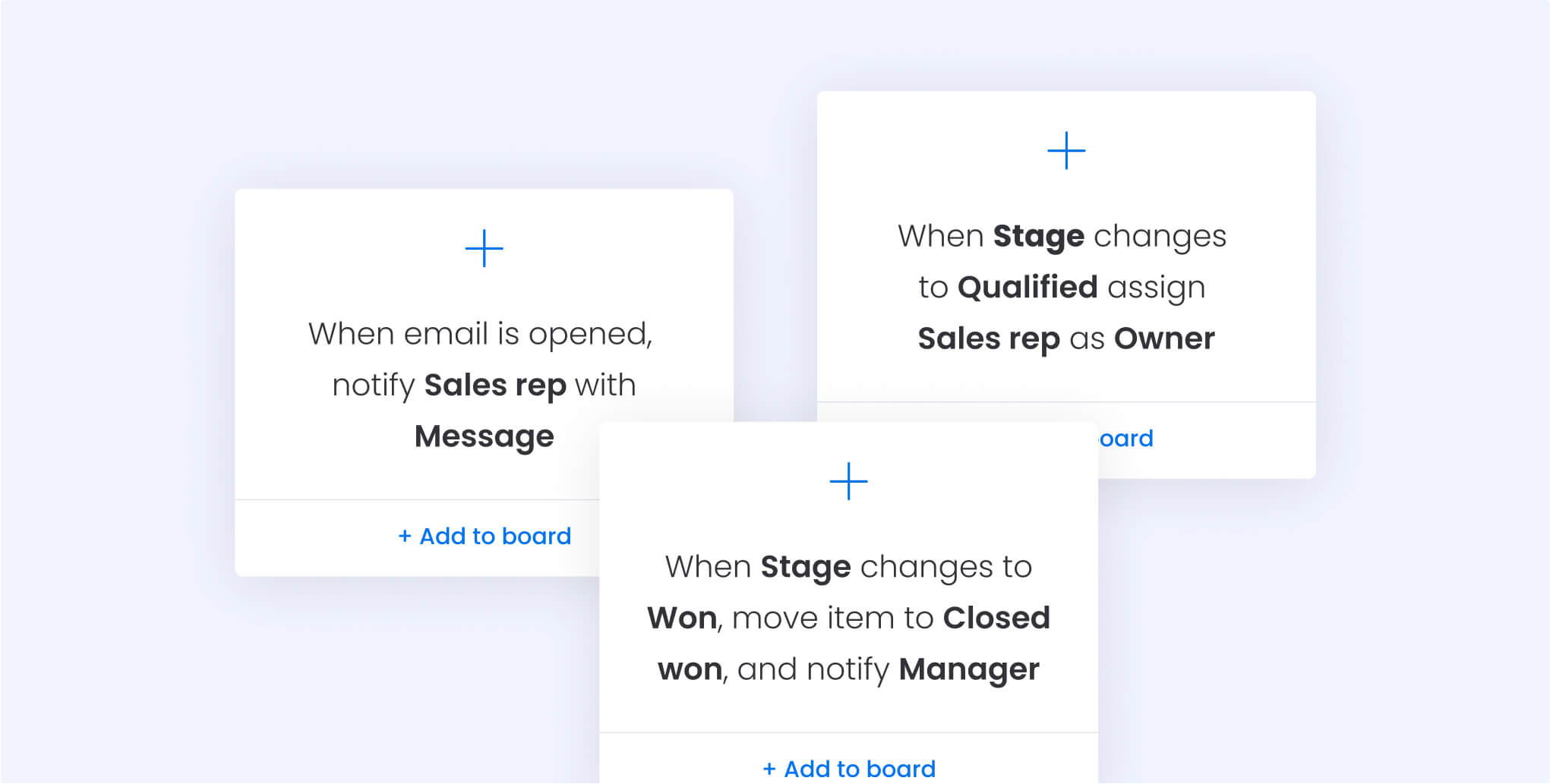
3. Invest in sales forecasting and tracking
The best CRM software should provide robust analytics and data dashboards so you can track KPIs. With more than 25 dashboard widgets on monday sales CRM, you can visualize the information that matters the most in your business and remove needless data.
For example, the Chart Widget helps track sales and commissions earned by individual sales reps:
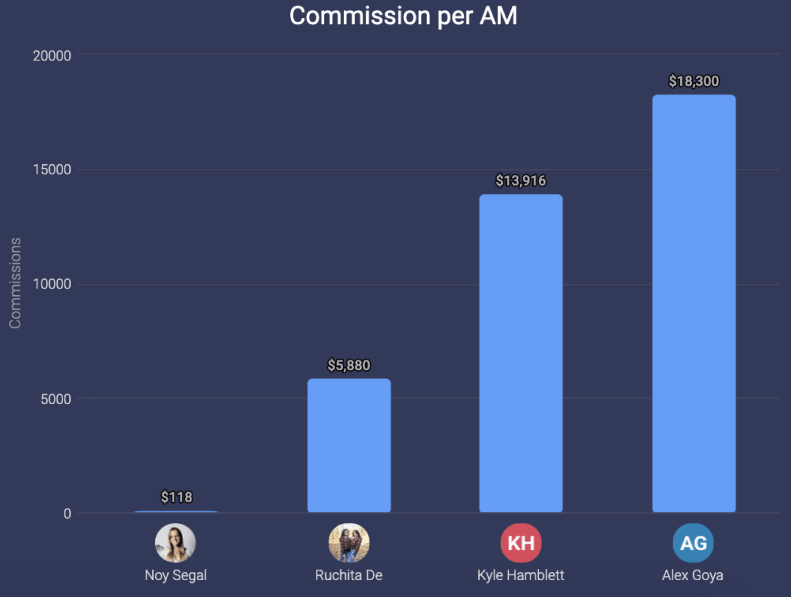
Your final dashboard might look something like this:
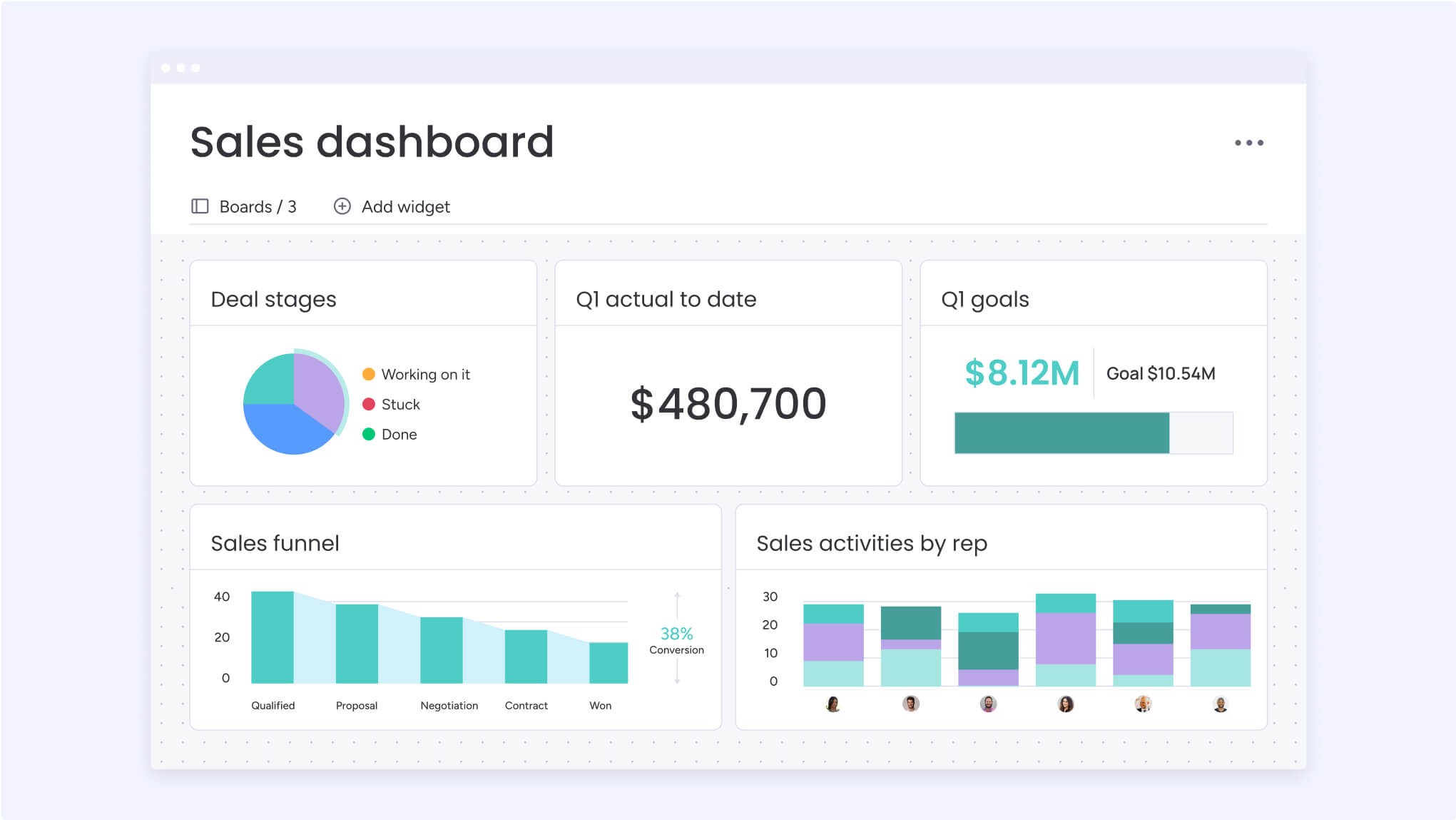
This lets you understand your progress accurately and make fast, intelligent decisions. You can communicate directly with your colleagues and partners about these results using the Team Updates Widget.
4. Don’t skim on top-notch security
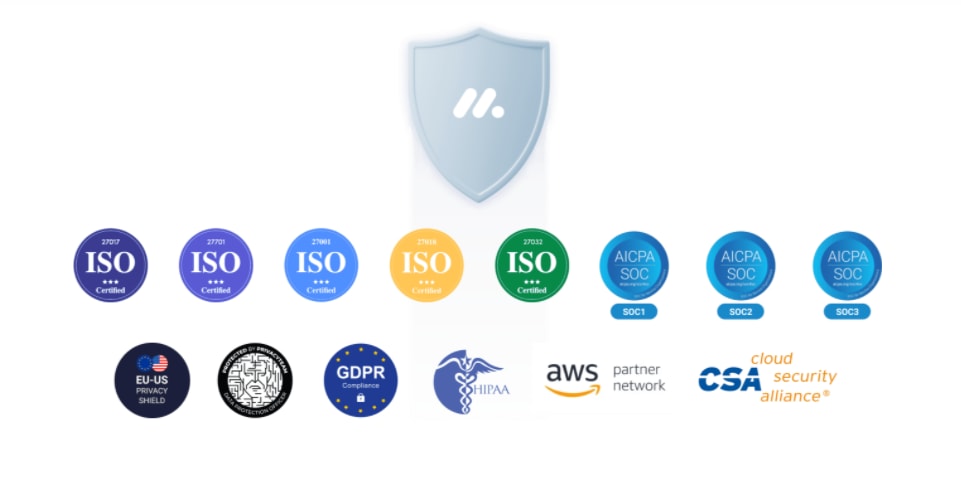
Cybercrime has increased by 300% since the beginning of 2020. Your CRM software holds critical information about your customers. And if that information isn’t safe, customers won’t stay loyal, and your business will suffer. Before choosing a specific software, make sure it complies with the most common security standards and certifications.
Below are a few of the most rigorous global security standards for Information Security Management Systems (ISMS): ISO/IEC 27001:2013:
5. Stay connected with integrations
If you want to get the most out of your CRM, make sure it integrates with your current tools and apps. Here are some of the most popular integrations that will strengthen customer relationships, business processes, and user experiences:
- DocuSignlets you send documents for signature, store all documents in one centralized place, and track agreement status in real-time.
- Aircallallows you to turn phone conversations into actionable customer data — stored, organized, and leveraged from your CRM.
- Mailchimp email marketing and automation platform helps you send emails, invitations, and reminders to all your clients and prospects.
- Zendesk builds business software for customer service and engagement. The help desk system manages and organizes customer tickets from all your different channels.
- Slack is an online collaboration platform that connects apps, people, and data. It consolidates all your communication into a single channel to increase productivity and reduce time wasted.
- Zoom is a communication and collaboration platform featuring virtual meetings, team chat, whiteboard, voice calls, and multi-device webinars.
With over 200 integrations and apps, monday sales CRM lets you work seamlessly, centralize information, and boost collaboration.Try monday sales CRM
Streamline your sales activities with monday sales CRM software
A CRM platform will undoubtedly help boost business growth, but choosing the right one takes careful consideration.
That said, if you’re looking for a visual, intuitive, and fully customizable CRM platform to manage your leads, prospects, and customers, then monday sales CRM can help you manage your pipeline, automate your sales processes, streamline communication, and gain valuable insights into your entire sales cycle.
Overall, monday sales CRM is the best software to streamline your sales activities. But don’t just take our word for it.
Currently, monday sales CRM rates 4.6 out of 5 on G2’s software review platform. Users say the platform is extremely easy to set up and effortless to navigate. And, when needed, the support team responds quickly and efficiently.
Try monday sales CRM yourself with a 14-day free trial.
Final Thoughts on the Best CRM Software
The Best CRM Software can transform how businesses manage customer relationships, automate operations, and grow revenue. Whether you are a startup seeking affordability or a large enterprise requiring advanced customization and AI-powered insights, modern CRM platforms offer solutions tailored to every business size and industry.
Platforms such as monday.com, HubSpot, Salesforce, Zoho, and Pipedrive continue leading the market because of their innovation, scalability, and customer-focused tools.
Ultimately, the right CRM depends on your business goals, operational complexity, budget, and growth strategy. By investing in the Best CRM Software, companies can strengthen customer engagement, improve sales performance, and build long-term business success.
The information provided in this article is accurate and up-to-date at the time of publication. Changes and updates in the business operations, policies, or any other relevant factors may occur after publication and we encourage readers to verify any information directly.
Read Also: Best CRM Hosting for Small-to-Mid Businesses


