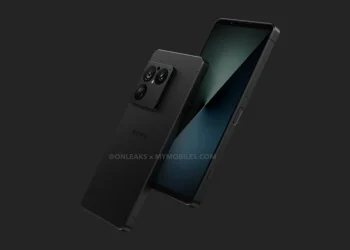
Sony’s Xperia 1 VII, which was launched a few months ago with Android 15, is now receiving the highly anticipated Android 16 update. While the full changelog remains a mystery, users have started sharing their experiences with the update, shedding light on what’s changed and what’s stayed the same.
Android 16 Update Details
The Android 16 update for the Sony Xperia 1 VII is being rolled out with firmware version 71.1.A.2.68. The update requires a download of about 1.13GB, and it’s currently available for the Xperia 1 VII model XQ-FS54 EU.
Interestingly, the update screenshot shared on Reddit reveals that the Android security patch level remains at August 2025, even after installing the update, which may indicate that this update doesn’t come with any immediate security improvements.
What’s Changed with Android 16?
While the update doesn’t introduce significant changes to the overall system, some users have reported subtle differences. The Settings app now looks slightly different, which may be part of the visual changes Android 16 brings. However, many Reddit users noted that the update feels very much like Android 15 in terms of overall user experience, with no major system changes or new features observed.
Sony Xperia 1 VII Specifications and Performance
The Sony Xperia 1 VII continues to impress with its Snapdragon 8 Elite SoC, 12GB of RAM, and up to 512GB of storage. This powerful configuration, combined with the promise of four major Android OS upgrades and six years of security updates, ensures the phone remains competitive in the premium smartphone market.
It features a 6.5″ 120Hz FullHD+ LTPO OLED display and a 5,000mAh battery with 30W fast charging. On the camera front, the Xperia 1 VII offers a triple camera setup with a 48MP primary, 48MP ultrawide, and 12MP telephoto camera featuring continuous zoom capability between 85mm and 170mm. It also has a 12MP selfie camera.
How to Update Your Sony Xperia 1 VII to Android 16
To update your Xperia 1 VII to Android 16, follow these steps:
- Connect to Wi-Fi: Ensure you’re connected to a stable Wi-Fi network.
- Check for Updates: Go to Settings > Software Update > Check for Updates.
- Download and Install: If the update is available, click Download and follow the on-screen instructions.
- Reboot: After the update is installed, your phone will reboot.
Conclusion
The Android 16 update for the Sony Xperia 1 VII brings some minor tweaks to the Settings app but doesn’t drastically change the user experience. While the update’s security patch level remains unchanged, it’s still an important step in ensuring the device stays up-to-date with the latest Android version.
For those enjoying the Xperia 1 VII’s impressive hardware, this update ensures continued support with four more OS updates and six years of security patches. Stay tuned for more details on any future updates or features that may come with the upcoming Android 16 upgrades!