Social media image sizes matter more than most creators, publishers and brands realize. The wrong dimensions can crop out a logo, blur a thumbnail, cut off text, weaken a Facebook cover photo, or make a professional LinkedIn post look rushed.
In 2026, one rule is clear: vertical and mobile-first images now dominate most major platforms. Instagram, Facebook, TikTok, YouTube Shorts, Threads and Snapchat all reward full-screen or near-full-screen formats, while LinkedIn, X and Pinterest still depend heavily on clean feed images, link previews and square or vertical cards.
The safest working standard for many creators remains 1080 pixels wide. That size works well across Instagram posts, Facebook posts, TikTok visuals, Stories, Reels and many vertical-first formats. But each platform still has its own rules for profile pictures, banners, covers, feed posts, ads, carousels and thumbnails.
This guide gives you an updated 2026 reference for the best image dimensions across Instagram, Facebook, X, LinkedIn, Pinterest, Snapchat, YouTube, TikTok, Bluesky and Threads. The recommendations are based on current platform guidance, official ad specifications and updated social media sizing references, including Hootsuite’s July 2026 guide and platform documentation from Meta, X, LinkedIn, Pinterest, TikTok and YouTube.
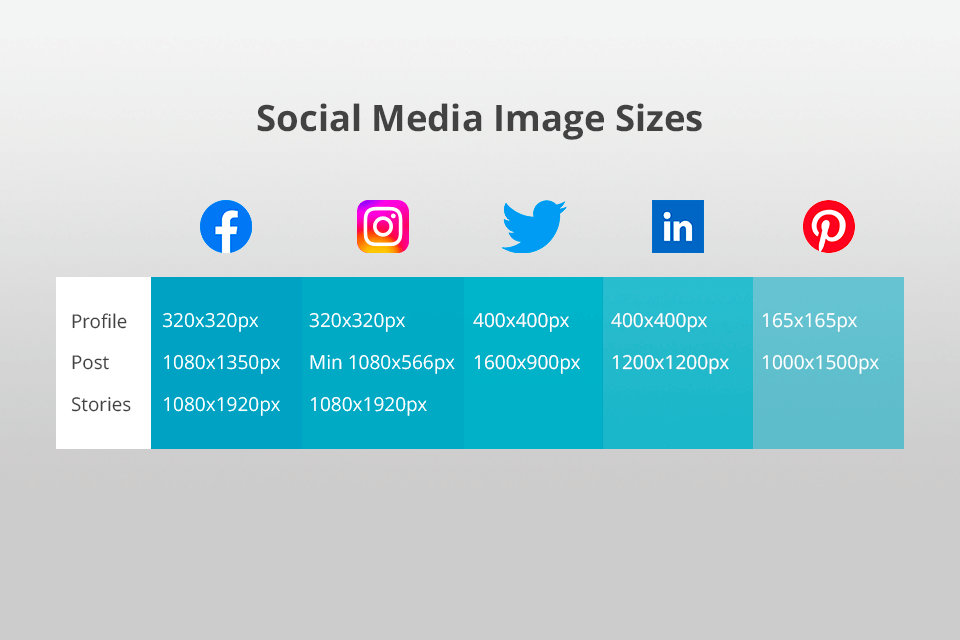
Quick Social Media Image Sizes for 2026
Use this table when you need the fastest answer.
| Platform | Profile Image | Feed / Post Image | Vertical / Story / Reel | Cover / Banner |
|---|---|---|---|---|
| 320 x 320 px | 1080 x 1080 px or 1080 x 1350 px | 1080 x 1920 px | N/A | |
| 320 x 320 px | 1080 x 1080 px or 1080 x 1359 px | 1080 x 1920 px | 851 x 315 px | |
| X | 400 x 400 px | 1080 x 1080 px or 1280 x 720 px | 720 x 1280 px | 1500 x 500 px |
| 400 x 400 px | 1200 x 627 px or 1200 x 1200 px | 720 x 900 px | 1584 x 396 px personal / 1128 x 191 px company | |
| 280 x 280 px | 1000 x 1500 px | 1000 x 1500 px | 800 x 450 px | |
| Snapchat | 320 x 320 px | N/A | 1080 x 1920 px | 375 x 278 px |
| YouTube | 800 x 800 px | 1280 x 720 px thumbnail | 1080 x 1920 px for Shorts visuals | 2560 x 1440 px |
| TikTok | 200 x 200 px | 1080 x 1920 px carousel | 1080 x 1920 px | N/A |
| Bluesky | 1000 x 1000 px | 1000 px longest side | 9:16 works | 3000 x 1000 px |
| Threads | 640 x 640 px | 1440 x 1920 px | 1440 x 1920 px | N/A |
The most useful creator rule is simple: design one vertical version at 1080 x 1920 pixels, one portrait feed version at 1080 x 1350 pixels, one square version at 1080 x 1080 pixels, and one landscape version at 1200 x 628 or 1280 x 720 pixels. Those four templates will cover most publishing needs.
Why Correct Social Media Image Sizes Matter
Correct image sizing protects your brand.
A poorly sized image may look fine on your desktop but fail on mobile. A cover photo may crop differently on a phone. A profile image may cut off your face or logo when displayed as a circle. A LinkedIn banner may hide key text behind the profile photo. An Instagram Reel may cover captions or logos with interface buttons.
Using the right dimensions helps you avoid five common problems:
Images stay sharp instead of pixelated.
Text, logos and faces remain inside safe areas.
Posts look native on each platform.
Ads avoid unnecessary cropping or compression.
Your brand appears consistent across channels.
This is especially important for publishers, newsrooms, creators, agencies and businesses managing several platforms at once. A single image size is no longer enough. You need platform-specific templates.
Instagram Image Sizes 2026
Instagram remains one of the most visual platforms, but its sizing rules can be tricky because images display differently in the feed, grid, Stories and Reels.
Instagram’s own help guidance says photos should be uploaded at a width of at least 1080 pixels and within supported aspect ratios for best results.
| Instagram Format | Recommended Size |
| Profile photo | 320 x 320 px |
| Square feed post | 1080 x 1080 px |
| Portrait feed post | 1080 x 1350 px |
| Landscape feed post | 1080 x 566 px |
| Carousel post | 1080 x 1350 px |
| Stories | 1080 x 1920 px |
| Reels | 1080 x 1920 px |
| Reels grid preview | 1080 x 1440 px |
| Story ads | 1440 x 2560 px |
| Reels ads | 1440 x 2560 px |
The best Instagram feed format in 2026 is usually 1080 x 1350 pixels. It takes more vertical space on mobile than a square post and gives your image more room to attract attention.
For Stories and Reels, use 1080 x 1920 pixels. Keep important text and logos away from the top and bottom of the design because profile names, buttons, captions and interaction icons can cover them.
For profile photos, upload a square image, but remember that Instagram displays it as a circle. Keep your face, logo or central object in the middle.
Facebook Image Sizes 2026
Facebook still uses several different display formats across profiles, pages, feeds, Stories, Reels, groups and ads. This makes it one of the easiest platforms to get wrong.
Meta’s ad guidance recommends 1080 x 1080 pixels for 1:1 feed images and 1440 x 1800 pixels for 4:5 feed placements.
| Facebook Format | Recommended Size |
| Profile photo | 320 x 320 px |
| Cover photo | 851 x 315 px |
| Landscape post | 1080 x 566 px |
| Vertical post | 1080 x 1359 px |
| Square post | 1080 x 1080 px |
| Stories | 1080 x 1920 px |
| Reels | 1080 x 1920 px |
| Feed ad | 1440 x 1440 px or 1440 x 1800 px |
| Stories ad | 1440 x 2560 px |
| Reels ad | 1440 x 2560 px |
For Facebook cover photos, avoid placing important text or logos near the edges. Cover images display differently on desktop and mobile. A design that looks centered on desktop may crop differently on a phone.
For feed posts, square images are safe, but vertical images often perform better on mobile because they occupy more screen space. Use 1080 x 1359 pixels or 1080 x 1350 pixels for vertical Facebook visuals.
For Facebook Stories and Reels, use a 9:16 image at 1080 x 1920 pixels. Keep the top and bottom clean because buttons and captions may cover those areas.
X Image Sizes 2026
X, formerly Twitter, remains fast-moving and text-led, but images still help posts stand out in the feed. X also has important size rules for profile images, headers and ads.
X’s help page recommends 400 x 400 pixels for profile photos and 1500 x 500 pixels for header images. It also warns that header images can crop differently depending on browser and screen size.
| X Format | Recommended Size |
| Profile photo | 400 x 400 px |
| Header photo | 1500 x 500 px |
| Landscape post | 1280 x 720 px |
| Square post | 1080 x 1080 px |
| Vertical post | 720 x 1280 px |
| GIF | 1280 x 1080 px |
| Standalone image ad | 1200 x 1200 px or 1200 x 628 px |
| Carousel image ad | 800 x 418 px or 800 x 800 px |
For normal X posts, square and landscape images are the safest. Use 1080 x 1080 pixels for square visuals and 1280 x 720 pixels for landscape images.
For ads, X’s official creative specifications list 800 x 418 pixels for 1.91:1 carousel images and 800 x 800 pixels for square carousel images. X also supports expanded image ad ratios such as 4:5, 2:3, 1:1, 1.91:1, 16:9 and 9:16 in certain ad formats.
For header photos, keep important content near the center. X notes that up to 60 pixels may be cropped from the top and bottom depending on display conditions.
LinkedIn Image Sizes 2026
LinkedIn is a professional platform, so image quality matters. Poor cropping on a company page, personal banner or ad can weaken trust quickly.
LinkedIn’s official ad guidance recommends 1200 x 628 pixels for landscape single-image ads, 1200 x 1200 pixels for square ads and 720 x 900 pixels for 4:5 vertical ads.
| LinkedIn Format | Recommended Size |
| Personal profile photo | 400 x 400 px |
| Personal cover photo | 1584 x 396 px |
| Company logo | 400 x 400 px |
| Company cover image | 1128 x 191 px |
| Link preview image | 1200 x 627 px |
| Square post | 1200 x 1200 px |
| Landscape ad | 1200 x 628 px |
| Square ad | 1200 x 1200 px |
| Vertical ad | 720 x 900 px |
| Carousel ad | 1080 x 1080 px |
For LinkedIn posts, use 1200 x 627 pixels when sharing links. For image-only posts, 1200 x 1200 pixels is safe, while 720 x 900 pixels works well for mobile-first vertical posts.
For personal profile banners, use 1584 x 396 pixels. For company pages, use 1128 x 191 pixels. These two sizes are different, so avoid using the same banner file for both.
For LinkedIn carousels, official guidance recommends square cards at 1080 x 1080 pixels, with 2 to 10 cards and a maximum file size of 10 MB.
Pinterest Image Sizes 2026
Pinterest is built for vertical discovery. The best image format is still a 2:3 vertical Pin.
Pinterest’s business guidance recommends a 2:3 aspect ratio, or 1000 x 1500 pixels, and warns that taller ratios may be cut off in feeds.
| Pinterest Format | Recommended Size |
| Profile image | 280 x 280 px |
| Profile cover photo | 800 x 450 px |
| Standard Pin | 1000 x 1500 px |
| Square Pin | 1000 x 1000 px |
| Collections Pin | 1000 x 1000 px or 1000 x 1500 px |
| Shopping ad | 1000 x 1500 px |
| Carousel ad | 1000 x 1000 px or 1000 x 1500 px |
The best Pinterest size for most brands is 1000 x 1500 pixels. This gives your image a tall, mobile-friendly shape without risking excessive feed cropping.
Pinterest is especially important for evergreen content such as recipes, fashion, home design, travel, products, tutorials and infographics. Use clean text overlays, strong contrast and clear product or topic visuals.
Avoid extremely tall Pins unless you are sure the platform will display them properly. Pinterest says Pins taller than the recommended 2:3 ratio may be cut off in feeds.
Snapchat Image Sizes 2026
Snapchat remains a vertical-first platform. Most creative should be built for full-screen mobile display.
| Snapchat Format | Recommended Size |
| Profile picture | 320 x 320 px |
| Banner image | 375 x 278 px |
| Ads | 1080 x 1920 px |
Use 1080 x 1920 pixels for Snapchat ads and full-screen creative. This is a 9:16 aspect ratio.
Keep important text away from the top and bottom of the image. Snapchat interface elements can cover parts of the creative, especially on smaller screens.
For banners, use 375 x 278 pixels. Snapchat may allow taller uploads, but the visible display area is smaller, so design for the recommended crop.
YouTube Image Sizes 2026
YouTube uses several important visual assets: profile photos, channel banners, video thumbnails and podcast playlist thumbnails.
YouTube’s help page says standard video playback uses a 16:9 aspect ratio on computers and lists common resolutions including 1280 x 720 for 720p and 1920 x 1080 for full HD.
| YouTube Format | Recommended Size |
| Profile photo | 800 x 800 px |
| Channel banner | 2560 x 1440 px |
| Minimum banner size | 2048 x 1152 px |
| Banner safe area | 1235 x 338 px minimum |
| Standard thumbnail | 1280 x 720 px |
| Higher-quality thumbnail option | 3840 x 2160 px |
| Podcast playlist thumbnail | 1280 x 1280 px |
| Shorts visual format | 1080 x 1920 px |
For YouTube thumbnails, 1280 x 720 pixels remains the common creator workflow standard. However, YouTube’s current help page recommends uploading thumbnails as large as possible and lists 3840 x 2160 pixels as a recommended resolution, with a minimum width of 640 pixels and a 16:9 aspect ratio.
For channel banners, use 2560 x 1440 pixels. Keep text and logos inside the safe area because YouTube banners display differently on TVs, desktops, tablets and phones.
For podcast playlist thumbnails, use a square image. YouTube’s help guidance says podcast playlist thumbnails should use a 1:1 aspect ratio.
TikTok Image Sizes 2026
TikTok is built around vertical, full-screen content. Almost every important visual should be designed in 9:16.
TikTok’s carousel ad guidance lists vertical, square and horizontal image options, including 720 x 1280 pixels for vertical carousel ads and up to 35 images for carousel formats.
| TikTok Format | Recommended Size |
| Profile photo | 200 x 200 px |
| Organic video | 1080 x 1920 px |
| Carousel post | 1080 x 1920 px |
| Stories | 1080 x 1920 px |
| Vertical ad minimum | 540 x 960 px |
| Landscape ad minimum | 960 x 540 px |
| Square ad minimum | 640 x 640 px |
| Carousel ad | 1080 x 1920 px recommended |
For TikTok videos, carousels and Stories, use 1080 x 1920 pixels. This fills the screen naturally and avoids black bars.
For TikTok carousel ads, official guidance allows horizontal, square and vertical images, but vertical creative is the best match for the platform’s mobile-first environment.
For profile photos, TikTok allows very small uploads, but a 200 x 200 pixel image is better for future-proofing. Keep faces and logos centered because the profile photo appears in a circular crop.
Bluesky Image Sizes 2026
Bluesky has fewer image rules than older social networks, but sizing still matters because post images are compressed and displayed differently across devices.
| Bluesky Format | Recommended Size |
| Profile picture | 1000 x 1000 px |
| Banner image | 3000 x 1000 px |
| Post image | 1000 px on the longest side |
| Number of images per post | Up to 4 images |
Hootsuite’s July 2026 guide recommends a 1000 x 1000 pixel profile image and a 3000 x 1000 pixel banner for Bluesky. It also notes that Bluesky stores images with the longest side at 1000 pixels.
For posts, stick with simple ratios such as 1:1, 4:5, 3:4, 16:9 or 9:16. Avoid placing important text too close to the edges because display crops may vary.
Bluesky is still evolving, so brands should test how banners and post images appear on both desktop and mobile before finalizing templates.
Threads Image Sizes 2026
Threads is closely connected to Instagram’s visual culture, but it has its own display behavior.
| Threads Format | Recommended Size |
| Profile image | 640 x 640 px |
| Post image | 1440 x 1920 px |
| Native aspect ratio | 3:4 |
| Minimum width | 320 px |
| Maximum width | 1440 px |
| Maximum file size | 8 MB |
| Carousel limit | Up to 20 images |
For Threads posts, 1440 x 1920 pixels is a strong vertical format. It gives more screen presence than a square image and aligns well with the platform’s native 3:4 display preference.
For profile photos, use 640 x 640 pixels and keep the main subject centered because the display crop is circular.
Threads carousels can include multiple images, so use a consistent aspect ratio across all slides to avoid awkward cropping.
Best Universal Image Templates for 2026
Instead of memorizing every platform size, creators and businesses should build a small set of master templates.
| Use Case | Best Universal Size |
| Square feed image | 1080 x 1080 px |
| Vertical feed image | 1080 x 1350 px |
| Full-screen Story / Reel / TikTok | 1080 x 1920 px |
| Landscape social post | 1280 x 720 px |
| Link preview | 1200 x 627 px |
| Pinterest Pin | 1000 x 1500 px |
| YouTube thumbnail | 1280 x 720 px |
| LinkedIn carousel | 1080 x 1080 px |
| Facebook cover | 851 x 315 px |
| X header | 1500 x 500 px |
| YouTube banner | 2560 x 1440 px |
For most teams, these templates cover daily publishing needs. The best workflow is to create one design concept and then resize it into platform-specific versions.
Do not simply stretch the same file. Reposition the subject, adjust text size and check safe areas for each platform.
Best Aspect Ratios for Social Media in 2026
Pixel dimensions matter, but aspect ratio matters just as much.
| Aspect Ratio | Best For |
| 1:1 | Instagram, Facebook, LinkedIn, X, carousel cards |
| 4:5 | Instagram feed, Facebook feed, LinkedIn mobile ads |
| 9:16 | Stories, Reels, TikTok, Snapchat, YouTube Shorts |
| 16:9 | YouTube thumbnails, X landscape posts, video previews |
| 1.91:1 | Facebook and LinkedIn link previews, some ads |
| 2:3 | Pinterest Pins |
| 3:4 | Threads and some Instagram grid displays |
For maximum reach, prioritize 4:5 and 9:16 formats. These shapes work well on mobile screens and occupy more visual space than landscape posts.
Square images are still useful, especially for carousels, profile graphics and cross-platform posts. Landscape images remain important for YouTube thumbnails, link previews and X posts.
Safe Area Rules for Social Media Images
Safe areas are the parts of an image that should contain your most important content.
For full-screen vertical formats, keep key text and logos away from the top and bottom. Platform buttons, captions, profile names, comments and engagement icons can cover those spaces.
Use these practical safe-area habits:
Keep logos near the center, not the edges.
Avoid placing important text in the top 10% of Stories or Reels.
Avoid placing calls to action in the bottom 20% of full-screen formats.
Keep faces and products centered in profile photos.
Check cover photos on both desktop and mobile.
Use larger text for mobile-first designs.
Export images in high quality, but keep file sizes reasonable.
Safe areas are especially important for Instagram Stories, Facebook Stories, Reels, Snapchat ads, TikTok videos and YouTube Shorts-style visuals.
Best File Types for Social Media Images
The safest file types are JPG and PNG.
Use JPG for photos because it keeps file sizes smaller.
Use PNG for logos, graphics, screenshots and images with text.
Use GIF only where the platform supports it.
Avoid uploading tiny images and expecting platforms to fix them. Social networks may enlarge small files, but the result can look blurry.
For profile pictures and covers with logos or text, PNG is often better because it preserves sharp edges.
How Brands Should Manage Image Sizes Across Platforms
Brands should not design social media images one by one without a system. That wastes time and leads to inconsistent visuals.
A better workflow is to create a standard image-size library.
Start with these templates:
Instagram/Facebook portrait: 1080 x 1350 px
Instagram/Facebook/TikTok Story: 1080 x 1920 px
Square carousel: 1080 x 1080 px
LinkedIn link preview: 1200 x 627 px
X landscape: 1280 x 720 px
Pinterest Pin: 1000 x 1500 px
YouTube thumbnail: 1280 x 720 px
YouTube banner: 2560 x 1440 px
Facebook cover: 851 x 315 px
LinkedIn company cover: 1128 x 191 px
X header: 1500 x 500 px
Once these templates exist, every campaign can be resized quickly.
For example, a product launch can have one master visual, then separate versions for Instagram feed, Facebook post, LinkedIn post, X post, TikTok carousel, YouTube thumbnail and Pinterest Pin.
This keeps brand identity consistent while respecting each platform’s layout.
Common Social Media Image Size Mistakes
The most common mistake is using one square image everywhere.
Square images are useful, but they are not always the best choice. On TikTok, Stories, Reels and Snapchat, square images waste screen space. On Pinterest, square images often underperform compared with 2:3 Pins. On YouTube, square thumbnails do not fit the standard player preview.
The second mistake is placing text too close to the edge.
This causes cropping on covers, banners and full-screen placements.
The third mistake is designing only on desktop.
Most social media content is consumed on mobile. Always preview images on a phone before publishing.
The fourth mistake is uploading low-resolution files.
If an image is too small, platforms may enlarge and compress it, making it look blurry.
The fifth mistake is ignoring circular crops.
Profile photos on Instagram, X, TikTok, Bluesky, Threads and many other platforms display as circles. Keep logos and faces centered.
Frequently Asked Questions
What are the most important social media image sizes in 2026?
The most important sizes are 1080 x 1080 pixels for square posts, 1080 x 1350 pixels for vertical feed posts, 1080 x 1920 pixels for Stories, Reels and TikTok, 1200 x 627 pixels for LinkedIn and link previews, 1280 x 720 pixels for YouTube thumbnails and landscape posts, and 1000 x 1500 pixels for Pinterest Pins.
What is the best Instagram image size in 2026?
The best Instagram feed size is 1080 x 1350 pixels for portrait posts. For Stories and Reels, use 1080 x 1920 pixels. For square posts, use 1080 x 1080 pixels.
What is the best Facebook image size in 2026?
For Facebook feed posts, use 1080 x 1080 pixels for square images or 1080 x 1359 pixels for vertical images. For Stories and Reels, use 1080 x 1920 pixels. For Facebook cover photos, use 851 x 315 pixels.
What is the best X image size in 2026?
For X posts, use 1080 x 1080 pixels for square images or 1280 x 720 pixels for landscape images. For profile photos, use 400 x 400 pixels. For headers, use 1500 x 500 pixels.
What is the best LinkedIn image size in 2026?
For LinkedIn link posts, use 1200 x 627 pixels. For square image posts, use 1200 x 1200 pixels. For vertical mobile-first posts, use 720 x 900 pixels. For personal cover photos, use 1584 x 396 pixels.
What is the best TikTok image size in 2026?
Use 1080 x 1920 pixels for TikTok videos, Stories and carousel images. This 9:16 format fills the mobile screen and looks native on the platform.
What is the best YouTube thumbnail size in 2026?
The common creator standard remains 1280 x 720 pixels, but YouTube’s current help guidance recommends uploading thumbnails as large as possible, listing 3840 x 2160 pixels with a minimum width of 640 pixels and a 16:9 aspect ratio.
What is the best Pinterest image size in 2026?
Use 1000 x 1500 pixels for standard Pinterest Pins. Pinterest recommends a 2:3 aspect ratio and warns that taller images may be cut off in feeds.
What happens if I use the wrong social media image size?
Your image may be cropped, compressed, stretched or displayed with empty space. Text, logos and faces may also be cut off, which can reduce engagement and make your brand look unprofessional.
Conclusion
Social media image sizes in 2026 are shaped by one major trend: mobile-first visuals.
Vertical formats such as 4:5 and 9:16 now matter more than ever. Instagram, Facebook, TikTok, Snapchat, Threads and YouTube Shorts all reward images and videos that fill the phone screen. At the same time, X, LinkedIn, Pinterest and YouTube still require carefully sized banners, thumbnails, link previews and feed images.
The best strategy is not to memorize every size. Build a simple design system.
Use 1080 x 1920 pixels for full-screen content, 1080 x 1350 pixels for vertical feed posts, 1080 x 1080 pixels for square posts, 1200 x 627 pixels for link previews, 1280 x 720 pixels for thumbnails and landscape posts, and 1000 x 1500 pixels for Pinterest.
From there, customize each image for the platform where it will appear.
The brands and creators that win visually in 2026 will not be the ones posting the most images. They will be the ones posting correctly sized, mobile-ready, brand-consistent images that look native everywhere.