


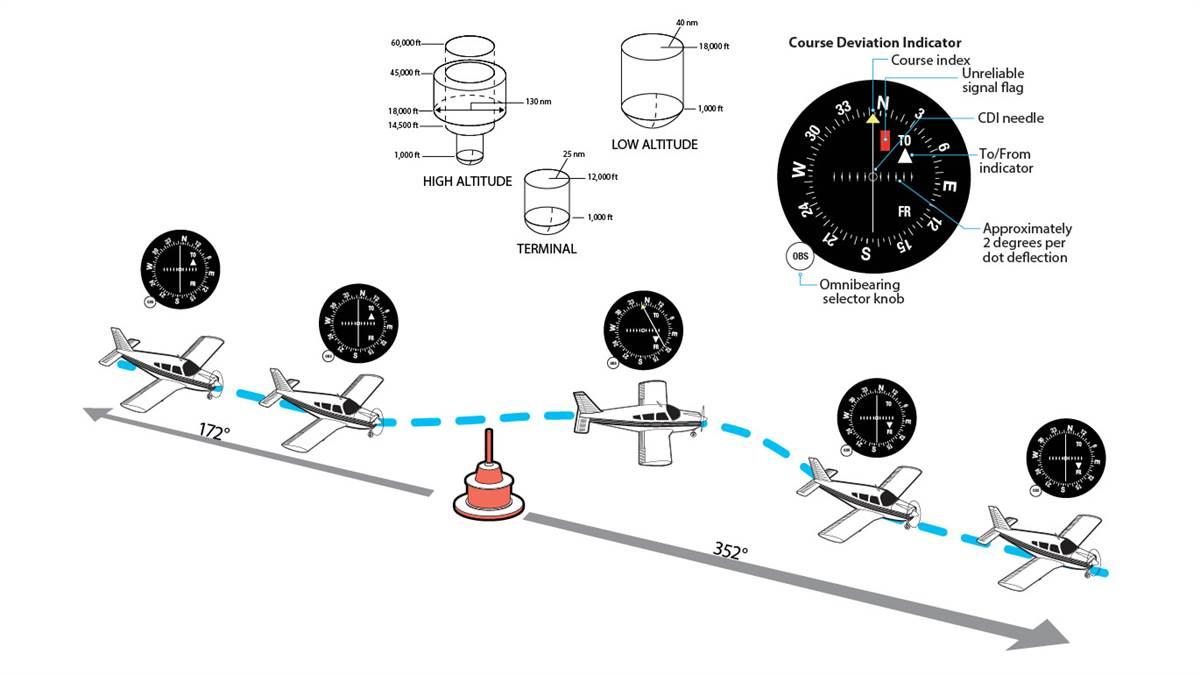
Master the art of VOR navigation for aircraft with this step-by-step guide. Learn how to intercept courses, identify intersections, and track radials effectively. The antenna on the tail of your aircraft knows something. And it is pretty important. It receives signals from nearby VOR (very high frequency omnidirectional range) ground stations.
The VOR system consists of a ground component and an aircraft receiver component. Ground stations transmit radio signals on a designated frequency. On your aircraft, there’s a VOR antenna, a VOR frequency selector, and an in-cockpit instrument. The instrument can be an course deviation indicator (CDI), horizontal situation indicator (HSI), or radio magnetic indicator (RMI). At VOR/DMEs, distance measuring equipment (DME) collocates with a VOR to give distance from the VOR station.
The ground station is referenced to magnetic north and emits two signals. These are a 360-degree sweeping signal and an omni-directional reference signal. The signals are compared at the aircraft’s receiver and the difference between them is displayed in the cockpit. The instrument in the cockpit looks like a compass. Centering the needle shows the radial the airplane is on, giving the direction from the station.
There are three classes of VORs: terminal, low-altitude, and high-altitude. Terminal VOR signals reach up to about 12,000 feet high and a radius of 25 nautical miles. Low-altitude VORs are usable up to about 18,000 feet high and 40 nm. High-altitude VORs may be usable up to 60,000 feet high and 130 nm.
The FAA is phasing out some VORs (in favor of GPS), but there are still hundreds of VOR stations around the country. If you get lost, they can quickly help identify your position. They might be 1940s technology, but it’s nice to know you can always find your way home.
Introduction
The VHF Omni-directional Range (VOR) system remains one of the most reliable and widely used methods of navigation in aviation. It helps pilots pinpoint their location and chart their course using magnetic bearings derived from VOR stations. These stations broadcast a composite VHF radio signal that aircraft receivers interpret to determine their radial position in relation to the station. With its combination of Morse code identification and navigational data, the VOR system has been an integral part of air travel since its inception.
This article provides a step-by-step explanation of how to navigate using VOR. Whether you’re intercepting a course, identifying intersections, or tracking radials, mastering VOR navigation will improve your situational awareness and confidence in flight. While basic knowledge of aviation is assumed, the detailed instructions here will ensure you can handle VOR navigation effectively. Let’s dive into the techniques that will enhance your navigation skills and help you conquer the skies.
Understanding the Basics of VOR Navigation
A VOR station broadcasts radio signals, including its unique Morse code identifier, allowing pilots to verify they are tuned to the correct station. The system provides directional information based on the aircraft’s position relative to the station, represented as radials. Each radial corresponds to a specific degree from magnetic north, helping pilots determine their location and navigate their desired path.
Step-by-Step Guide to Navigating Using a VOR
Step 1: Tune and Identify the VOR Station
- Tune the Frequency:
Access the navigation radio and set the frequency of the desired VOR station, which you can find on VFR and IFR charts. - Identify the Station:
Verify the station by listening to its Morse code identifier. If the Morse code signal is unclear or absent, the signal is unreliable. Look for indicators such as red “NAV” or “VOR” flags, barber poles, or an OFF message to confirm signal issues. - Signal Reliability:
If no issues are detected, the station is operational, and you can proceed with navigation.
Step 2: Determine Your Bearing
- Set the OBS (Omni Bearing Selector):
Rotate the OBS knob on your VOR receiver until the Course Deviation Indicator (CDI) needle is centered. - Read the Bearing:
Check whether the instrument displays a “TO” or “FROM” indication. For example, if the needle is centered with a FROM indication, your aircraft is aligned with the station’s radial. - Flying Towards the Station:
To navigate to the station, adjust the OBS to center the needle with a “TO” indication, then align the aircraft’s heading accordingly.
Method 1: Intercepting a Course
Step 1: Fly Toward the Desired Radial
- Locate the Radial:
Identify the radial you wish to follow on a VFR or IFR chart and set its direction into the OBS. - Align Your Heading:
Turn the aircraft to match the radial heading and observe the CDI needle’s position.- If the needle is right, the radial lies to your right.
- If the needle is left, the radial is on your left.
Step 2: Intercept the Radial
- Adjust Your Heading:
Turn the aircraft 30 degrees toward the radial to intercept it. If the distance to the radial is significant, you may need to use a larger intercept angle to meet the desired course in time. - Monitor the CDI:
As the needle moves closer to the center, gradually adjust your heading to align with the radial.
Step 3: Track the Radial
- Maintain the Course:
Once the CDI needle is centered, adjust the aircraft’s heading to match the radial. - Correct for Deviations:
If the needle drifts left, turn left to regain alignment. Similarly, correct to the right if necessary. Maintain the needle’s centered position to stay on course. - Inbound vs. Outbound:
- When flying toward the station, the instrument should display a “TO” indication.
- For outbound flights, a “FROM” indication should be visible.
Step 4: Adjust for Wind
- Identify Wind Drift:
Monitor the CDI for signs of wind-induced deflection. - Wind Correction Angle (WCA):
Turn the aircraft twice the deflection angle toward the radial. Once the needle centers, turn back halfway to establish a correction angle that compensates for wind drift.
Method 2: Identifying an Intersection
Intersections are key points in navigation, often used for airway changes, holding patterns, or reporting positions. You can identify intersections using two VOR stations or a combination of a VOR and Distance Measuring Equipment (DME).
Step 1: Tune and Identify Two VORs
- Dual VOR Receivers:
If available, use two VOR receivers to tune and identify both stations. Alternatively, use one receiver to switch between frequencies and compare the radials.
Step 2: Set the OBS for Both Stations
- Configure Each OBS:
Use the OBS knobs to set the radials of both VORs that define the intersection. These radials can be found on VFR and IFR charts, with arrows indicating their direction.
Step 3: Pinpoint the Intersection
- Track the First Radial:
Navigate along the course of one VOR while observing the CDI of the second VOR. - Center Both Needles:
When both CDI needles are centered, your aircraft is positioned at the intersection.
Using DME for Intersections
- Combine VOR and DME:
If your aircraft is equipped with DME, determine your distance from a VOR/DME or VORTAC station. - Eliminate the Second VOR:
While tracking a VOR radial, use the DME to confirm your position. For example, WARIC intersection can be identified using the 238 radial from a VOR and a 21 nm DME fix.
Practical Tips for VOR Navigation
- Avoid Reverse Sensing:
Select a radial close to your aircraft’s heading to prevent reverse sensing, where CDI readings become inverted. - Use Magnetic North:
VOR radials align with magnetic north, not true north, so account for variations in your navigation. - Plan Ahead:
Chart your desired headings and routes before departure for a smoother navigation experience.
Common Applications of VOR Navigation
- Airway Navigation:
Follow Victor airways (low altitude) or Jet airways (high altitude) for efficient routing. - Approach Procedures:
Use VOR for instrument approaches, especially when navigating to non-precision airports. - ATC Reporting Points:
Provide precise location updates to air traffic control by referencing VOR radials and intersections.
Conclusion
Mastering VOR navigation is an essential skill for pilots, providing reliable guidance for routing, intersections, and approaches. By tuning into VOR frequencies, identifying radials, and tracking courses with precision, pilots can ensure accurate and safe navigation. Whether intercepting a course or pinpointing an intersection, the techniques outlined in this guide will help you navigate the skies confidently. With practice, you’ll turn these principles into second nature, becoming a more proficient and adaptable aviator.


_after_crash_landing-75x75.jpg)


