
Nyongesa Sande
No Result
View All Result
  • News
    • World
    • Africa
  • Politics
  • Business
  • Tech
  • AI
  • Telecom
  • Sports
  • Opinion
  • Lifestyle
  • Live
Nyongesa Sande
No Result
View All Result
Nyongesa Sande
No Result
View All Result
  • News
  • Politics
  • Business
  • Tech
  • AI
  • Telecom
  • Sports
  • Opinion
  • Lifestyle
  • Live
ADVERTISEMENT

Home » How to Check Computer History

How to Check Computer History

NyongesaSande News Desk by NyongesaSande News Desk
1 year ago
in How To
Reading Time: 4 mins read
A A
Google Chrome for Mac Free Download

If you suspect someone has been using your computer or want to review your activity, you can check the computer’s history, including browser activity, downloads, and recently accessed files. Here’s how to get started.

  • How to Check Recent Computer History
    • 1. Viewing Browser History
    • 2. Checking Download History
    • 3. Recent Files
  • Can You View Recent Activity on a Computer?
  • Other Tips
    • How to Check Router History
    • Clearing Your History

How to Check Recent Computer History

1. Viewing Browser History

Most browsers store a list of websites you’ve visited. Here’s how to access it:

  • Windows: Press Ctrl+H to open browser history (works for Chrome, Edge, Firefox, and Opera).
  • Mac: Press Command+Y to see Safari’s browsing history.
  • Alternative Method: Open your browser, click the menu button, and navigate to History > History. You can search for specific sites in the search bar at the top of the history window.

Note: Browsers like Microsoft Edge retain history for only up to 90 days. If you can’t find older records, they may have been deleted.

ADVERTISEMENT

2. Checking Download History

  • Windows: Press Ctrl+J in your browser to open the downloads page.
  • Mac: Click the Show Downloads button in Safari (top-right corner).
  • File Explorer: Look in the default downloads folder on your computer:
    • Windows path: C:\Users\[username]\Downloads
    • Mac shortcut: Option+Command+L

If files were saved to a different location (like the desktop), check those directories manually.

3. Recent Files

Both Windows and Mac maintain a list of recently accessed files:

ADVERTISEMENT
  • Windows: Open File Explorer, go to the Home tab, and review the Recent section.
  • Mac: Click the Apple menu to see recently used files, drives, and servers.

Can You View Recent Activity on a Computer?

You can typically see recent activity, but there are a few caveats:

  • Private Mode: If someone used Incognito Mode (Chrome) or InPrivate (Edge), the browsing history won’t be recorded.
  • Cleared History: Users can delete browser history, downloads, and file access logs.
  • Privacy Settings: Adjusted privacy settings may limit what data is recorded.
  • Third-Party Apps: Some apps, like games or specialized software, may not leave a clear history or may have their own history sections.

Other Tips

How to Check Router History

Your router logs connected devices’ activity. Consult your router’s manual or login interface to view the history of websites accessed from the network.

Clearing Your History

If you need to erase your activity:

ADVERTISEMENT
  1. Clear Google Search History:
    • Visit Google My Activity.
    • Click Controls > Manage Web & App Activity > Delete and select the desired timeframe.
  2. Clear Browser History:
    • Use Ctrl+H (Windows) or Command+Y (Mac) to access history.
    • Delete specific entries or the entire history from the browser menu.

By following these steps, you can effectively monitor, check, and manage computer activity.
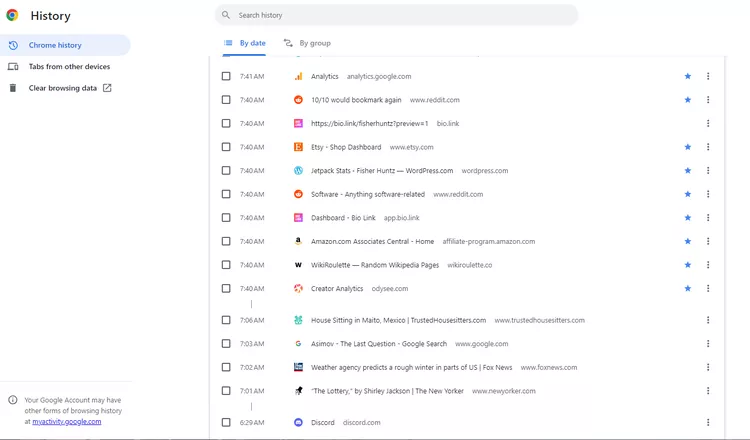
You can also check your file history through the Control Panel or Windows Settings. 

Tags: How To
Google Add as a Preferred Source on Google
Previous Post

How to View and delete browser history in Microsoft Edge

Next Post

States and territories of Australia

NyongesaSande News Desk

NyongesaSande News Desk

Nyongesa Sande offers diverse content across news, technology, entertainment, and more, aiming to provide readers with a wide range of informative and engaging articles. NYONGESA SANDE's dedicated team provides our audience not only with the highly relevant news but also with outstanding interactive experience.

Related Posts

How to Weld a 2-Block Rectangular Hollow Block Mold: Measurements, Materials and Step-by-Step Guide
How To

How to Weld a 2-Block Rectangular Hollow Block Mold: Measurements, Materials and Step-by-Step Guide

4 weeks ago
How to Create a Facebook Account on iPhone App
How To

How to Fix Facebook Confirmation Email Not Received

1 month ago
How to Create a Facebook Account on iPhone App
How To

How to Fix Facebook Confirmation Code Not Received

1 month ago
How to Create a Facebook Account on iPhone App
How To

How to Confirm Your Facebook Email or Phone Number

1 month ago
How to Create a Facebook Account on iPhone App
How To

How to Understand Your Facebook Account and Profiles

1 month ago
How to Create a Facebook Account on iPhone App
How To

How to Fix Facebook Name Not Accepted

1 month ago
Load More
Next Post
Flag of Australia

States and territories of Australia

Mansa Musa Net Worth

The debt-to-GDP ratio for countries

ADVERTISEMENT

Who We Are

Nyongesa Sande

NyongesaSande.com is a digital news and media platform covering breaking news, business, technology, AI, politics, sports, world affairs and African innovation.

News Sections

  • News
    • World
    • Africa
  • Politics
  • Business
  • Tech
  • AI
  • Telecom
  • Sports
  • Opinion
  • Lifestyle
  • Live

Editorial Standards

  • Editorial Policy
  • Fact Checking Policy
  • Corrections Policy
  • Ethics Policy
  • AI Usage Policy
  • News Tips
  • Submit Press Release

Legal

  • Privacy Policy
  • Terms of Use
  • Cookie Policy
  • Disclaimer
  • Risk Disclaimer
  • DMCA
  • Ad Choices

Our Company

  • About Us
    • Nyosake Designers
      • Nyosake Webmasters
      • Nyosake Investment
  • Contact Us
    • Newsroom Contact
  • Ownership Disclosure
  • Advertise
  • Privacy Policy
  • Terms of Use
  • Cookie Policy
  • Disclaimer
  • Risk Disclaimer
  • DMCA
  • Ad Choices

NyongesaSande.com is an independent digital news and media platform covering Africa, business, technology, AI, politics and global developments.

© 2026 NyongesaSande.com. All rights reserved.

No Result
View All Result
  • News
    • World
    • Africa
  • Politics
  • Business
  • Tech
  • AI
  • Telecom
  • Sports
  • Opinion
  • Lifestyle
  • Live

NyongesaSande.com is an independent digital news and media platform covering Africa, business, technology, AI, politics and global developments.

© 2026 NyongesaSande.com. All rights reserved.