Nyongesa Sande
No Result
View All Result
  • News
    • World
    • Africa
  • Politics
  • Business
  • Tech
  • AI
  • Telecom
  • Sports
  • Opinion
  • Lifestyle
  • Live
Nyongesa Sande
No Result
View All Result
Nyongesa Sande
No Result
View All Result
  • News
  • Politics
  • Business
  • Tech
  • AI
  • Telecom
  • Sports
  • Opinion
  • Lifestyle
  • Live
ADVERTISEMENT

Home » How to Use Dell’s New Headset, Speakerphones, and Soundbar for Clearer Meetings

How to Use Dell’s New Headset, Speakerphones, and Soundbar for Clearer Meetings

NyongesaSande News Desk by NyongesaSande News Desk
11 months ago
in Tech News
Reading Time: 4 mins read
A A
How to Use Dell’s New Headset, Speakerphones, and Soundbar for Clearer Meetings

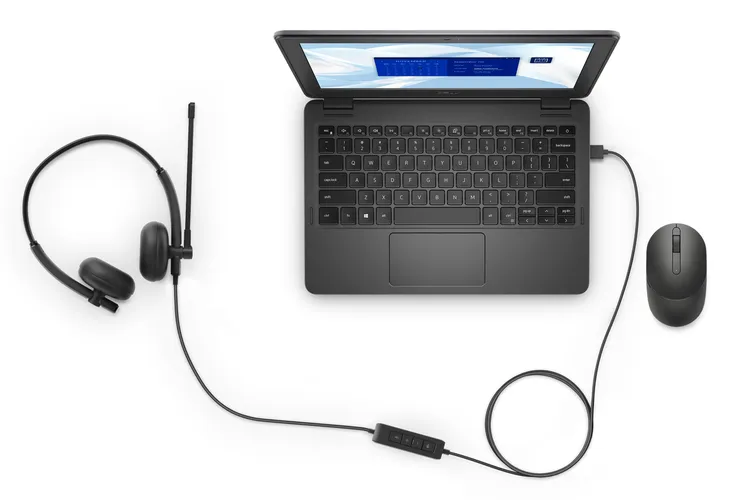
Dell's wired headset plugs in via USB-A and includes a 270° rotatable boom mic. Dell Technologies

Dell quietly released a set of audio accessories aimed at improving video calls and virtual meetings. The new Dell meeting gear includes a USB-A wired headset, two AI-powered speakerphones, and a magnetically-attached soundbar. If your home office struggles with noise or poor call clarity, this compact gear might be the solution.

  • 1. Dell Wired Headset: Clear Voice, Minimal Fuss
  • 2. Dell AI-Powered Speakerphones: Wired and Wireless
  • 3. Dell Magnetic Soundbar: Seamless Desktop Audio
  • Why Dell Meeting Gear Matters
  • Conclusion

Here’s a guide on how to set up and use each device to get the most out of Dell’s latest audio lineup.


1. Dell Wired Headset: Clear Voice, Minimal Fuss

Features:

ADVERTISEMENT
  • USB-A plug-and-play
  • 270° rotatable boom mic
  • Passive noise cancellation
  • Certified for Microsoft Teams and Zoom

How to Use:

  1. Plug the headset into a USB-A port on your laptop or desktop.
  2. Wait for automatic driver installation (should take a few seconds).
  3. Open your preferred meeting app (Zoom, Microsoft Teams).
  4. Go to Audio Settings and select Dell Wired Headset as the input and output device.
  5. Rotate the mic boom to the left or right side based on your preference.

Tip: The mic automatically disables background sounds thanks to built-in passive noise cancellation. Ideal for shared spaces.

ADVERTISEMENT

2. Dell AI-Powered Speakerphones: Wired and Wireless

Features:

  • AI-based voice isolation
  • Picks up voice clearly from several feet away
  • Options for both wired USB and wireless Bluetooth use

How to Use (Wired):

  1. Connect the USB-C or USB-A cable to your computer.
  2. Select the Dell Speakerphone in your app’s audio settings.
  3. Position it within 3–5 feet of your seating area for best voice pickup.

How to Use (Wireless):

ADVERTISEMENT
  1. Turn on Bluetooth on your speakerphone.
  2. Open Bluetooth settings on your PC or phone and pair the device.
  3. Use the speakerphone for video calls or even hands-free voice control apps.

Pro Tip: Great for group meetings—the AI algorithms suppress background chatter and echo.


3. Dell Magnetic Soundbar: Seamless Desktop Audio

Features:

  • Magnetic attachment to Dell monitors
  • EQ tuning via Dell Peripheral Manager
  • Compact design, ideal for tight workspaces

How to Install:

  1. Align the soundbar’s magnetic edge with the bottom of your compatible Dell monitor.
  2. It clicks into place magnetically—no screws or clutter.
  3. Connect it using the included USB-C cable.
  4. Launch Dell Peripheral Manager to fine-tune the equalizer settings for voice clarity or ambient audio.

Ideal For: Solo meetings, small video conferencing rooms, or hybrid workstations where space matters.


Why Dell Meeting Gear Matters

These devices focus on boosting call quality without overcomplicating your desk. Whether you’re on a Zoom call from home or hosting a hybrid meeting in the office, Dell’s gear is certified, compact, and functional. The integration with Microsoft Teams and other platforms ensures seamless operation.


Conclusion

The new Dell meeting gear—wired headset, speakerphones, and magnetic soundbar—offers a serious audio upgrade for professionals. With easy plug-and-play setups, AI enhancements, and a design that avoids desk clutter, they make every conversation clearer and more productive.

Ready to sound better in every meeting? Try Dell’s new audio devices and experience the difference.


Tags: Dell audio devicesDell headsetDell meeting gearDell soundbarDell speakerphoneimprove call qualityoffice audio setup
Google Add as a Preferred Source on Google
Previous Post

Unlock Hidden Features on Your Android with These Secret Codes Easily

Next Post

Kenya’s 30 Richest People

NyongesaSande News Desk

NyongesaSande News Desk

Nyongesa Sande offers diverse content across news, technology, entertainment, and more, aiming to provide readers with a wide range of informative and engaging articles. NYONGESA SANDE's dedicated team provides our audience not only with the highly relevant news but also with outstanding interactive experience.

Related Posts

Galaxy Z Fold8 Could Be Lighter Than S26 Ultra
Tech News

Galaxy Z Fold8 Could Be Lighter Than S26 Ultra

by NyongesaSande News Desk
3 days ago
0

Samsung's next-generation foldable smartphone may achieve something that once seemed impossible: becoming lighter than a...

Read moreDetails
Nvidia Vera CPU Promises 80% Faster AI Performance
Tech News

Nvidia Vera CPU Promises 80% Faster AI Performance

by NyongesaSande News Desk
3 days ago
0

Nvidia has unveiled one of its most ambitious server processors yet: the Nvidia Vera CPU....

Read moreDetails
AMD Unveils 5800X3D, 7700X3D and RX 9070 GRE
Tech News

AMD Unveils 5800X3D, 7700X3D and RX 9070 GRE

by NyongesaSande News Desk
3 days ago
0

AMD's Computex 2026 presentation may not have featured a next-generation CPU architecture or a flagship...

Read moreDetails
Leaked iPhone Fold Photo Reveals New Design
Tech News

Leaked iPhone Fold Photo Reveals New Design

by NyongesaSande News Desk
3 days ago
0

Apple's long-rumored foldable iPhone may have just appeared in one of its most revealing leaks...

Read moreDetails
Google Opens First Store Outside the US
Tech News

Google Opens First Store Outside the US

by NyongesaSande News Desk
3 days ago
0

Google is preparing to open its first physical retail store outside the United States, marking...

Read moreDetails
Xiaomi Adds AirDrop Support to Quick Share
Tech News

Xiaomi Adds AirDrop Support to Quick Share

by NyongesaSande News Desk
3 days ago
0

Xiaomi has announced support for Apple's AirDrop within Android's Quick Share ecosystem, becoming the latest...

Read moreDetails
Load More
Next Post
Top 10 Richest People in Mombasa County

Kenya’s 30 Richest People

Este Medical Kenya – Premier Skin, Hair & Dental Treatment Services in Nairobi

Este Medical Kenya - Premier Skin, Hair & Dental Treatment Services in Nairobi

ADVERTISEMENT

Who We Are

Nyongesa Sande

NyongesaSande.com is a digital news and media platform covering breaking news, business, technology, AI, politics, sports, world affairs and African innovation.

News Sections

  • News
    • World
    • Africa
  • Politics
  • Business
  • Tech
  • AI
  • Telecom
  • Sports
  • Opinion
  • Lifestyle
  • Live

Editorial Standards

  • Editorial Policy
  • Fact Checking Policy
  • Corrections Policy
  • Ethics Policy
  • AI Usage Policy
  • News Tips
  • Submit Press Release

Legal

  • Privacy Policy
  • Terms of Use
  • Cookie Policy
  • Disclaimer
  • Risk Disclaimer
  • DMCA
  • Ad Choices

Our Company

  • About Us
    • Nyosake Designers
      • Nyosake Webmasters
      • Nyosake Investment
  • Contact Us
    • Newsroom Contact
  • Ownership Disclosure
  • Advertise
  • Privacy Policy
  • Terms of Use
  • Cookie Policy
  • Disclaimer
  • Risk Disclaimer
  • DMCA
  • Ad Choices

NyongesaSande.com is an independent digital news and media platform covering Africa, business, technology, AI, politics and global developments.

© 2026 NyongesaSande.com. All rights reserved.

No Result
View All Result
  • News
    • World
    • Africa
  • Politics
  • Business
  • Tech
  • AI
  • Telecom
  • Sports
  • Opinion
  • Lifestyle
  • Live

NyongesaSande.com is an independent digital news and media platform covering Africa, business, technology, AI, politics and global developments.

© 2026 NyongesaSande.com. All rights reserved.