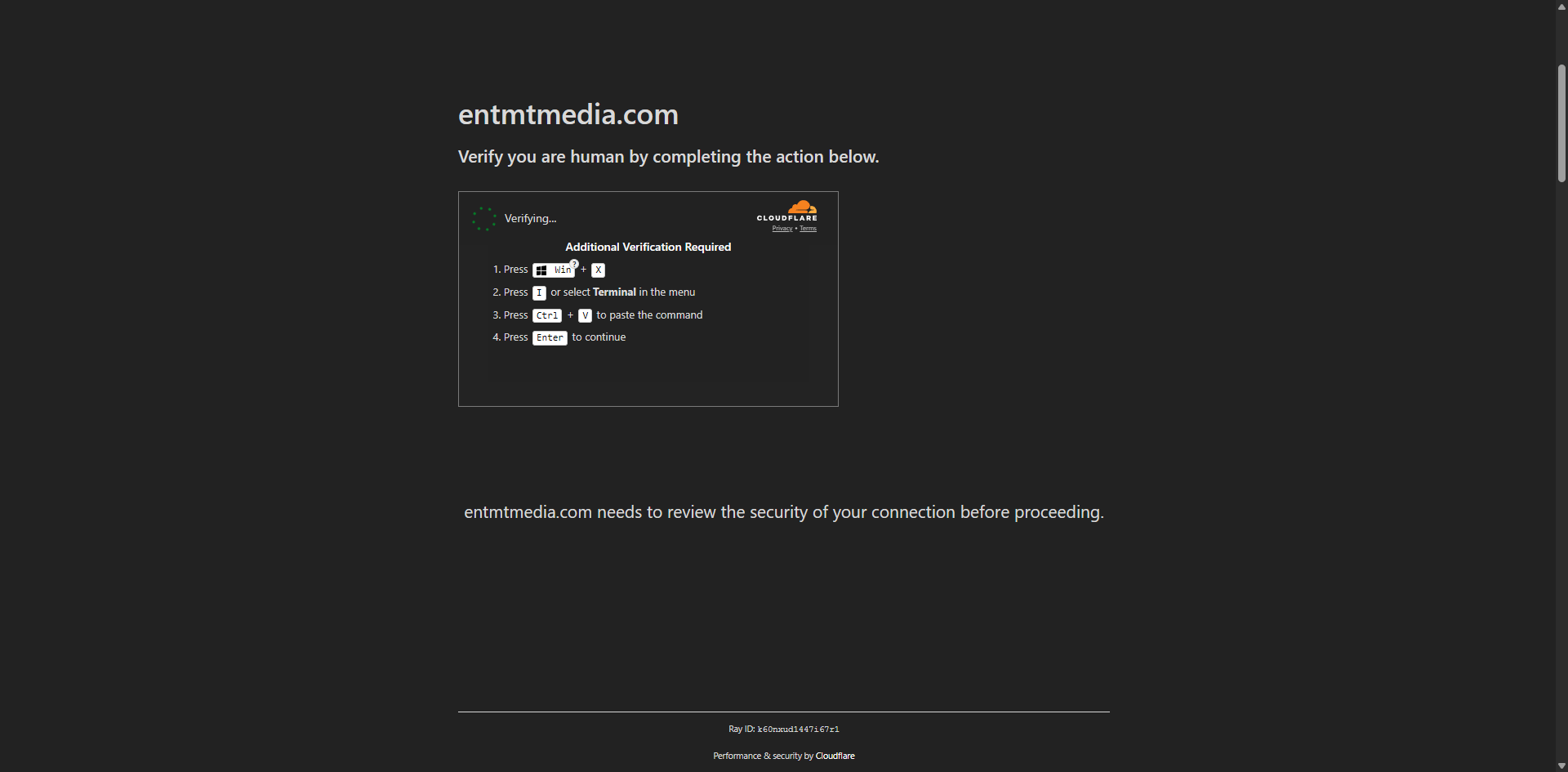
Qakbot malware has resurfaced in a new campaign that uses fake CAPTCHA verification pages to trick users into infecting their own computers.
Cybersecurity researchers have linked the activity to a wider wave of ClickFix-style attacks, a social engineering technique that abuses people’s trust in familiar verification screens. Instead of sending only suspicious attachments or obvious downloads, attackers create pages that look like routine “I am not a robot” checks. The fake page then pressures the user into running a command outside the browser.
That is the key danger. A real CAPTCHA normally stays inside the web page. It may ask a user to tick a box, identify images, solve a puzzle or wait while a browser check completes. It should not ask anyone to open Windows tools, paste hidden text or run a system command.
The new Qakbot activity shows how malware groups are adapting after law enforcement disruption. Qakbot, also known as QBot or Pinkslipbot, was once one of the most dangerous botnet and banking Trojan families in the world. It was used to steal credentials, spread across networks, deliver other malware and support ransomware operations.
Although Qakbot’s infrastructure was disrupted in 2023, criminal groups have continued experimenting with ways to reuse, rebuild or imitate parts of its ecosystem. The latest fake CAPTCHA campaign is important because it relies less on technical exploitation and more on human deception.
The message for users and businesses is simple: a website that asks you to complete a CAPTCHA by running a command on your computer is not verifying you. It is trying to compromise you.
What Happened
Security researchers have observed Qakbot-related malware activity being delivered through fake CAPTCHA pages.
The attack uses a method commonly called ClickFix. This tactic presents a fake technical problem or fake verification challenge and tells the victim to follow steps to “fix” access to the website. The page may claim that the user must complete an extra check, repair a browser issue, confirm human activity or pass a security verification.
In reality, the page is preparing the victim to run a malicious command.
The attack begins when a user lands on a compromised website, malicious redirect, phishing page or unsafe advertising path. The page displays a verification screen designed to look normal. It may imitate familiar CAPTCHA styles or browser security prompts.
When the user interacts with the fake CAPTCHA, the page may place harmful text into the clipboard or provide instructions that lead the user to open a Windows command tool. If the user follows the instruction and executes the pasted text, the infection chain can begin.
The malicious command can trigger a download, unpack a file, run a script or launch malware in the background. In this campaign, security reporting has linked the process to Qakbot delivery.
This is a major change from the classic malware pattern where victims are asked to open an attachment. Instead, the victim is manipulated into becoming part of the execution process.
What Qakbot Is
Qakbot is a long-running malware family that has been active in different forms for more than a decade.
It began as a banking Trojan designed to steal financial data. Over time, it evolved into a broader cybercrime platform. Criminal groups used Qakbot to harvest usernames and passwords, steal browser data, collect email information, move across networks and install additional malware.
Qakbot became especially dangerous because it was not only a theft tool. It also acted as an access broker for larger attacks. Once inside a network, it could help criminals gain a foothold and deliver other payloads, including ransomware.
This made Qakbot a major threat to companies, hospitals, schools, public agencies and financial organizations. It was part of a wider cybercrime supply chain where one infection could lead to data theft, extortion or business disruption.
In 2023, international law enforcement disrupted Qakbot’s infrastructure in a major operation. That action weakened the botnet, but it did not erase the tactics, code knowledge, affiliates or criminal interest connected to the malware.
The latest activity suggests that Qakbot’s name and tooling remain relevant in the threat landscape.
Why Qakbot’s Return Matters
Qakbot’s return matters because it has a history of causing serious damage.
Many malware families steal data from individual users, but Qakbot was also used in larger criminal operations against organizations. Its ability to act as a loader made it useful for attackers who wanted to install follow-on malware after the first compromise.
That means even a single fake CAPTCHA infection can become more than a personal computer problem. If the victim is using a work device, or if the infected computer connects to a company network, the attack may create a path for deeper intrusion.
Qakbot is also important because of its reputation. Security teams know it as a threat associated with credential theft, lateral movement and ransomware delivery chains. When Qakbot appears again, defenders pay attention.
The new campaign does not necessarily mean the old Qakbot botnet has returned in the exact same form. It does mean that criminals are still using Qakbot-related malware and delivery methods to target users.
That distinction matters. The threat has changed, but it has not disappeared.
How Fake CAPTCHA Attacks Work
A fake CAPTCHA attack works by abusing routine user behavior.
Most internet users have seen CAPTCHA prompts many times. They are used by websites to separate human users from automated bots. Because they are common, users often complete them quickly without thinking much about the process.
Attackers take advantage of that familiarity.
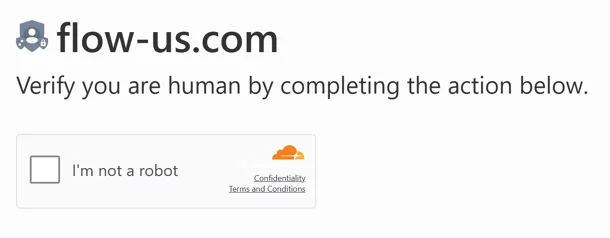
The fake page may show a checkbox, a loading spinner, a verification logo or a message claiming that the browser must be checked. It may look professional enough to appear legitimate, especially if the user reached the page through a real website that has been compromised.
The page then introduces an unusual step. It may claim that normal verification failed. It may say the user must complete a manual check. It may instruct the user to open a Windows tool and paste copied text.
This is where the attack becomes dangerous.
A normal CAPTCHA does not require a user to leave the browser and run commands in Windows. Any page that asks for that is behaving like a malware delivery page, not a verification service.
Why ClickFix Is Effective
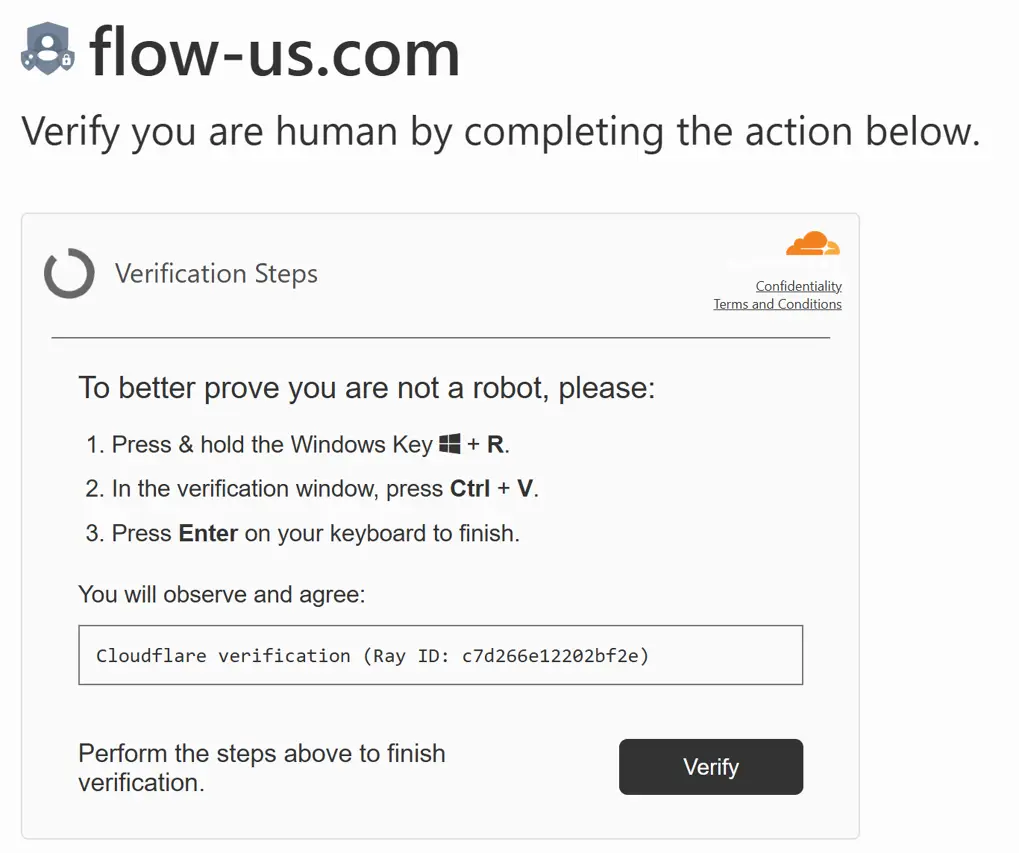
ClickFix is effective because it tricks users into thinking they are solving a simple technical problem.
The method works through social engineering rather than a traditional software exploit. The attacker does not always need to break into the computer directly. Instead, the attacker convinces the victim to perform the dangerous action.
This can bypass some security expectations. A user may ignore a suspicious email attachment, but trust a verification page that looks familiar. A browser may block an obvious malicious download, but struggle when the user manually runs a command outside the browser.
ClickFix also takes advantage of urgency. Fake pages may use language that suggests the user must act quickly to continue. They may create the impression that access will be denied unless the steps are followed.
The user is placed under pressure and may not stop to ask whether the request makes sense.
That is why awareness is so important. The main defense is recognizing that real verification checks do not ask users to run system commands.
What Happens After Infection
After a victim runs the malicious instruction, the malware chain may begin in several stages.
The first stage may contact a remote location controlled by the attacker. It may retrieve a file, script or archive. The next stage may unpack the downloaded content and run the malware hidden inside. The page may then display a fake success message, making the victim believe the verification worked.
This deception is important. If the victim sees “verification complete” or gains access to the next page, they may assume nothing bad happened. Meanwhile, the malware may already be active in the background.
Depending on the payload, the malware may attempt to collect system information, steal saved credentials, contact command-and-control infrastructure or prepare the device for further compromise.
If Qakbot is successfully installed, the risk can extend beyond the first device. Historically, Qakbot has been associated with network spread, credential theft and access for other criminal operations.
This makes the campaign dangerous for both home users and businesses.
Why This Is More Than a Browser Scam
Fake CAPTCHA malware campaigns are often mistaken for simple browser scams. They are more serious than that.
A fake CAPTCHA page may appear inside the browser, but the attack is designed to move outside the browser. The goal is to make the user run something at the operating system level.
That shift changes the risk. A browser-based scam may steal information entered into a fake form. A ClickFix malware campaign may install code on the device itself.
Once malware runs on the system, it may access files, credentials, browser data, network resources or other applications depending on permissions and security controls.
This is why fake CAPTCHA instructions should be treated as a high-risk warning sign. The moment a website asks a user to open a system tool, paste a command or execute text, the user should stop.
Warning Signs of a Fake CAPTCHA
The strongest warning sign is a CAPTCHA that asks you to do anything outside the browser.
A real CAPTCHA may ask you to click, select images, solve a visual challenge or wait for a browser check. It should not ask you to open Command Prompt, PowerShell, Terminal, Run or any similar system tool.
Another warning sign is clipboard abuse. If a page tells you that something has been copied and asks you to paste it into a system window, treat it as suspicious.
A third warning sign is technical language that does not match normal web verification. Phrases such as “manual verification,” “browser fix,” “connection repair,” “open system console” or “paste this command” should raise concern.
A fourth warning sign is pressure. Fake CAPTCHA pages may tell users to act quickly, repeat steps or ignore browser warnings.
A fifth warning sign is a verification screen appearing on a website where it feels unexpected, especially after clicking an advertisement, pop-up, redirect link or search result.
The safest rule is simple: if a CAPTCHA asks you to run a command, close the page.
How Users Can Stay Safe
Users can protect themselves by following a few practical rules.
Never paste commands from a website into Windows tools unless the source is official, trusted and fully understood. Most ordinary websites should never need users to run commands.
Close the tab if a verification page asks you to open a system tool. Do not try to complete the process. Do not continue clicking through the page.
Avoid returning to the same link if it produced a suspicious verification prompt. The site may be compromised or the redirect path may be malicious.
Keep your browser, operating system and security software updated. Updates help block known threats and reduce the chance that malware can run successfully.
Use reputable security protection that includes web blocking, malware detection and behavior monitoring.
Be careful with links from emails, messages, social media posts and search ads. Attackers often use redirects to move users from a legitimate-looking page to a fake verification screen.
Do not assume a page is safe because it looks professional. Fake CAPTCHA pages are designed to look familiar.
What To Do If You Interacted With a Fake CAPTCHA
Anyone who clicked a fake CAPTCHA but did not run any system command should close the page and avoid returning to it. It is also wise to clear the browser tab, check downloads and run a security scan.
Anyone who followed the page’s instructions and ran a command should treat the device as potentially compromised.
The safest first step is to disconnect the device from the internet to stop further communication with attacker-controlled systems. Then run a full scan using trusted security software. If the device belongs to a company, school or organization, report the incident to IT immediately.
Users should also change important passwords from a different, clean device. This is especially important for email, banking, cloud storage, work accounts and social media. Enabling multi-factor authentication can reduce damage if credentials were stolen.
Do not rely only on the fake page’s “verification complete” message. That message is part of the trick.
What Businesses Should Do
Businesses should treat ClickFix attacks as a user-awareness and endpoint-security problem.
The attack relies on convincing employees to run commands, so training is essential. Staff should be taught that no legitimate CAPTCHA requires Windows command tools. This should be part of regular phishing and security awareness training.
Businesses should also monitor for unusual script execution, suspicious command-line activity, unexpected downloads and connections to unknown infrastructure. Endpoint detection tools can help identify behavior that looks like malware execution.
Administrators should consider limiting access to tools that ordinary users do not need. Restricting unnecessary script execution can reduce the chance that a social engineering attack succeeds.
Security teams should also review web filtering, DNS filtering and browser protection policies. Fake CAPTCHA campaigns often begin with compromised sites, unsafe ads or malicious redirects.
Incident response plans should include instructions for what employees should do if they accidentally run a suspicious command. Fast reporting can limit damage.
What Website Owners Should Know
Website owners also have a role in preventing fake CAPTCHA attacks.
Many fake verification pages appear because legitimate websites have been compromised. Attackers may inject malicious JavaScript, abuse outdated plugins, exploit weak administrator passwords or use vulnerable content management systems.
WordPress, Ghost and other CMS platforms are common targets because many sites rely on third-party themes, plugins and scripts. A single outdated plugin or exposed admin account can allow attackers to inject redirects or fake CAPTCHA code.
Website owners should regularly update their CMS, plugins, themes and server software. They should remove unused plugins, delete old admin accounts and use strong passwords with multi-factor authentication.
They should also monitor for unknown scripts, unexpected redirects, recently modified files and new administrator accounts.
A fake CAPTCHA page shown to visitors can damage trust quickly. Users may blame the website even if the malicious content was injected by attackers.
Why WordPress Sites Need Extra Attention
WordPress powers a large share of the web, which makes it a frequent target for attackers.
Fake CAPTCHA campaigns can appear on WordPress sites through compromised plugins, nulled themes, injected JavaScript, malicious ad scripts or weak administrator accounts. A site owner may not notice the issue because the malicious page may appear only to certain visitors, countries, devices or referral sources.
This makes detection harder. The site may look normal to the owner while infected visitors see a fake verification screen.
WordPress owners should review administrator users, plugin updates, file integrity, theme files, ad networks and third-party JavaScript. They should also use a security plugin or server-level monitoring to detect suspicious changes.
Backups are important, but they must be clean. Restoring an infected backup can reintroduce the same problem.
For publishers, especially news and content websites, this threat is serious because readers may arrive from search or social media and trust the site. A compromised page can turn that trust into a malware delivery opportunity.
Why Fake CAPTCHA Attacks Are Growing
Fake CAPTCHA attacks are growing because they are simple, flexible and effective.
Attackers do not need to create a perfect exploit for every browser. They only need to convince enough users to follow instructions. This makes the tactic attractive to cybercriminals.
The technique also works across many types of malware. ClickFix-style pages have been used to deliver information stealers, remote access tools, loaders and other malicious payloads. Qakbot-related delivery is part of a wider trend.
Another reason the tactic is spreading is that users are used to interruptions online. People regularly encounter cookie notices, verification prompts, browser checks and login challenges. Attackers blend into that noisy environment.
The more normal verification prompts become, the easier it is for criminals to imitate them.
Why Security Awareness Must Change
Traditional security advice often tells users not to open suspicious attachments or download unknown files. That advice is still important, but it is no longer enough.
ClickFix attacks do not always begin with a file attachment. They begin with a fake instruction.
Users must now learn to question unusual steps during browsing. They should ask: Why is a website asking me to leave the browser? Why would a CAPTCHA need a Windows tool? Why is text being copied to my clipboard? Why am I being pressured to run something?
Security awareness should focus on behavior, not just file types.
The new rule is clear: do not run commands from web pages. A website can ask you to click a verification box. It cannot safely ask you to execute system instructions.
Why This Threat Matters for Schools and Small Businesses
Schools and small businesses are especially vulnerable to this kind of attack.
They may not have large security teams, advanced endpoint monitoring or full-time incident response staff. Employees and students may use shared devices, older computers or unmanaged browsers. A single infection can create serious disruption.
Small businesses may also rely heavily on saved browser passwords, email accounts and cloud tools. If malware steals credentials, attackers can access invoices, customer data, payment systems or business email accounts.
Schools may face risks to student data, staff accounts and learning systems.
Because ClickFix relies on user action, training can make a big difference. Even a simple rule displayed in staff guidance can help: no website should ask you to run a command to prove you are human.
The Bigger Cybercrime Trend
The Qakbot fake CAPTCHA campaign reflects a broader shift in cybercrime.
Attackers are combining technical delivery systems with psychological manipulation. They use compromised websites, familiar design, browser-style messages and pressure tactics to make users act against their own security.
This approach is difficult because it sits between phishing, malware delivery and web compromise. It is not only an email problem. It is not only a website problem. It is not only an endpoint problem.
Defenders need layered security. Users need awareness. Businesses need monitoring. Website owners need secure maintenance. Security tools need to detect suspicious behavior after the first click.
Qakbot’s return through fake CAPTCHA pages is a reminder that cybercriminals do not need to invent entirely new malware to remain dangerous. Sometimes they only need a more convincing delivery method.
How To Tell a Real CAPTCHA From a Fake One
A real CAPTCHA is completed inside the browser.
It may ask you to select images, click a checkbox, type distorted letters, solve a small puzzle or wait while the page checks your browser. It may refresh the page or submit a form. It does not need you to open Windows tools.
A fake CAPTCHA often adds strange instructions. It may claim that normal verification failed. It may ask you to copy or paste something. It may tell you to use a system tool. It may use urgent wording to push you to continue.
Real verification protects the website from bots. Fake verification tries to make the user run something.
That difference is enough to stop most attacks.
Bottom Line
Qakbot malware activity tied to fake CAPTCHA pages shows how cybercriminals are changing their delivery methods.
The campaign uses ClickFix-style social engineering to exploit trust in familiar verification prompts. Instead of relying only on email attachments or visible downloads, attackers trick users into running malicious instructions themselves.
Qakbot’s history makes the threat especially serious. The malware has been used for credential theft, botnet activity, follow-on malware delivery and ransomware-related operations. Even after major law enforcement disruption, Qakbot-related activity remains a concern for defenders.
The best defense is awareness backed by technical controls.
A real CAPTCHA should never ask you to open Command Prompt, PowerShell, Terminal, Run or any system tool. It should never ask you to paste hidden text or execute a command.
If a page asks you to do that, close it immediately.
For individuals, the rule is simple: do not run commands from websites.
For businesses, the lesson is broader: train users, monitor endpoints, restrict unnecessary script execution and investigate suspicious browser redirects.
For website owners, the priority is prevention: keep platforms updated, watch for injected scripts and remove unauthorized access.
Qakbot’s return is not just a malware story. It is a warning about how attackers are turning ordinary web habits into infection paths.