
Nyongesa Sande
No Result
View All Result
  • News
    • World
    • Africa
  • Politics
  • Business
  • Tech
  • AI
  • Telecom
  • Sports
  • Opinion
  • Lifestyle
  • Live
  • World Cup 2026
    • World Cup 2026 Standings
    • World Cup 2026
Nyongesa Sande
No Result
View All Result
Nyongesa Sande
No Result
View All Result
  • News
  • Politics
  • Business
  • Tech
  • AI
  • Telecom
  • Sports
  • Opinion
  • Lifestyle
  • Live
  • World Cup 2026
ADVERTISEMENT

Home » Dell Pro 14 Plus P1425 Review: Bright, Accurate, Portable

Dell Pro 14 Plus P1425 Review: Bright, Accurate, Portable

A Sleek USB-C Monitor With Great Brightness and Color

NyongesaSande News Desk by NyongesaSande News Desk
1 year ago
in Gadget Reviews
Reading Time: 5 mins read
A A
Dell Pro 14 Plus P1425 Review: Bright, Accurate, Portable

Dell Pro 14 Plus P1425 Review: A Sleek, Bright Portable Monitor

The Dell Pro 14 Plus (P1425) is a portable monitor designed for professionals who prioritize display quality, brightness, and portability over flashy specs. At $369.99, it sits at the premium end of the portable monitor market—but does its performance justify the price? This Dell Pro 14 Plus P1425 review breaks it down.

  • Dell Pro 14 Plus P1425 Review: A Sleek, Bright Portable Monitor
  • Pros and Cons
  • Design: Premium Yet Familiar
  • Ports & Controls: USB-C Only
  • Display Quality: Bright and Color-Accurate
  • Comparison: Dell P1425 vs. Budget Alternatives
  • Should You Buy the Dell Pro 14 Plus (P1425)?
  • Final Verdict

Pros and Cons

Pros:

  • Sleek, durable design
  • Bright IPS display
  • High color accuracy
  • Crisp image quality
  • Folds flat and comes with carry pouch

Cons:

ADVERTISEMENT
  • Limited to two USB-C ports
  • No HDMI input
  • Basic controls only

Design: Premium Yet Familiar

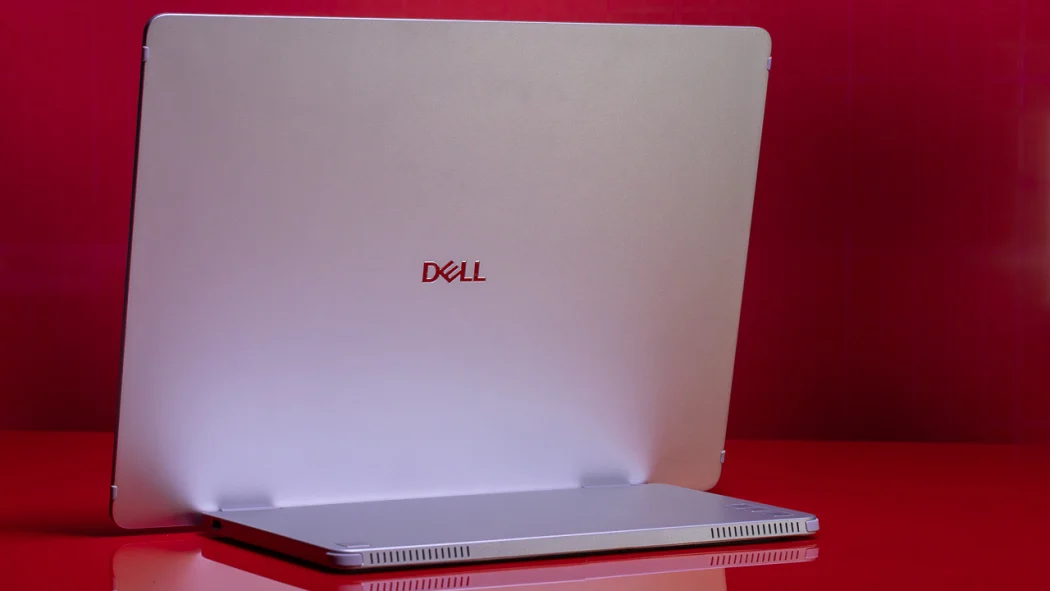
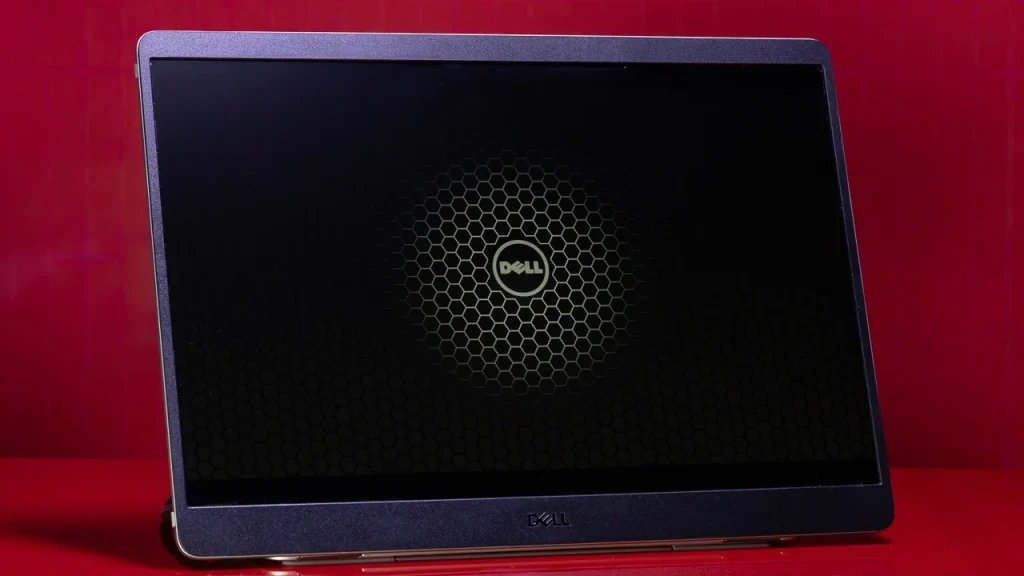
The P1425 looks nearly identical to Dell’s previous model (C1422H), featuring a thin 14-inch panel with a substantial foot that doubles as a hinge and houses the ports and controls. The display folds nearly flat or can tilt to nearly 90 degrees.

The screen is framed by thicker bezels than we’d like, but the overall design feels professional, durable, and definitely more premium than budget competitors that rely on flimsy kickstands.

ADVERTISEMENT

Ports & Controls: USB-C Only

The monitor includes just two USB-C ports (with DisplayPort support) and no HDMI or mini-HDMI input. This could be limiting depending on your setup. Many budget monitors like Arzopa Z1RC offer more connectivity options, including HDMI.

The buttons are positioned conveniently on the foot. They’re tactile and include controls for brightness, power, and screen rotation lock.


Display Quality: Bright and Color-Accurate

The 14-inch IPS screen features a 1920 x 1200 resolution at 60Hz. Though not groundbreaking, the monitor delivers impressive brightness and accurate colors.

ADVERTISEMENT
  • Brightness: Easily suitable for well-lit environments
  • Contrast: Strong enough to deliver depth
  • Sharpness: Small text remains legible and clear
  • Color Accuracy: Great for photo editing or design workflows

While not as vibrant as OLED or high-end 4K displays, the Dell Pro 14 Plus excels where it matters most for pros: reliable, accurate output.


Comparison: Dell P1425 vs. Budget Alternatives

FeatureDell Pro 14 Plus (P1425)Arzopa Z1RC
Price$369.99~$150
Resolution1920 x 12002K or 1080p
BrightnessHighModerate
Ports2x USB-C2x USB-C + HDMI
Color AccuracyExcellentAverage
DesignPremium, hingedBasic, kickstand

While budget models win on price and resolution, Dell delivers superior brightness, build, and image quality—which may matter more to professionals or creators.


Should You Buy the Dell Pro 14 Plus (P1425)?

Yes, if:

  • You need color accuracy for creative work
  • You prefer clean design and portability
  • Your setup is USB-C friendly
  • You want a trusted brand with build quality to match

Maybe not, if:

  • You need HDMI compatibility
  • You’re looking for highest resolution per dollar
  • You’re on a tight budget

Final Verdict

The Dell Pro 14 Plus P1425 is a well-built, reliable portable monitor that shines in brightness and color accuracy. While it lacks in ports and isn’t the cheapest option, its professional-grade performance makes it worth the investment for users who value quality over quantity.

Rating: ★★★★☆ (4/5)
Tags: Arzopa alternativecolor-accurate portable screenDell Pro 14 PlusDell USB-C monitorP1425 monitorportable monitor reviewtravel monitor
Share1Tweet1SendShareSharePinShareShare
Google Add as a Preferred Source on Google
Previous Post

ChatGPT Plus Free for US and Canada Students Until May

Next Post

Instagram Screenshot Alerts: What You Can & Can’t Do

NyongesaSande News Desk

NyongesaSande News Desk

Nyongesa Sande offers diverse content across news, technology, entertainment, and more, aiming to provide readers with a wide range of informative and engaging articles. NYONGESA SANDE's dedicated team provides our audience not only with the highly relevant news but also with outstanding interactive experience.

Related Posts

Samsung Galaxy A57 Review and Full Specs
Gadget Reviews

Samsung Galaxy A57 Review and Full Specs

2 months ago
Samsung Galaxy A37 Review and Full Specs
Gadget Reviews

Samsung Galaxy A37 Review and Full Specs

2 months ago
Honor MagicBook Pro 14 (2026) Review
Gadget Reviews

Honor MagicBook Pro 14 (2026) Review

Sony Xperia 1 VIII Review: Sony’s Flagship Stays Uniquely Different
Gadget Reviews

Sony Xperia 1 VIII Review: Sony’s Flagship Stays Uniquely Different

Shell Stations in Eastern Kenya: Fuel, EV Charging & Café
Gadget Reviews

Shell Stations in Lower Mt. Kenya: Fuel & EV Charging

2 months ago
Xbox Mode Windows 11 rollout begins globally
Gadget Reviews

Xbox Mode Windows 11 rollout begins globally

2 months ago
Load More
Next Post
Instagram Adds Music Previews, Message Scheduling, and More to DMs

Instagram Screenshot Alerts: What You Can & Can’t Do

How to Restart Your Chromebook: Complete Step-by-Step Guide

How to Restart Your Chromebook: Complete Step-by-Step Guide

ADVERTISEMENT

Who We Are

Nyongesa Sande

NyongesaSande.com is a digital news and media platform covering breaking news, business, technology, AI, politics, sports, world affairs and African innovation.

Our Brands

  • YouTube
  • Forums
  • Law Archive
  • Sandes Kitchen

News Sections

  • News
    • World
    • Africa
  • Politics
  • Business
  • Tech
  • AI
  • Telecom
  • Sports
  • Opinion
  • Lifestyle
  • Live
  • World Cup 2026
    • World Cup 2026 Standings
    • World Cup 2026

Editorial Standards

  • Editorial Policy
  • Fact Checking Policy
  • Corrections Policy
  • Ethics Policy
  • AI Usage Policy
  • News Tips
  • Submit Press Release

Legal

  • Privacy Policy
  • Terms of Use
  • Cookie Policy
  • Disclaimer
  • Risk Disclaimer
  • DMCA
  • Ad Choices
  • YouTube

Our Company

  • About Us
    • Nyosake Designers
      • Nyosake Webmasters
      • Nyosake Investment
  • Contact Us
    • Newsroom Contact
  • Ownership Disclosure
  • Advertise
  • Privacy Policy
  • Terms of Use
  • Cookie Policy
  • Disclaimer
  • Risk Disclaimer
  • DMCA
  • Ad Choices
  • YouTube

NyongesaSande.com is an independent digital news and media platform covering Africa, business, technology, AI, politics and global developments.

© 2026 NyongesaSande.com. All rights reserved.

No Result
View All Result
  • News
    • World
    • Africa
  • Politics
  • Business
  • Tech
  • AI
  • Telecom
  • Sports
  • Opinion
  • Lifestyle
  • Live
  • World Cup 2026
    • World Cup 2026 Standings
    • World Cup 2026

NyongesaSande.com is an independent digital news and media platform covering Africa, business, technology, AI, politics and global developments.

© 2026 NyongesaSande.com. All rights reserved.