To download your Presbyterian University of East Africa (PUEA) admission letter, follow these detailed steps:
Requirements to Download PUEA Admission Letters
Before proceeding, ensure you have the following information and documents ready:
- KCSE Index Number and Year of Examination: This is crucial for identifying your academic record.
- Personal Details: Including a passport photo, date of birth, address details, and other personal information.
- Education Details: Information about your secondary school attended, certificate or result slip, and KCSE grades.
- Contact Details: Including postal address and region of residence.
Procedure to Download PUEA Admission Letters
- Visit PUEA Website
- Open your web browser and go to the official Presbyterian University of East Africa website.
- Navigate to Online Applications
- Look for the section related to “Online Applications” on the website’s homepage.
- Click on “Login” under the section specified for “KUCCPS Self Sponsored Students”.
- Enter KCSE Index Number
- On the login page, enter your KCSE index number followed by “/2023” (replace 2023 with the year of admission, e.g., 2024).
- Enter the security stamp or CAPTCHA as prompted.
- Click on “Login” to proceed.
- Fill in Personal Details
- After logging in, you will be directed to a page where you need to fill in your personal details.
- Provide accurate information including your date of birth, location, county, and upload a passport-sized photo.
- Click on “Next” to proceed.
- Provide Education Background
- Fill in details about the high school you attended, the period you were there, and upload your KCSE certificate or result slip.
- Enter your KCSE grades per subject as obtained in your examination.
- Click on “Next” to proceed.
- Fill Contact Details
- Enter your postal address and other required contact information.
- Proceed to the final section.
- Complete Sports and Clubs Information
- Fill in details about your involvement in sports and clubs if required.
- Review all the information provided to ensure accuracy.
- Submit and Finish
- Click on “Submit” and then “Finish” to complete the application process.
- Download Admission Letter
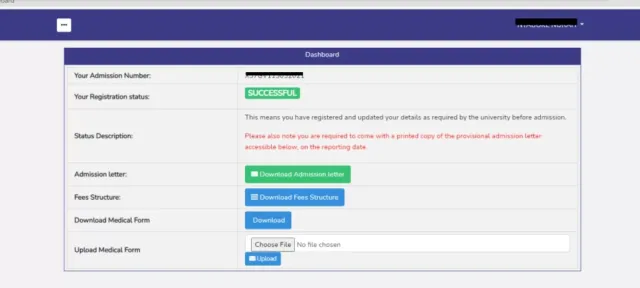
- Once your application is successfully processed, you will see a confirmation page displaying your name and the status as “Successful”.
- Click on the option to “Download Admission Letter” to obtain your PUEA admission letter.
- Additionally, download the medical form and fee structure as instructed.
- Complete Medical Form
- Fill out the medical form and have it signed by relevant personnel where required.
- Attach the completed medical form back as per the university’s instructions.
By following these steps carefully, you will be able to successfully download your Presbyterian University of East Africa admission letter and complete the necessary documentation for admission. Ensure all details are accurately filled to avoid any delays in processing your admission.